
Safety Warning
DIY auto repair can cause serious injury, fire, or vehicle damage. These guides are for informational purposes only. Always follow OEM torque specs, wear PPE, and consult a certified mechanic if you are unsure. You are solely responsible for your safety.
2000 Toyota RAV4 2-Door 2WD L4-2.0L (3S-FE)FACTORY OEM SERVICE PROCEDURE
Checking Monitor Status
CHECKING MONITOR STATUS
1. Introduction
The Monitor Status (Mode 06 data) allows the OBD scan tool to display the monitor result, test value and test limit (malfunction criterion). A problem in the emission-related components such as the catalyst, EVAP and thermostat can be found by comparing the test value and test limit. The monitor status information is included under Decoding Mode 06 Data.
The ECM (PCM) monitors the emission-related components. After the monitor, the ECM stores the monitor results and test values. The monitor result indicates whether the component is functioning normally or not (PASS or FAIL). The test value is the value that was used to determine the monitor result. When the test value is inside the test limit, the ECM determines the component is functioning normally (PASS). If the test value is outside the test limit, the ECM determines the component is malfunctioning (FAIL).
2. Procedure
NOTICE: The monitor results and test values are cleared when the ignition switch is OFF.
(a) Connect the hand-held tester to the DLC3.
(b) Turn the ignition switch and hand-held tester switch ON.
(c) Clear the DTCs.
(d) Run the vehicle in accordance with the applicable drive pattern described in "OBD Monitor Drive Pattern".
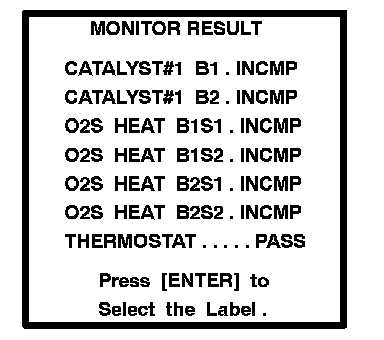
(e) Select from the tester menus: DIAGNOSIS, ENHANCED OBD II, MONITOR INFO and MONITOR RESULT. The monitor result appears after the component name.
INCMP: The component has not been monitored yet.
PASS: The component is functioning normally.
FAIL: The component is malfunctioning.
(f) Confirm that the component is set to either PASS or FAIL.

(g) Select the component and press ENTER. If TLT is 0, the component is malfunctioning when the test value is higher than the test limit. If TLT is 1, the component is malfunctioning when the test value is lower then the test limit.
VAL: The test value.
LMT: The test limit.
TLT: The test limit type.
(h) Compare the test value with the test limit. The test value is usually significantly higher or lower then the test limit. If the test value is on the borderline of the test limit, there is a potential malfunction in the component.
HINT: The monitor result might on rare occasions be PASS even if the MIL is illuminated. This indicates the system malfunctioned on a previous driving cycle. This might be caused by an intermittent problem.
DECODING MODE 06 DATA
The Monitor Status (Mode 06 data) allows the OBD scan tool to display the monitor result, test value and test limit (malfunction criterion). A problem in the emission-related components such as the catalyst, EVAP and thermostat can be found by comparing the test value and test limit. This procedure is described in Checking Monitor Status.
- TID (Test Identification Data) is assigned to each emission-related component.
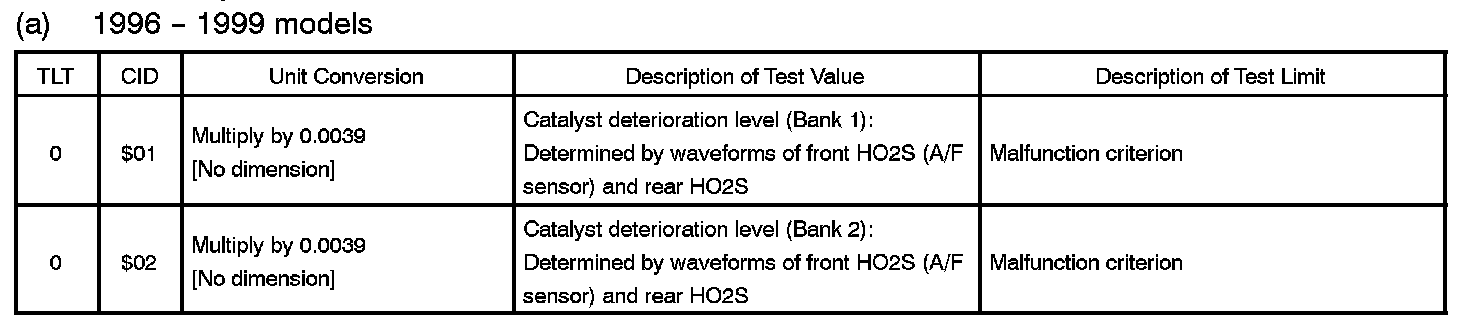
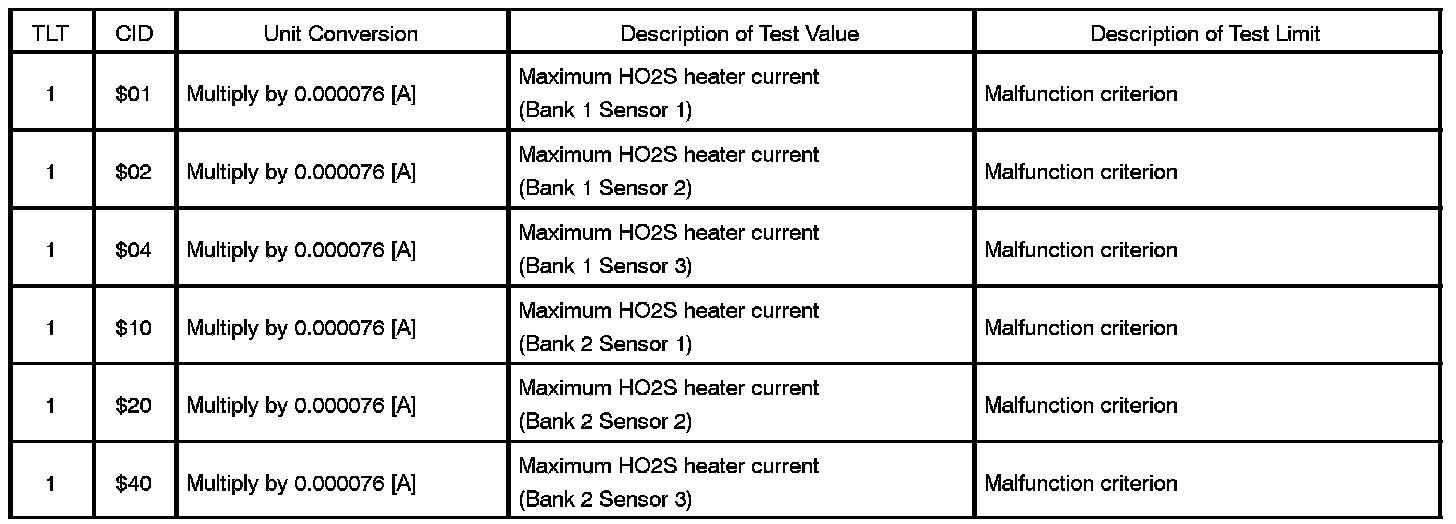
- TLT (Test Limit Type):
If TLT is 0, the component is malfunctioning when the test value is higher than the test limit.
If TLT is 1, the component is malfunctioning when the test value is lower than the test limit.
- CID (Component Identification Data) is assigned to each test value.
- Unit Conversion is used to calculate the test value indicated on generic OBD scan tools.
TID $01: Catalyst

TID $02: EVAP


TID $03: Heated oxygen sensor (HO2S)
Not supported by Mode 06, but by Mode 05.
TID $04: HO2S heater
TID $05: EGR



TID $06: A/F sensor

TID $07: A/F sensor heater

TID $08: Thermostat

1. Introduction
The Monitor Status (Mode 06 data) allows the OBD scan tool to display the monitor result, test value and test limit (malfunction criterion). A problem in the emission-related components such as the catalyst, EVAP and thermostat can be found by comparing the test value and test limit. The monitor status information is included under Decoding Mode 06 Data.
The ECM (PCM) monitors the emission-related components. After the monitor, the ECM stores the monitor results and test values. The monitor result indicates whether the component is functioning normally or not (PASS or FAIL). The test value is the value that was used to determine the monitor result. When the test value is inside the test limit, the ECM determines the component is functioning normally (PASS). If the test value is outside the test limit, the ECM determines the component is malfunctioning (FAIL).
2. Procedure
NOTICE: The monitor results and test values are cleared when the ignition switch is OFF.
(a) Connect the hand-held tester to the DLC3.
(b) Turn the ignition switch and hand-held tester switch ON.
(c) Clear the DTCs.
(d) Run the vehicle in accordance with the applicable drive pattern described in "OBD Monitor Drive Pattern".
(e) Select from the tester menus: DIAGNOSIS, ENHANCED OBD II, MONITOR INFO and MONITOR RESULT. The monitor result appears after the component name.
INCMP: The component has not been monitored yet.
PASS: The component is functioning normally.
FAIL: The component is malfunctioning.
(f) Confirm that the component is set to either PASS or FAIL.
(g) Select the component and press ENTER. If TLT is 0, the component is malfunctioning when the test value is higher than the test limit. If TLT is 1, the component is malfunctioning when the test value is lower then the test limit.
VAL: The test value.
LMT: The test limit.
TLT: The test limit type.
(h) Compare the test value with the test limit. The test value is usually significantly higher or lower then the test limit. If the test value is on the borderline of the test limit, there is a potential malfunction in the component.
HINT: The monitor result might on rare occasions be PASS even if the MIL is illuminated. This indicates the system malfunctioned on a previous driving cycle. This might be caused by an intermittent problem.
DECODING MODE 06 DATA
The Monitor Status (Mode 06 data) allows the OBD scan tool to display the monitor result, test value and test limit (malfunction criterion). A problem in the emission-related components such as the catalyst, EVAP and thermostat can be found by comparing the test value and test limit. This procedure is described in Checking Monitor Status.
- TID (Test Identification Data) is assigned to each emission-related component.
- TLT (Test Limit Type):
If TLT is 0, the component is malfunctioning when the test value is higher than the test limit.
If TLT is 1, the component is malfunctioning when the test value is lower than the test limit.
- CID (Component Identification Data) is assigned to each test value.
- Unit Conversion is used to calculate the test value indicated on generic OBD scan tools.
TID $01: Catalyst
TID $01: Catalyst (1996-99 Models):
TID $01: Catalyst (2000-04 Models):
TID $02: EVAP
TID $02: EVAP (Fuel Tank Pressure Monitor):
TID $02: EVAP (Vacuum Monitor (4 CIDs)):
TID $02: EVAP (Vacuum Monitor (5 CIDs)):
TID $02: EVAP (LEV II Vacuum Monitor (2003 GX470, Tundra, 2004 Sienna)):
TID $03: Heated oxygen sensor (HO2S)
Not supported by Mode 06, but by Mode 05.
TID $04: HO2S heater
TID $04: HO2S Heater:
TID $05: EGR
TID $05: EGR (EGR Temperature Idle/Misfire Monitor And Stepper Motor Type):
TID $05: EGR (EGR Temperature/EGR Valve Lift Monitor):
TID $05: EGR (MAP/Idle Misfire Monitor):
TID $06: A/F sensor
TID $06: A/F Sensor:
TID $07: A/F sensor heater
TID $07: A/F Sensor Heater:
TID $08: Thermostat
TID $08: Thermostat:
Factory Service Tools
Use the Manual With the Right Hardware
Pair factory procedures with proven DIY tools so the instructions are easier to execute.
Disclosure: Verified tool recommendations may earn an affiliate commission at no cost to you.
When to See a Mechanic
Stop DIY work and contact a certified mechanic immediately if any of the following apply:
- • You smell fuel, burning insulation, or see smoke.
- • Brakes feel soft, pull hard to one side, or make grinding noises.
- • The engine overheats, stalls repeatedly, or misfires under load.
- • You are missing required tools, torque specs, or safe lifting equipment.
- • You are not confident in the next step or safety outcome.
Rather have a pro handle this?
A certified mobile mechanic comes to your home or office. They bring the tools, you stay comfortable. No tow truck, no waiting room, no surprises.
Comes to youSame-day available12-month warranty
Get a Free QuoteNo obligation. See pricing before you book.