
Safety Warning
DIY auto repair can cause serious injury, fire, or vehicle damage. These guides are for informational purposes only. Always follow OEM torque specs, wear PPE, and consult a certified mechanic if you are unsure. You are solely responsible for your safety.
2008 Acura TL V6-3.2LFACTORY OEM SERVICE PROCEDURE
Engine Control Module: Service and Repair
ECM/PCM Replacement
Special Tools Required
- Honda diagnostic system (HDS) tablet tester
- Honda interface module (HIM) and an iN workstation with HDS and CM update software
- HDS pocket tester
- GNA-600 and an iN workstation with HDS and CM update software
NOTE:
- Make sure the HDS is loaded with the latest software version.
- If you are replacing the ECM/PCM after substituting a known-good ECM/PCM, reinstall the original ECM/PCM, then do this procedure.
- During the procedure, if any READ DATA, WRITE DATA, or other data checks fail, note the failure, then continue.
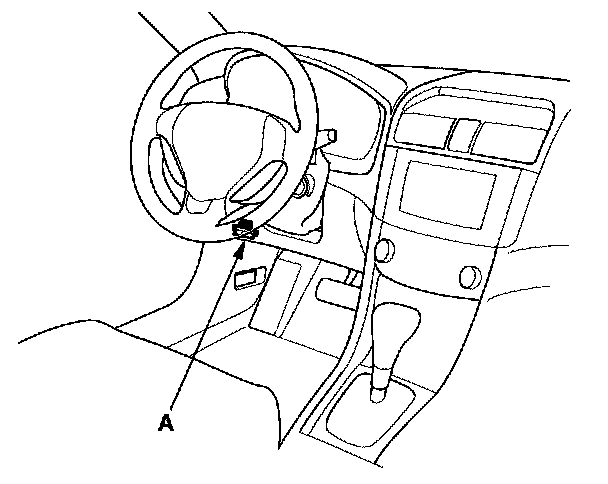
1. Connect the HDS to the data link connector (DLC) (A) located under the driver's side of the dashboard.
2. Turn the ignition switch ON (II).
3. Make sure the HDS communicates with the ECM/PCM and other vehicle systems. If it does not, go to the DLC circuit troubleshooting Testing and Inspection.
If you are returning from DLC circuit troubleshooting, skip steps 4 through 7 and 18 through 20, and do the following procedure after replacing the ECM/PCM.
- Replace the engine oil, and the engine oil filter.
- Clean the throttle body.
4. Select the PGM-FI system with the HDS.
5. Select the INSPECTION MENU with the HDS.
6. Select the ETCS TEST, then select the TP POSITION CHECK, and follow the screen prompts.
NOTE: If the TP POSITION CHECK indicates FAILED, continue with this procedure.
7. Select the REPLACE ECM/PCM MENU, then select READ DATA, and follow the screen prompts.
NOTE:
- Doing this step copies (READS) the engine oil life data from the original ECM/PCM so you can later download (WRITES) it into the new ECM/PCM.
- If READ DATA indicates FAILED, continue with this procedure.
8. Turn the ignition switch OFF.
9. Jump the SCS line with the HDS.
10. Pull back the carpet.
11. Remove the ducts (A).

12. Disconnect the ECM/PCM connectors (B).
13. Remove the bolts (C), then remove the ECM/PCM (D).
14. Install the parts in the reverse order of removal.
15. Open the SCS line with the HDS.
16. Turn the ignition switch ON (II).
17. Manually input the VIN into the ECM/PCM with the HDS.
NOTE: DTC P0630 "VIN Not Programmed or Mismatch" may be stored because the VIN has not been programmed into the ECM/PCM; ignore it, and continue this procedure.
18. If the READ DATA (engine oil life) failed in step 7, go to step 21. Otherwise, go to step 19.
19. Select the PGM-FI system with the HDS.
20. Select the REPLACE ECM/PCM MENU, then WRITE DATA and follow the screen prompt.
NOTE: If the WRITE DATA indicates FAILED, continue with this procedure.
21. Select IMMOBI system with the HDS.
22. Enter the immobilizer code with the ECM/PCM replacement procedure in the HDS; it allows you to start the engine.
23. If the TP POSITION CHECK failed in step 6, clean the throttle body, then go to step 24.
24. If the READ DATA failed in step 7 or the WRITE DATA failed in step 20, replace the engine oil, and engine oil filter, then go to step 25.
25. Select PGM-FI system, and reset the ECM/PCM with the HDS.
26. Update the ECM/PCM if it does not have the latest software.
27. Do the ECM/PCM idle learn procedure.
28. Do the CKP pattern learn procedure.
Special Tools Required
- Honda diagnostic system (HDS) tablet tester
- Honda interface module (HIM) and an iN workstation with HDS and CM update software
- HDS pocket tester
- GNA-600 and an iN workstation with HDS and CM update software
NOTE:
- Make sure the HDS is loaded with the latest software version.
- If you are replacing the ECM/PCM after substituting a known-good ECM/PCM, reinstall the original ECM/PCM, then do this procedure.
- During the procedure, if any READ DATA, WRITE DATA, or other data checks fail, note the failure, then continue.
1. Connect the HDS to the data link connector (DLC) (A) located under the driver's side of the dashboard.
2. Turn the ignition switch ON (II).
3. Make sure the HDS communicates with the ECM/PCM and other vehicle systems. If it does not, go to the DLC circuit troubleshooting Testing and Inspection.
If you are returning from DLC circuit troubleshooting, skip steps 4 through 7 and 18 through 20, and do the following procedure after replacing the ECM/PCM.
- Replace the engine oil, and the engine oil filter.
- Clean the throttle body.
4. Select the PGM-FI system with the HDS.
5. Select the INSPECTION MENU with the HDS.
6. Select the ETCS TEST, then select the TP POSITION CHECK, and follow the screen prompts.
NOTE: If the TP POSITION CHECK indicates FAILED, continue with this procedure.
7. Select the REPLACE ECM/PCM MENU, then select READ DATA, and follow the screen prompts.
NOTE:
- Doing this step copies (READS) the engine oil life data from the original ECM/PCM so you can later download (WRITES) it into the new ECM/PCM.
- If READ DATA indicates FAILED, continue with this procedure.
8. Turn the ignition switch OFF.
9. Jump the SCS line with the HDS.
10. Pull back the carpet.
11. Remove the ducts (A).
12. Disconnect the ECM/PCM connectors (B).
13. Remove the bolts (C), then remove the ECM/PCM (D).
14. Install the parts in the reverse order of removal.
15. Open the SCS line with the HDS.
16. Turn the ignition switch ON (II).
17. Manually input the VIN into the ECM/PCM with the HDS.
NOTE: DTC P0630 "VIN Not Programmed or Mismatch" may be stored because the VIN has not been programmed into the ECM/PCM; ignore it, and continue this procedure.
18. If the READ DATA (engine oil life) failed in step 7, go to step 21. Otherwise, go to step 19.
19. Select the PGM-FI system with the HDS.
20. Select the REPLACE ECM/PCM MENU, then WRITE DATA and follow the screen prompt.
NOTE: If the WRITE DATA indicates FAILED, continue with this procedure.
21. Select IMMOBI system with the HDS.
22. Enter the immobilizer code with the ECM/PCM replacement procedure in the HDS; it allows you to start the engine.
23. If the TP POSITION CHECK failed in step 6, clean the throttle body, then go to step 24.
24. If the READ DATA failed in step 7 or the WRITE DATA failed in step 20, replace the engine oil, and engine oil filter, then go to step 25.
25. Select PGM-FI system, and reset the ECM/PCM with the HDS.
26. Update the ECM/PCM if it does not have the latest software.
27. Do the ECM/PCM idle learn procedure.
28. Do the CKP pattern learn procedure.
Factory Service Tools
Use the Manual With the Right Hardware
Pair factory procedures with proven DIY tools so the instructions are easier to execute.
Disclosure: Verified tool recommendations may earn an affiliate commission at no cost to you.
When to See a Mechanic
Stop DIY work and contact a certified mechanic immediately if any of the following apply:
- • You smell fuel, burning insulation, or see smoke.
- • Brakes feel soft, pull hard to one side, or make grinding noises.
- • The engine overheats, stalls repeatedly, or misfires under load.
- • You are missing required tools, torque specs, or safe lifting equipment.
- • You are not confident in the next step or safety outcome.
Rather have a pro handle this?
A certified mobile mechanic comes to your home or office. They bring the tools, you stay comfortable. No tow truck, no waiting room, no surprises.
Comes to youSame-day available12-month warranty
Get a Free QuoteNo obligation. See pricing before you book.