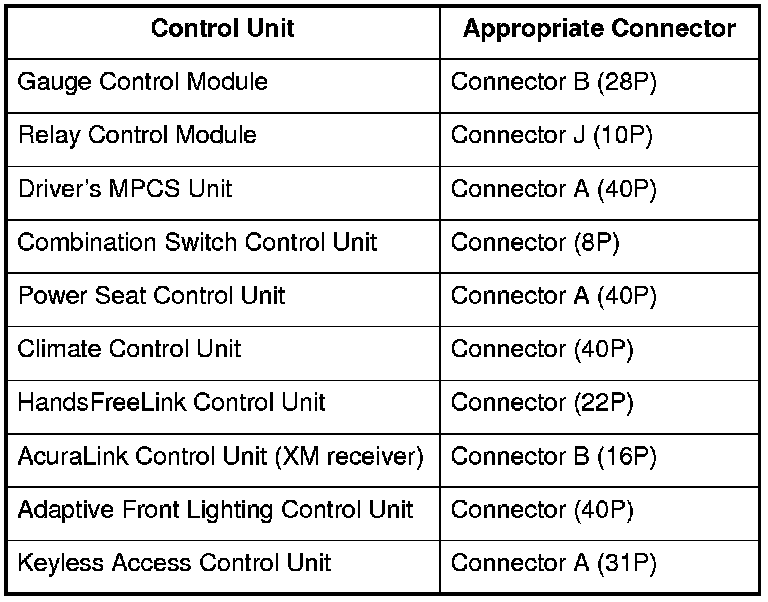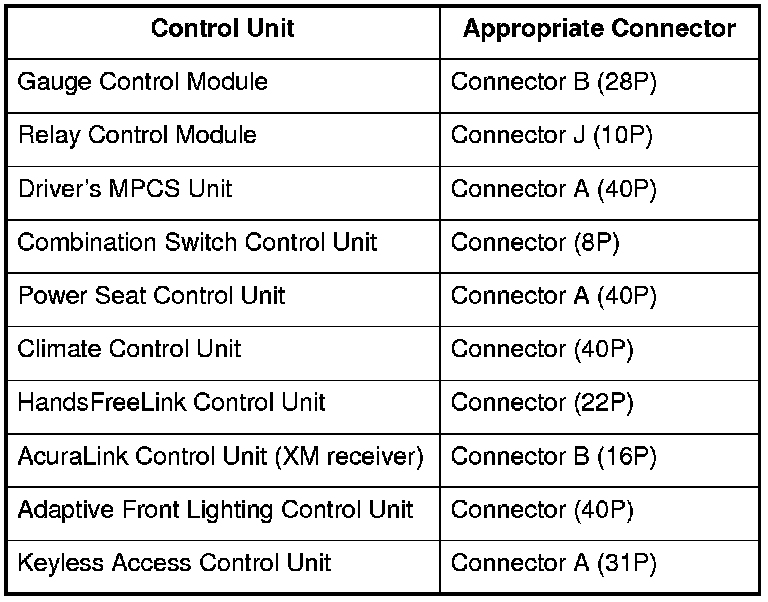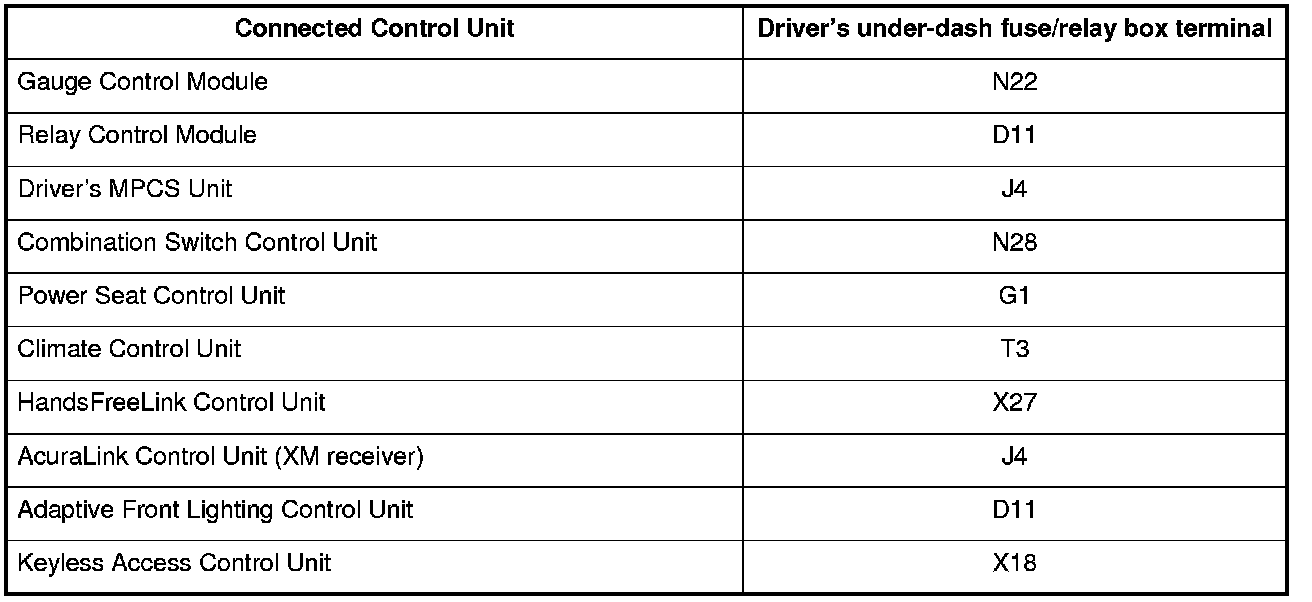
A L L Diagnostic Trouble Codes ( DTC )
- Testing and Inspection
- B Code Charts
- B1000
- B1001
- B1002
- B1005
- B1007
- B1008
- B1011
- B1013
- B1014
- B1015
- B1016
- B1032
- B1050
- B1055
- B1056
- B1060
- B1061
- B1062
- B1063
- B1064
- B1065
- B1066
- B1075
- B1076
- B1077
- B1078
- B1079
- B1080
- B1132
- B1133
- B1134
- B1135
- B1136
- B1147
- B1148
- B1149
- B1150
- B1152
- B1155
- B1156
- B1157
- B1158
- B1161
- B1166
- B1168
- B1169
- B1170
- B1171
- B1173
- B1175
- B1176
- B1177
- B1178
- B1180
- B1181
- B1182
- B1200
- B1202
- B1205
- B1206
- B1207
- B1208
- B1225
- B1226
- B1227
- B1228
- B1229
- B1230
- B1231
- B1232
- B1235
- B1238
- B1240
- B1241
- B1250
- B1255
- B1275
- B1276
- B1277
- B1278
- B1279
- B1280
- B1281
- B1282
- B1283
- B1284
- B1575
- B1600
- B1601
- B1602
- B1605
- B1610
- B1613
- B1614
- B1615
- B1626
- B1627
- B1628
- B1640
- B1641
- B1645
- B1646
- B1647
- B1648
- B1657
- B1658
- B1659
- B1660
- B1663
- B1664
- B1667
- B1668
- B1671
- B1672
- B1673
- B1674
- B1675
- B1750
- B1775
- B1776
- B1779
- B1780
- B1792
- B1800
- B1802
- B1805
- B1806
- B1808
- B1810
- B1811
- B1812
- B1825
- B1826
- B1827
- B1828
- B1829
- B1835
- B1836
- B1837
- B1840
- B1841
- B1842
- B1843
- B1844
- B1845
- B1846
- B1847
- B1848
- B2100
- B2105
- B2106
- B2107
- B2108
- B2127
- B2131
- B2135
- B2136
- B2137
- B2139
- B2140
- B2141
- B2142
- B2143
- B2144
- B2145
- B2146
- B2150
- B2152
- B2155
- B2156
- B2157
- B2159
- B2160
- B2175
- B2176
- B2177
- B2178
- B2179
- B2180
- B2181
- B2182
- B2183
- B2184
- B2185
- B2186
- B2187
- B2188
- B2189
- B2190
- B2191
- B2200
- B2204
- B2206
- B2211
- B2212
- B2240
- B2248
- B2249
- B2975
- B2976
- B2977
- B2978
- B2979
- B2980
- B2981
- B2982
- B2983
- B2984
- B2985
- B2987
- B2991
- P Code Charts
- P2A00
- P2A03
- P16BB
- P16BC
- P16BD
- P16BE
- P16BF
- P050A
- P050B
- P062F
- P0101
- P0102
- P0103
- P0107
- P0108
- P0111
- P0112
- P0113
- P0116
- P0117
- P0118
- P0122
- P0123
- P0125
- P0128
- P0133
- P0134
- P0135
- P0137
- P0138
- P0139
- P0141
- P145C
- P0153
- P0154
- P0155
- P0157
- P0158
- P0159
- P0161
- P0171
- P0172
- P0174
- P0175
- P0222
- P0223
- P0300
- P0301
- P0302
- P0303
- P0304
- P0305
- P0306
- P0325
- P0335
- P0339
- P0340
- P0344
- P0385
- P0389
- P0400
- P0401
- P0406
- P0420
- P0430
- P0443
- P0451
- P0452
- P0453
- P0455
- P0456
- P0461
- P0462
- P0463
- P0480
- P0496
- P0497
- P0498
- P0499
- P0506
- P0507
- P0562
- P0563
- P0602
- P0615
- P0627
- P0630
- P0685
- P0705
- P0706
- P0711
- P0712
- P0713
- P0716
- P0717
- P0718
- P0721
- P0722
- P0723
- P0731
- P0732
- P0733
- P0734
- P0735
- P0741
- P0746
- P0747
- P0751
- P0752
- P0756
- P0757
- P0761
- P0762
- P0766
- P0767
- P0776
- P0777
- P0796
- P0797
- P0812
- P0842
- P0843
- P0847
- P0848
- P0872
- P0873
- P0962
- P0963
- P0966
- P0967
- P0970
- P0971
- P0973
- P0974
- P0976
- P0977
- P0979
- P0980
- P0982
- P0983
- P1077
- P1078
- P1109
- P1116
- P1128
- P1129
- P1172
- P1174
- P1297
- P1298
- P1454
- P1549
- P1683
- P1684
- P1717
- P1743
- P1744
- P1745
- P1780
- P2101
- P2108
- P2118
- P2122
- P2123
- P2127
- P2128
- P2135
- P2138
- P2176
- P2183
- P2184
- P2185
- P2195
- P2197
- P2227
- P2228
- P2229
- P2237
- P2238
- P2240
- P2241
- P2243
- P2245
- P2247
- P2249
- P2251
- P2252
- P2254
- P2255
- P2279
- P2413
- P2422
- P2552
- P2610
- P2646
- P2647
- P2648
- P2649
- U Code Charts
- Manufacturer Code Charts
- Audio Communication Error Is Indicated
- A1-1x
- A2-1x
- Blower Motor Lock Is Indicated
- BUS Communication Error Is Indicated
- B2-Bx
- B2-Cx
- B2-1x
- B2-2x
- B2-8x
- B2-9x
- COMP Solenoid Error Is Indicated
- DrA/M Motor Lock Is Indicated
- DrC/V Motor Lock Is Indicated
- DrVENT Sensor Open Is Indicated
- DrVENT Sensor Short Is Indicated
- EEPROM Error Is Indicated
- Ex-xx
- Fx-xx
- Mode Motor Lock Is Indicated
- NAVI Communication Error Is Indicated
- PaA/M Motor Lock Is Indicated
- PaC/V Motor Lock Is Indicated
- PaVENT Sensor Open Is Indicated
- PaVENT Sensor Short Is Indicated
- PRE Sensor Open Is Indicated
- PRE Sensor Short Is Indicated
- R/F Motor Lock Is Indicated
- RrVENT Motor Lock Is Indicated
- TAM Sensor Open Is Indicated
- TAM Sensor Short Is Indicated
- TE Sensor Open Is Indicated
- TE Sensor Short Is Indicated
- TR Sensor Open Is Indicated
- TR Sensor Short Is Indicated
- TS Sensor Open Is Indicated
- TS Sensor Short Is Indicated
- Vehicle Speed Error, ENGNe Error, or TW Sensor Error Is Indicated
- 10
- 11
- 11-Ax
- 11-Bx
- 11-1x
- 11-2x
- 11-3x
- 11-4x
- 11-5x
- 11-6x
- 11-8x
- 11-9x
- 12
- 12-Ax
- 12-Bx
- 12-1
- 12-1x
- 12-2
- 12-2x
- 12-3
- 12-3x
- 12-4x
- 12-5x
- 12-6x
- 12-8x
- 12-9x
- 13
- 14
- 14-1
- 14-2
- 15
- 16
- 16-1
- 16-3
- 17
- 18
- 20
- 21
- 21-1x
- 21-2x
- 21-3x
- 21-8x
- 21-9x
- 22
- 22-1x
- 22-2x
- 22-3x
- 22-8x
- 22-9x
- 23
- 24
- 25
- 26
- 27
- 27-1
- 27-2
- 30
- 31
- 31-1x
- 31-2x
- 31-3x
- 31-8x
- 31-9x
- 32
- 32-1x
- 32-2x
- 32-3x
- 32-8x
- 32-9x
- 33
- 33-1
- 33-1x
- 33-2
- 33-2x
- 33-3
- 33-3x
- 33-8x
- 33-9x
- 34
- 34-1x
- 34-2x
- 34-3x
- 34-8x
- 34-9x
- 35
- 35-1
- 35-2
- 36
- 37
- 38
- 41
- 41-Bx
- 41-Cx
- 41-1
- 41-1x
- 41-2
- 41-2x
- 41-3
- 41-6
- 41-8x
- 41-9x
- 42
- 42-Bx
- 42-Cx
- 42-1
- 42-1x
- 42-2
- 42-2x
- 42-8x
- 42-9x
- 43
- 43-Bx
- 43-Cx
- 43-1
- 43-1x
- 43-2x
- 43-8x
- 43-9x
- 44
- 44-Bx
- 44-Cx
- 44-1x
- 44-2x
- 44-8x
- 44-9x
- 44-11
- 44-12
- 44-21
- 44-31
- 44-32
- 44-41
- 44-50
- 45
- 45-Bx
- 45-Cx
- 45-1x
- 45-2x
- 45-8x
- 45-9x
- 46
- 46-Bx
- 46-Cx
- 46-1
- 46-1x
- 46-2x
- 46-8x
- 46-9x
- 47
- 48
- 49
- 50
- 51
- 51-xx
- 52
- 52-xx
- 52-3
- 53
- 53-xx
- 53-1
- 53-2
- 53-3
- 53-4
- 54
- 54-xx
- 55
- 55-xx
- 56-3
- 57
- 57-1
- 57-2
- 57-3
- 57-4
- 59-1
- 60
- 61
- 61-1
- 61-1x
- 61-2
- 61-2x
- 62
- 62-1x
- 62-2x
- 63
- 64
- 65
- 66
- 68
- 71
- 71-11
- 71-21
- 71-22
- 73
- 73-1x
- 74-1
- 74-2x
- 75-1
- 75-2
- 76-1
- 76-3x
- 76-4x
- 76-5x
- 76-61
- 76-63
- 77-1
- 77-2
- 77-3
- 77-6
- 78-xx
- 81
- 81-1
- 81-2
- 81-3
- 81-4x
- 81-5x
- 81-61
- 81-62
- 81-63
- 81-64
- 81-71
- 81-78
- 81-79
- 82-1
- 82-1x
- 82-2
- 82-3
- 83
- 83-2x
- 84
- 85
- 85-4x
- 85-5x
- 85-61
- 85-62
- 85-63
- 85-64
- 85-71
- 85-78
- 85-79
- 86
- 86-1x
- 86-2x
- 87-3x
- 90
- 91
- 91-1x
- 91-2x
- 92
- 92-1x
- 92-2x
- 93
- 95
- 97
- 100
- 103
- 105
- 107
- 108
- 110
- 111
- 112
- 113
- 115
- 117
- 121
- 122
- 123
- 124
- 1001
- 1101
- 1201
- 1202
- 1301
- 1302
- 1303
- 1304
- 1305
- 1306
- 1307
- 1403
- 1409
- 1701
- 1801
- 2601
- 2602
- 2603
- 2605
- 2607
- 2608
- 2609
- 2610
- 2701
- 2702
- 2703
- 2704
- 2705
- 2706
- 2707
- B Code Charts