
Safety Warning
DIY auto repair can cause serious injury, fire, or vehicle damage. These guides are for informational purposes only. Always follow OEM torque specs, wear PPE, and consult a certified mechanic if you are unsure. You are solely responsible for your safety.
2012 Subaru Outback F4-2.5L SOHCFACTORY OEM SERVICE PROCEDURE
Programming and Relearning
Learning Control
GENERAL DESCRIPTION
^ Follow the messages displayed on the Subaru Select Monitor when working.
^ When the following work is performed, perform learning for the transmission.
Replacement of TCM/Replacement or disassembly of transmission assembly/Replacement of control valve body/Performing "Clear Memories 2".
PROCEDURE
PREPARATION FOR LEARNING
1) Warm up or cool down until the ATF temperature displayed on the Subaru Select Monitor is 40 - 65°C (104 - 149°F).
2) After stopping the vehicle, shift the select lever to "P" range.
3) Apply the electronic parking brake.
4) Lift up the vehicle.
CAUTION:
While working, be sure to keep the lower edge of the tires 30 cm or more above the ground as vehicle will vibrate.
5) Connect the Subaru Select Monitor to data link connector.
6) Turn the ignition switch to ON.
7) Turn off all switches causing an electrical load, such as headlights, A/C, seat heater and rear defogger.
SIMPLE LEARNING
NOTE:
Simple learning is performed with the vehicle lifted, without actually running the vehicle.
CAUTION:
Do not turn the power of the Subaru Select Monitor OFF during work, and do not disconnect the data link connector.
1) Select {AT related learning & inspecting mode} in the [[Transmission Diagnosis]] display screen of the Subaru Select Monitor.
2) Select {AT learning mode} in the [[AT related learning & inspecting mode]] screen of the Subaru Select Monitor.
3) Follow the messages displayed on the Subaru Select Monitor screen when working.
NOTE:
During AT learning in progress, AT OIL TEMP light in the combination meter starts flashing at 2 Hz and the learning operation starts. The following message is displayed on the screen when the AT OIL TEMP light which was flashing at 2 Hz turns off.
4) When [[AT learning normally ended.]] is displayed, simple AT learning is completed.
NOTE:
^ If communication error occurs during learning, retry the "AT learning mode" from the beginning.
^ If the message [[Execute AT learning again after fixing troubles of the vehicle]] appears during learning, select [OK] and display the DTC list. After repairing the locations indicated by the DTC, start the "AT learning mode" over from the beginning.
^ When communication error occurs during learning, select lever does not shift occasionally. If select lever does not shift, turn the ignition switch to OFF before operating the select lever.
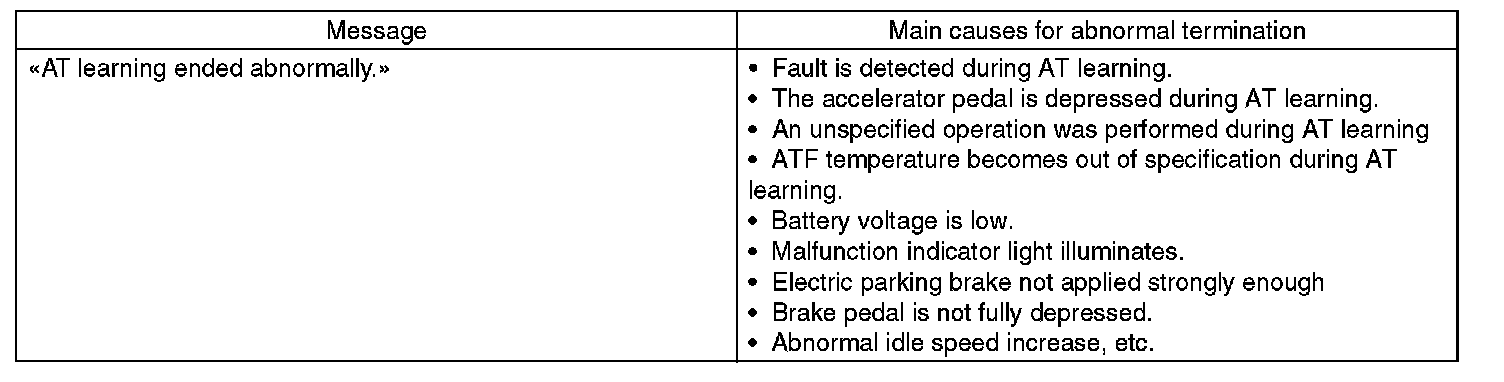
^ If the message [[AT learning ended abnormally.]] is displayed, start the "AT learning mode" over from the beginning.
^ For detailed operation procedures, refer to "PC application help for Subaru Select Monitor".
GENERAL DESCRIPTION
^ Follow the messages displayed on the Subaru Select Monitor when working.
^ When the following work is performed, perform learning for the transmission.
Replacement of TCM/Replacement or disassembly of transmission assembly/Replacement of control valve body/Performing "Clear Memories 2".
PROCEDURE
PREPARATION FOR LEARNING
1) Warm up or cool down until the ATF temperature displayed on the Subaru Select Monitor is 40 - 65°C (104 - 149°F).
2) After stopping the vehicle, shift the select lever to "P" range.
3) Apply the electronic parking brake.
4) Lift up the vehicle.
CAUTION:
While working, be sure to keep the lower edge of the tires 30 cm or more above the ground as vehicle will vibrate.
5) Connect the Subaru Select Monitor to data link connector.
6) Turn the ignition switch to ON.
7) Turn off all switches causing an electrical load, such as headlights, A/C, seat heater and rear defogger.
SIMPLE LEARNING
NOTE:
Simple learning is performed with the vehicle lifted, without actually running the vehicle.
CAUTION:
Do not turn the power of the Subaru Select Monitor OFF during work, and do not disconnect the data link connector.
1) Select {AT related learning & inspecting mode} in the [[Transmission Diagnosis]] display screen of the Subaru Select Monitor.
2) Select {AT learning mode} in the [[AT related learning & inspecting mode]] screen of the Subaru Select Monitor.
3) Follow the messages displayed on the Subaru Select Monitor screen when working.
NOTE:
During AT learning in progress, AT OIL TEMP light in the combination meter starts flashing at 2 Hz and the learning operation starts. The following message is displayed on the screen when the AT OIL TEMP light which was flashing at 2 Hz turns off.
4) When [[AT learning normally ended.]] is displayed, simple AT learning is completed.
NOTE:
^ If communication error occurs during learning, retry the "AT learning mode" from the beginning.
^ If the message [[Execute AT learning again after fixing troubles of the vehicle]] appears during learning, select [OK] and display the DTC list. After repairing the locations indicated by the DTC, start the "AT learning mode" over from the beginning.
^ When communication error occurs during learning, select lever does not shift occasionally. If select lever does not shift, turn the ignition switch to OFF before operating the select lever.
^ If the message [[AT learning ended abnormally.]] is displayed, start the "AT learning mode" over from the beginning.
^ For detailed operation procedures, refer to "PC application help for Subaru Select Monitor".
Factory Service Tools
Use the Manual With the Right Hardware
Pair factory procedures with proven DIY tools so the instructions are easier to execute.
Disclosure: Verified tool recommendations may earn an affiliate commission at no cost to you.
When to See a Mechanic
Stop DIY work and contact a certified mechanic immediately if any of the following apply:
- • You smell fuel, burning insulation, or see smoke.
- • Brakes feel soft, pull hard to one side, or make grinding noises.
- • The engine overheats, stalls repeatedly, or misfires under load.
- • You are missing required tools, torque specs, or safe lifting equipment.
- • You are not confident in the next step or safety outcome.