
Safety Warning
DIY auto repair can cause serious injury, fire, or vehicle damage. These guides are for informational purposes only. Always follow OEM torque specs, wear PPE, and consult a certified mechanic if you are unsure. You are solely responsible for your safety.
2004 Subaru Forester F4-2.5L SOHCFACTORY OEM SERVICE PROCEDURE
OBD-II General Scan Tool
OBD-II General Scan Tool
OPERATION
1. HOW TO USE OBD-II GENERAL SCAN TOOL
1. Prepare a general scan tool (OBD-II general scan tool) required by SAE J1978.
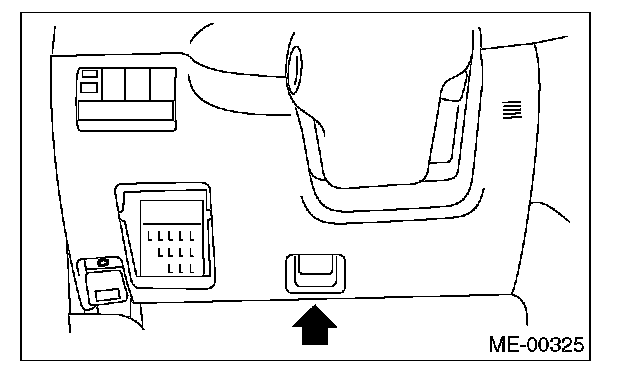
2. Open the cover and connect the OBD-II general scan tool to data link connector located in the lower portion of instrument panel (on the driver s side).
3. Using the OBD-II general scan tool, call up DTC and freeze frame data. OBD-II general scan tool functions consist of.
1. MODE $01: Current powertrain diagnostic data
2. MODE $02: Powertrain freeze frame data
3. MODE $03: Emission-related powertrain DTC
4. MODE $04: Clear/Reset emission-related diagnostic information
Read out the data according to repair procedures. (For detailed operation procedures, refer to the OBD-II General Scan Tool Operation Manual.)
NOTE: For details concerning DTC, refer to the List of Diagnostic Trouble Code (DTC).
2. MODE $01 (CURRENT POWERTRAIN DIAGNOSTIC DATA)
Refers to data denoting the current operating condition of analog input/output, digital input/output and/or the powertrain system.
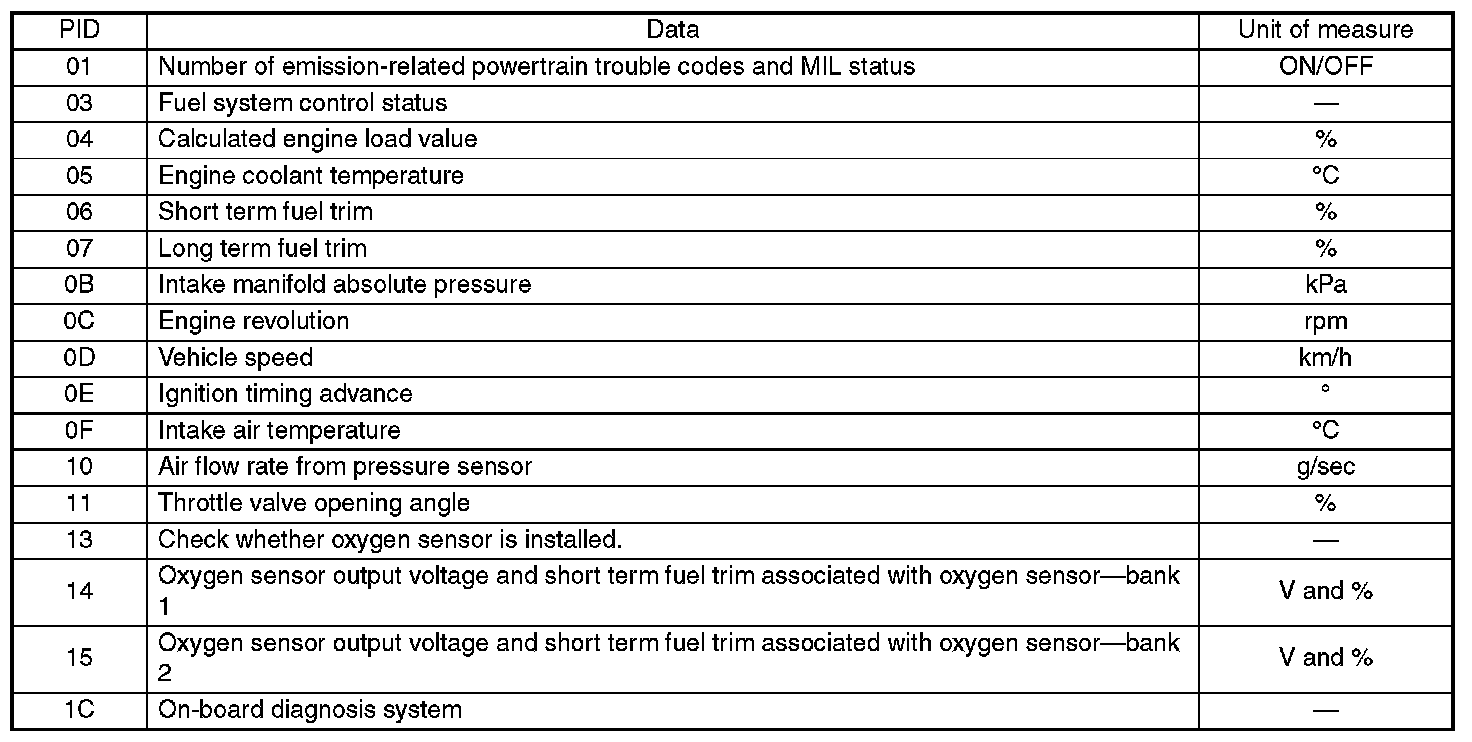
A list of the support data and PID (Parameter Identification) codes are shown in the table.
NOTE: Refer to OBD-II general scan tool manufacturer's instruction manual to access generic OBD-II PIDs (MODE $01).
3. MODE $02 (POWERTRAIN FREEZE FRAME DATA)
Refers to data denoting the operating condition when trouble is sensed by the on-board diagnosis system.

A list of the support data and PID (Parameter Identification) codes are shown in the table.
NOTE: Refer to OBD-II general scan tool manufacturer's instruction manual to access freeze frame data (MODE $02).
4. MODE $03 (EMISSION-RELATED POWERTRAIN DIAGNOSTIC TROUBLE CODE (DTC))
Refer to Read Diagnostic Trouble Code (DTC) for information about data denoting emission-related powertrain DTC.
5. MODE $04 (CLEAR/RESET EMISSION-RELATED DIAGNOSTIC INFORMATION)
Refers to the mode used to clear or reset emission-related diagnostic information (OBD-II trouble diagnostic information).
NOTE: Refer to OBD-II general scan tool manufacturer's instruction manual to clear or reset emission-related diagnostic information (MODE $04).
OPERATION
1. HOW TO USE OBD-II GENERAL SCAN TOOL
1. Prepare a general scan tool (OBD-II general scan tool) required by SAE J1978.
2. Open the cover and connect the OBD-II general scan tool to data link connector located in the lower portion of instrument panel (on the driver s side).
3. Using the OBD-II general scan tool, call up DTC and freeze frame data. OBD-II general scan tool functions consist of.
1. MODE $01: Current powertrain diagnostic data
2. MODE $02: Powertrain freeze frame data
3. MODE $03: Emission-related powertrain DTC
4. MODE $04: Clear/Reset emission-related diagnostic information
Read out the data according to repair procedures. (For detailed operation procedures, refer to the OBD-II General Scan Tool Operation Manual.)
NOTE: For details concerning DTC, refer to the List of Diagnostic Trouble Code (DTC).
2. MODE $01 (CURRENT POWERTRAIN DIAGNOSTIC DATA)
Refers to data denoting the current operating condition of analog input/output, digital input/output and/or the powertrain system.
A list of the support data and PID (Parameter Identification) codes are shown in the table.
NOTE: Refer to OBD-II general scan tool manufacturer's instruction manual to access generic OBD-II PIDs (MODE $01).
3. MODE $02 (POWERTRAIN FREEZE FRAME DATA)
Refers to data denoting the operating condition when trouble is sensed by the on-board diagnosis system.
A list of the support data and PID (Parameter Identification) codes are shown in the table.
NOTE: Refer to OBD-II general scan tool manufacturer's instruction manual to access freeze frame data (MODE $02).
4. MODE $03 (EMISSION-RELATED POWERTRAIN DIAGNOSTIC TROUBLE CODE (DTC))
Refer to Read Diagnostic Trouble Code (DTC) for information about data denoting emission-related powertrain DTC.
5. MODE $04 (CLEAR/RESET EMISSION-RELATED DIAGNOSTIC INFORMATION)
Refers to the mode used to clear or reset emission-related diagnostic information (OBD-II trouble diagnostic information).
NOTE: Refer to OBD-II general scan tool manufacturer's instruction manual to clear or reset emission-related diagnostic information (MODE $04).
Factory Service Tools
Use the Manual With the Right Hardware
Pair factory procedures with proven DIY tools so the instructions are easier to execute.
Disclosure: Verified tool recommendations may earn an affiliate commission at no cost to you.
When to See a Mechanic
Stop DIY work and contact a certified mechanic immediately if any of the following apply:
- • You smell fuel, burning insulation, or see smoke.
- • Brakes feel soft, pull hard to one side, or make grinding noises.
- • The engine overheats, stalls repeatedly, or misfires under load.
- • You are missing required tools, torque specs, or safe lifting equipment.
- • You are not confident in the next step or safety outcome.