
Safety Warning
DIY auto repair can cause serious injury, fire, or vehicle damage. These guides are for informational purposes only. Always follow OEM torque specs, wear PPE, and consult a certified mechanic if you are unsure. You are solely responsible for your safety.
2004 Saturn ION L4-2.0L SC VIN PFACTORY OEM SERVICE PROCEDURE
Scan Tool Data List - Powertrain System
SCAN TOOL DATA LIST
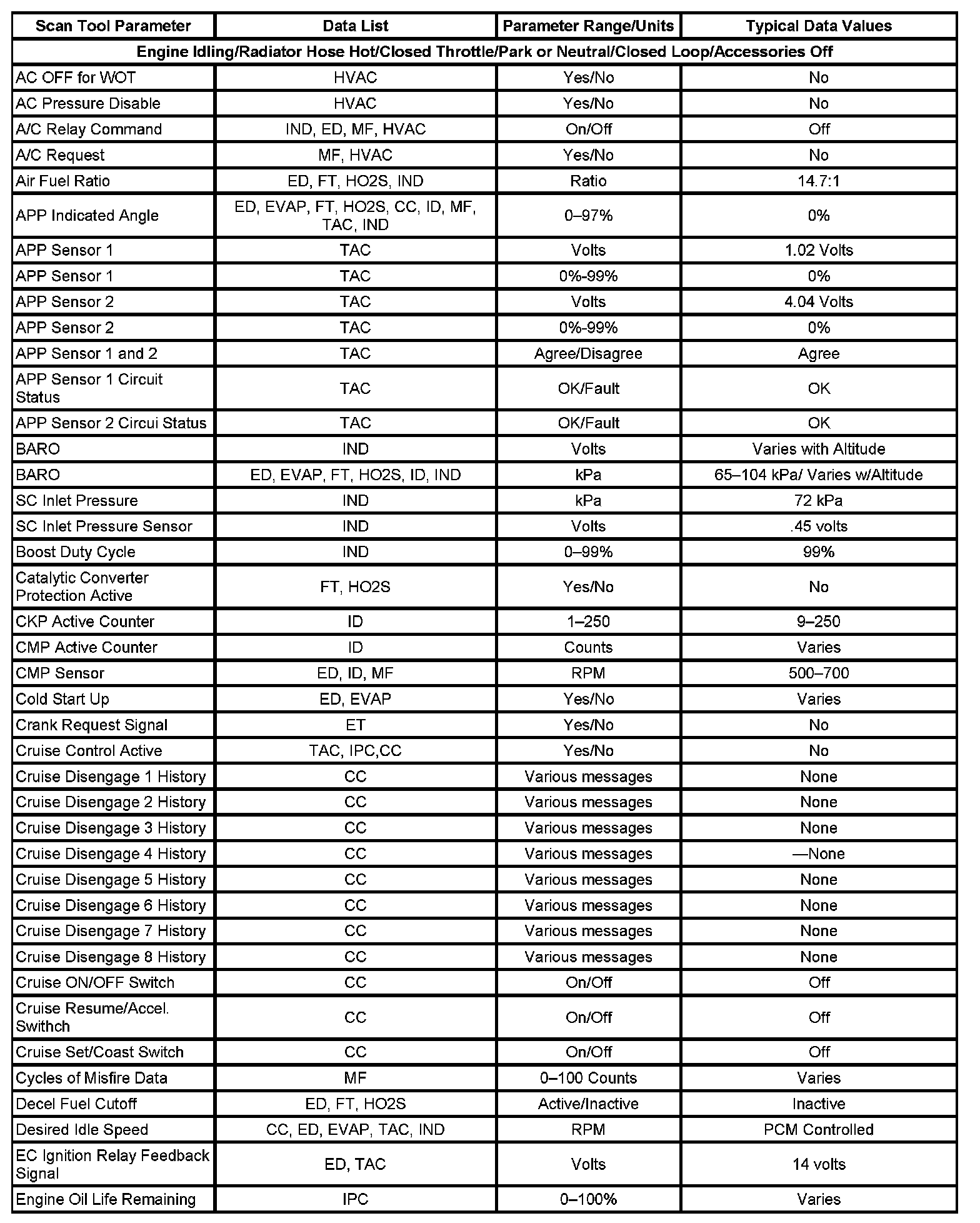
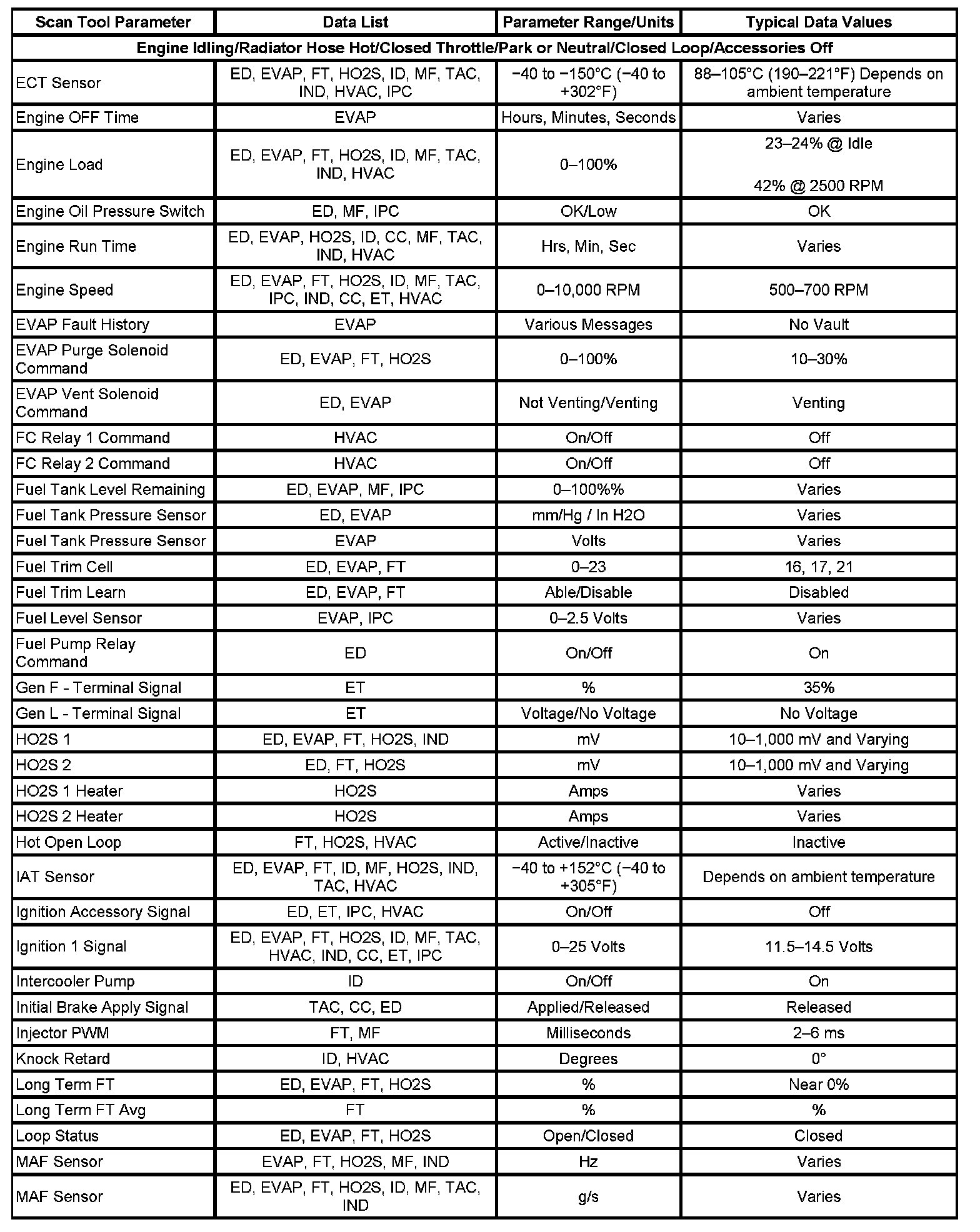
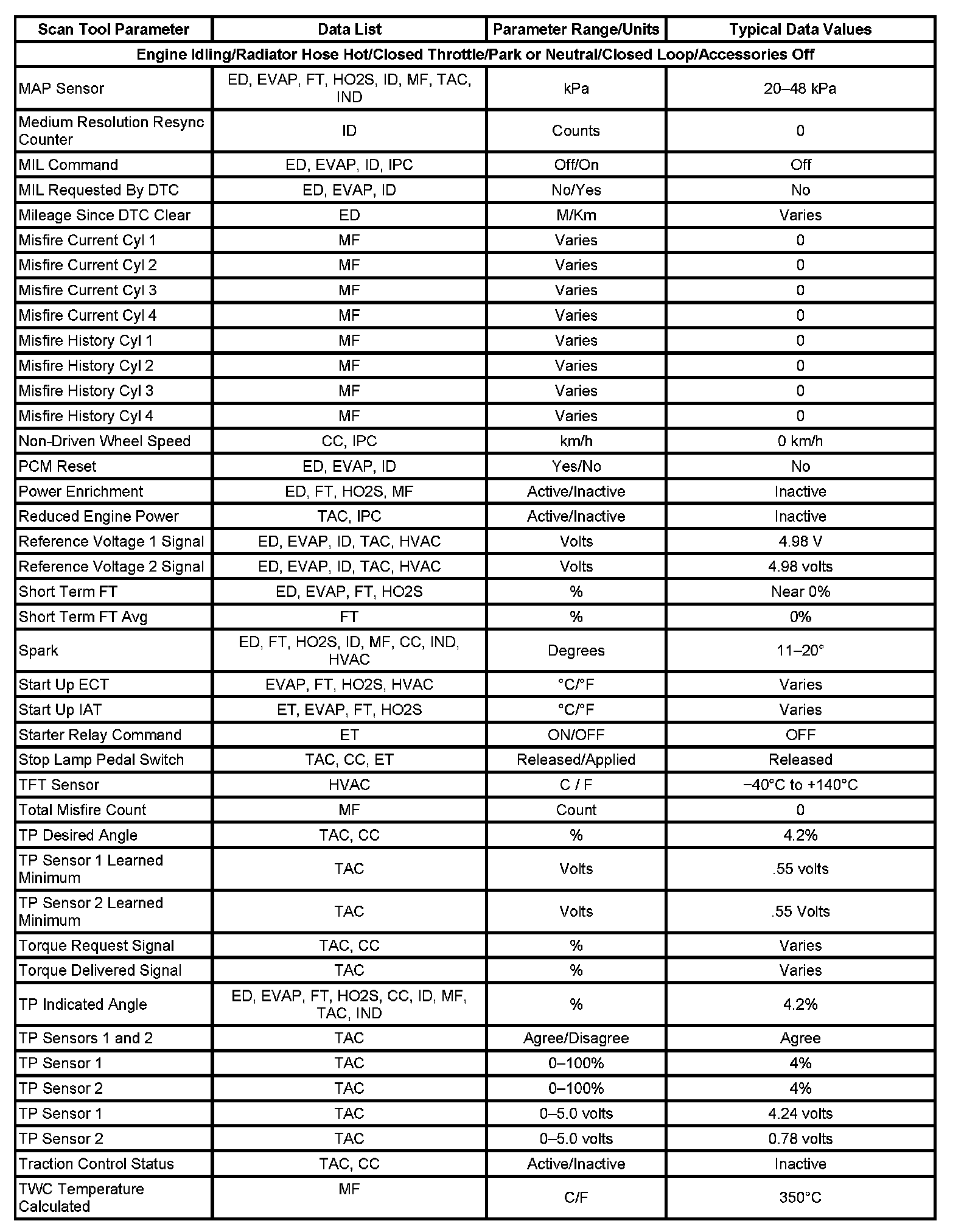
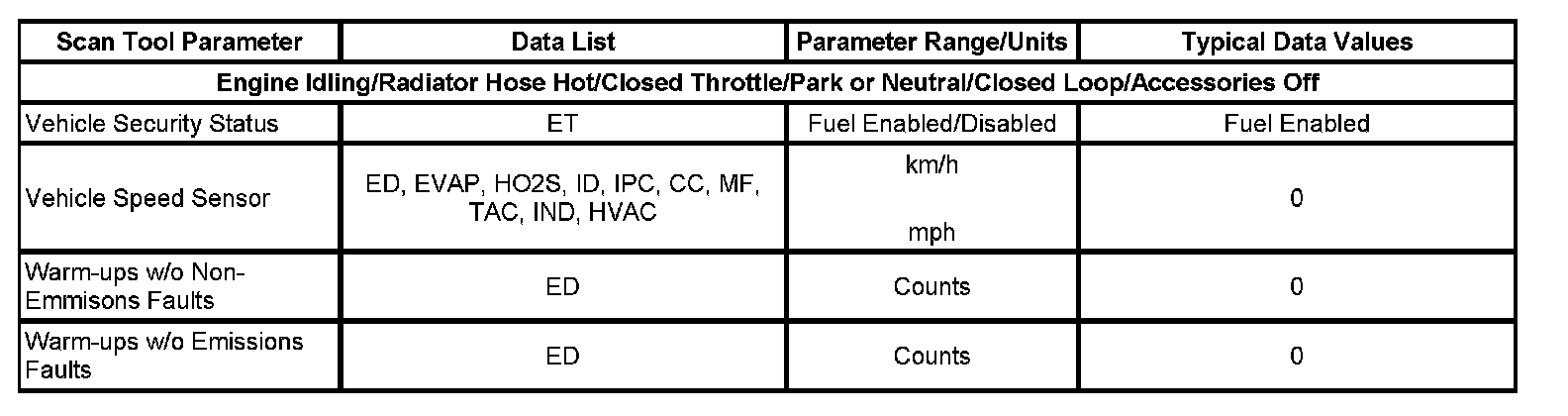
The Engine Scan Tool Data List contains all engine related parameters that are available on the scan tool. The list is arranged in alphabetical order. A parameter may appear in any one of the data lists, and in some cases may appear more than once, or in more than one data list in order to group certain related parameters together.
Use the Engine Scan Tool Data List only after the following is determined:
- The Diagnostic System Check - Computers and Control Systems is completed.
- No DTCs
- On-board diagnostics are functioning properly.
Scan tool values from a properly running engine may be used for comparison with the engine you are diagnosing. The Engine Scan Tool Data List represents values that would be seen on a normal running engine.
IMPORTANT: A scan tool that displays faulty data should not be used. The scan tool problem should be reported to the manufacturer. Use of a faulty scan tool can result in misdiagnosis and unnecessary parts replacement.
Only the parameters listed below are referenced in this Service Data for use in diagnosis. If all values are within the typical range described below, refer to Symptoms - Computers and Control Systems for diagnosis. Symptom Related Diagnostic Procedures
The column labeled Data List indicates where a parameter can be located on the scan tool. Refer to the scan tool operating manual for the exact locations of the data lists. The following is a description of each term listed:
All: The Parameter is in all of the data lists indicated below.
CC: Cruise Control
ED: Engine Data
ET: Electrical/Theft Data
EVAP: EVAP Data
FT: Fuel Trim Data List
HVAC: Heating, Ventilation, Air Condition
IND: Induction Data
IPC: Instrument Panel Control
MF: Misfire Data List
TAC: Throttle Actuated Control Data List
HO2S: HO2S Data
ID: Ignition Data
Scan Tool Data List Part 1:
Scan Tool Data List Part 2:
Scan Tool Data List Part 3:
Scan Tool Data List Part 4:
The Engine Scan Tool Data List contains all engine related parameters that are available on the scan tool. The list is arranged in alphabetical order. A parameter may appear in any one of the data lists, and in some cases may appear more than once, or in more than one data list in order to group certain related parameters together.
Use the Engine Scan Tool Data List only after the following is determined:
- The Diagnostic System Check - Computers and Control Systems is completed.
- No DTCs
- On-board diagnostics are functioning properly.
Scan tool values from a properly running engine may be used for comparison with the engine you are diagnosing. The Engine Scan Tool Data List represents values that would be seen on a normal running engine.
IMPORTANT: A scan tool that displays faulty data should not be used. The scan tool problem should be reported to the manufacturer. Use of a faulty scan tool can result in misdiagnosis and unnecessary parts replacement.
Only the parameters listed below are referenced in this Service Data for use in diagnosis. If all values are within the typical range described below, refer to Symptoms - Computers and Control Systems for diagnosis. Symptom Related Diagnostic Procedures
The column labeled Data List indicates where a parameter can be located on the scan tool. Refer to the scan tool operating manual for the exact locations of the data lists. The following is a description of each term listed:
All: The Parameter is in all of the data lists indicated below.
CC: Cruise Control
ED: Engine Data
ET: Electrical/Theft Data
EVAP: EVAP Data
FT: Fuel Trim Data List
HVAC: Heating, Ventilation, Air Condition
IND: Induction Data
IPC: Instrument Panel Control
MF: Misfire Data List
TAC: Throttle Actuated Control Data List
HO2S: HO2S Data
ID: Ignition Data
Factory Service Tools
Use the Manual With the Right Hardware
Pair factory procedures with proven DIY tools so the instructions are easier to execute.
Disclosure: Verified tool recommendations may earn an affiliate commission at no cost to you.
When to See a Mechanic
Stop DIY work and contact a certified mechanic immediately if any of the following apply:
- • You smell fuel, burning insulation, or see smoke.
- • Brakes feel soft, pull hard to one side, or make grinding noises.
- • The engine overheats, stalls repeatedly, or misfires under load.
- • You are missing required tools, torque specs, or safe lifting equipment.
- • You are not confident in the next step or safety outcome.