
Safety Warning
DIY auto repair can cause serious injury, fire, or vehicle damage. These guides are for informational purposes only. Always follow OEM torque specs, wear PPE, and consult a certified mechanic if you are unsure. You are solely responsible for your safety.
2003 Pontiac Sunfire L4-2.2L VIN FFACTORY OEM SERVICE PROCEDURE
Scan Tool Data List - Powertrain System
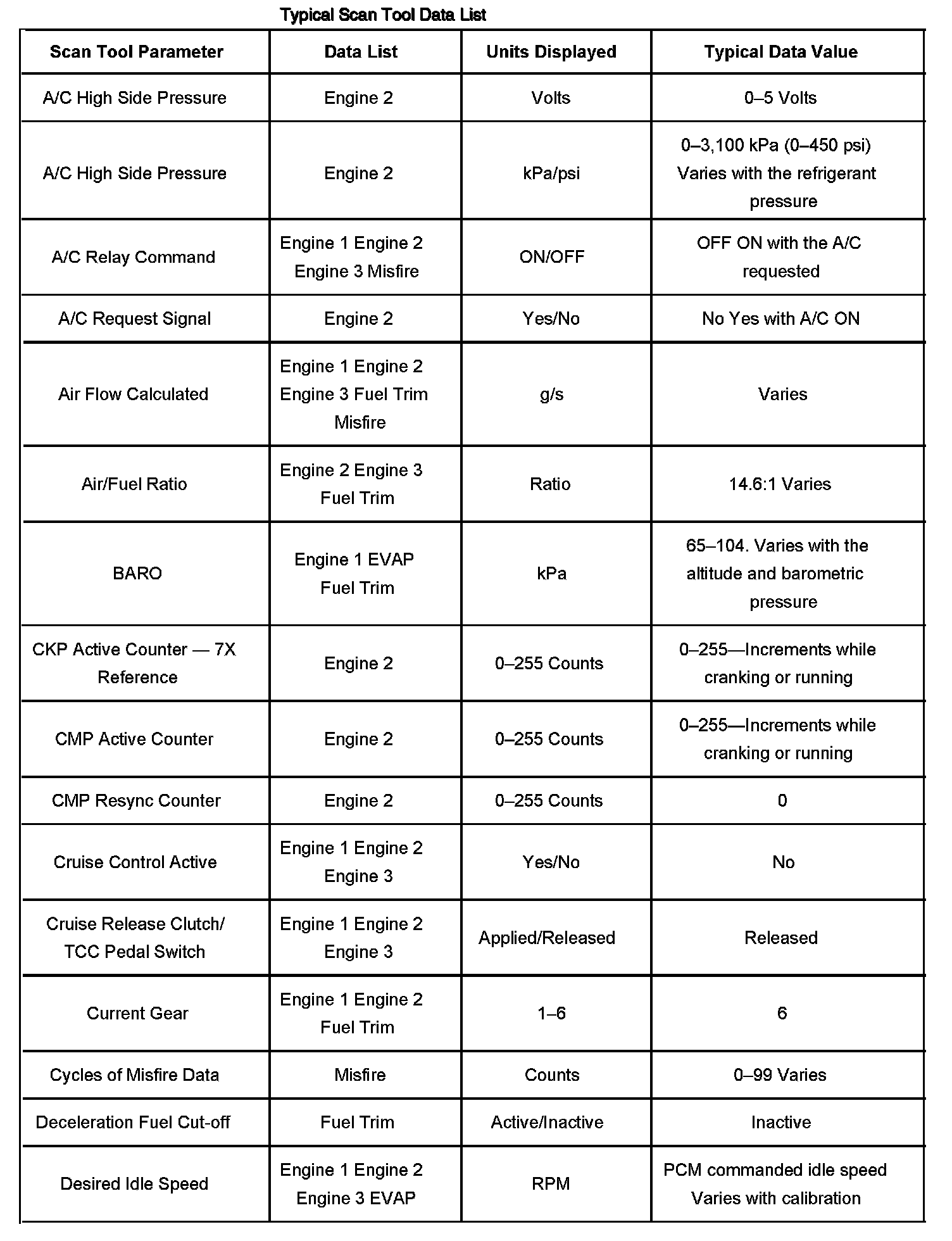
Scan Tool Data List Part 1:
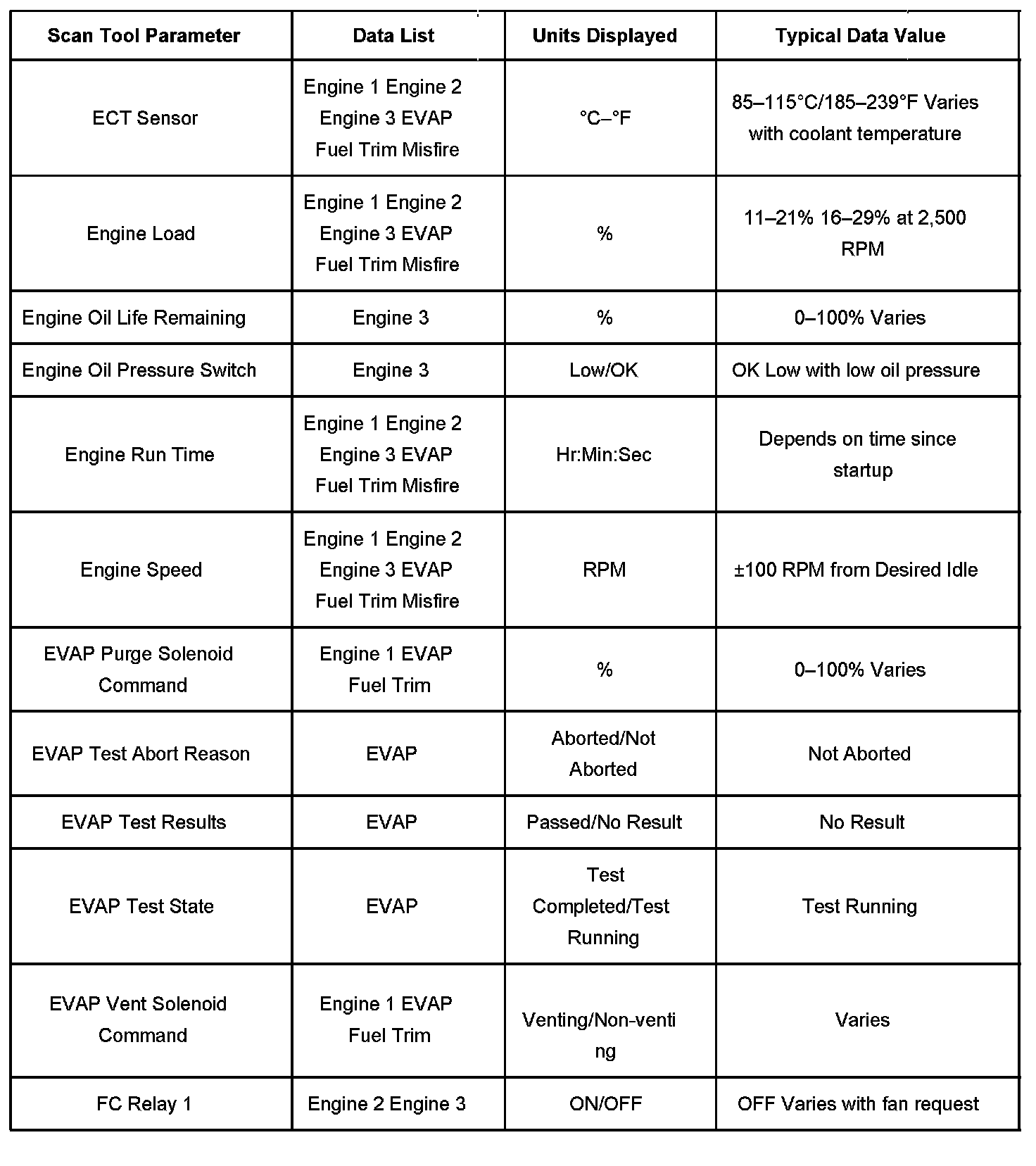
Scan Tool Data List Part 2:
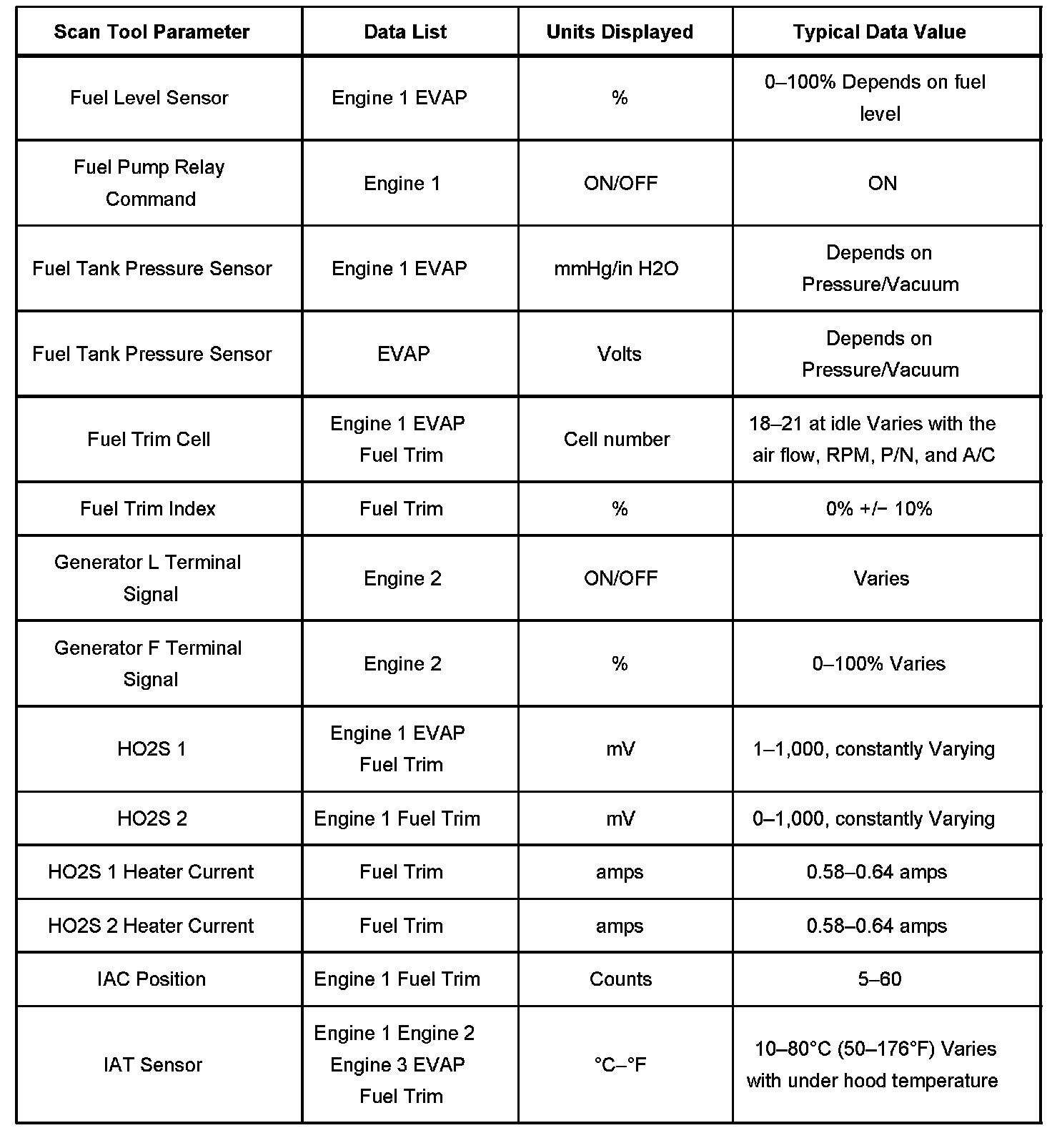
Scan Tool Data List Part 3:
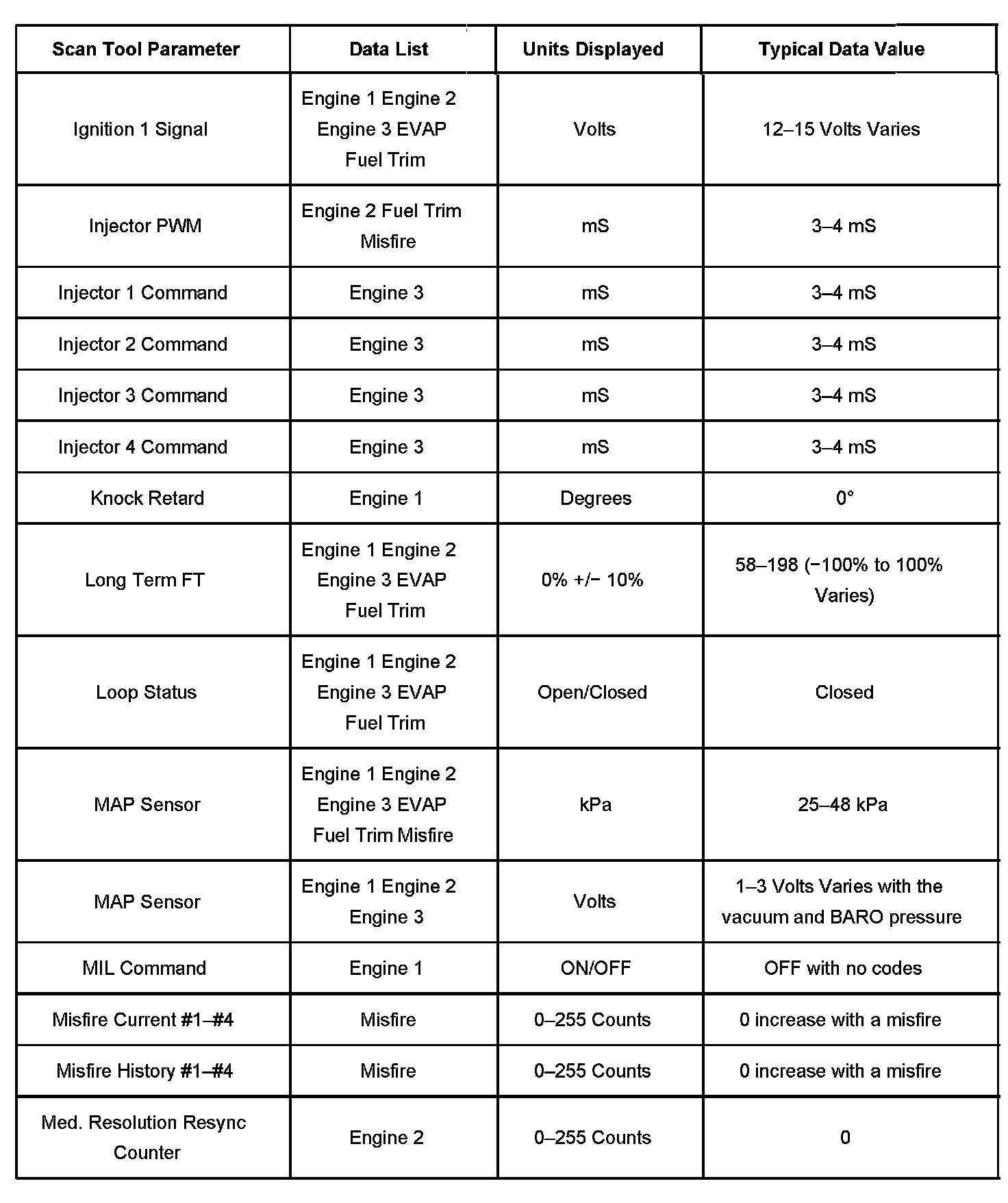
Scan Tool Data List Part 4:
Scan Tool Data List Part 5:
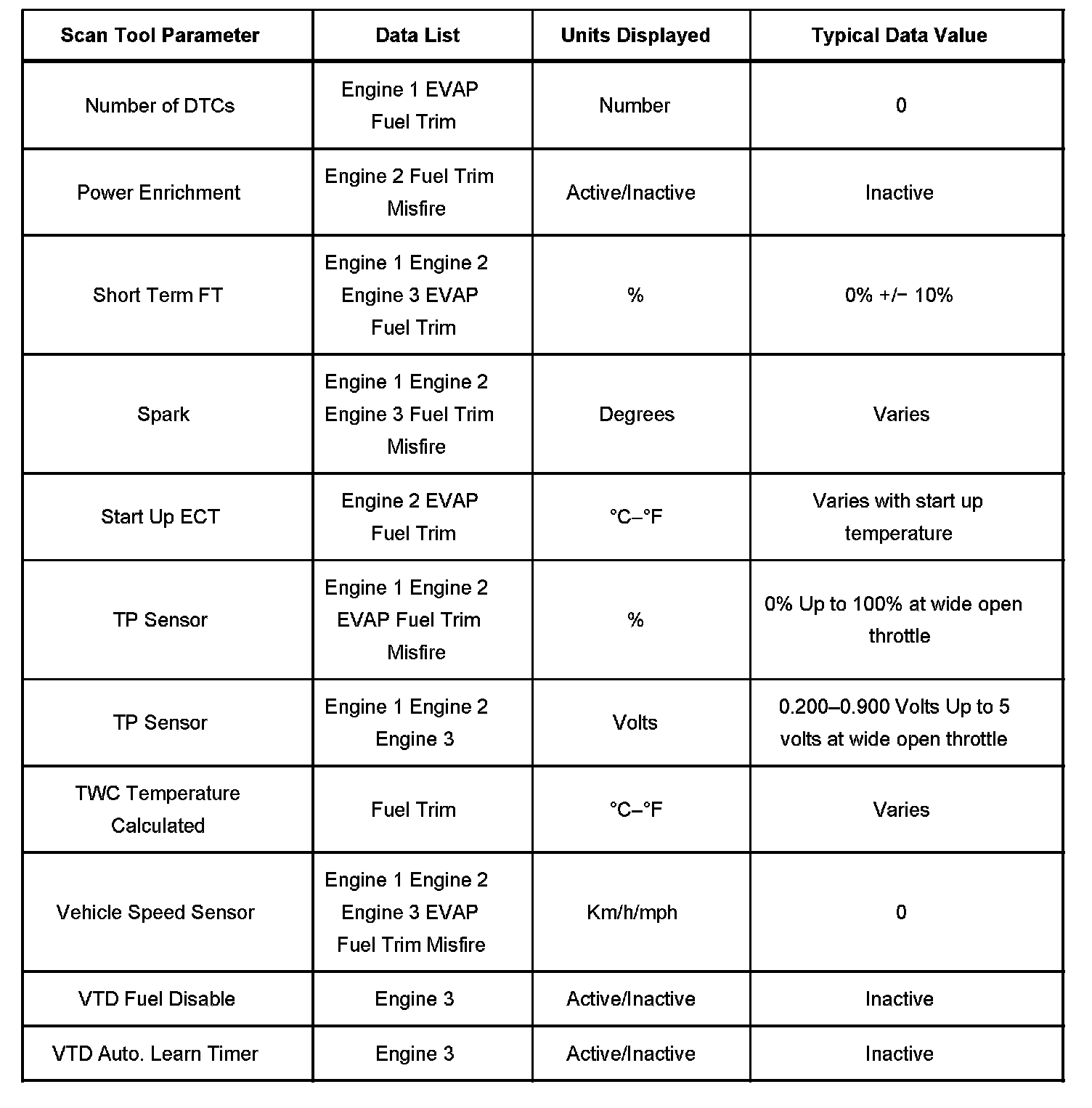
The Engine Scan Tool Data List contains all engine related parameters that are available on the scan tool. The list is arranged in alphabetical order. The parameters in the Typical Scan Data values column represent values that would be seen on a normally running engine.
IMPORTANT: A scan tool that displays faulty data should not be used, and the problem should be reported to the scan tool manufacturer. Use of a faulty scan tool can result in misdiagnosis and unnecessary parts replacement.
Only the parameters listed below are referred to in this service manual for use in diagnosis. For further information on using the scan tool to diagnose the powertrain control module (PCM) and related sensors, refer to the applicable reference section listed below. If all values are within the typical range described below, refer to Symptoms - Computers and Controls Systems for diagnosis. The Typical Scan Data Values table contains all the parameters included in the following data lists arranged in alphabetical order:
- Engine Data 1 - Contains general information regarding fuel delivery and basic engine operating conditions.
- Engine Data 2 - Contains general information regarding A/C, crankshaft position (CKP), camshaft position (CMP), knock sensor (KS), and basic engine operating conditions.
- Engine Data 3 - Contains general information regarding fuel delivery, engine coolant temperature (ECT), intake air temperature (IAT), vehicle theft deterrent (VTD), and basic engine operating conditions.
- Evaporative Emission (EVAP) Data - Contains information specific to the evaporative emissions (EVAP) control system. Also displays parameters required to verify proper EVAP system operation.
- Fuel Trim Data - Contains specific information regarding fuel trim.
- Misfire Data - Contains specific information regarding misfire diagnostics and parameters required to verify proper operation with regard to misfire. Symptom Related Diagnostic Procedures
For scan tool parameter definitions, refer to Scan Tool Data Definitions. Scan Tool Data, Normal Values and Definitions
IMPORTANT: Use the Typical Scan Data Values only after the following conditions are met:
- The Diagnostic System Check - Computers and Controls Systems has been completed.
- The engine is idling unless checking a value at a specified RPM.
- The throttle is closed unless checking a value at a specified RPM.
- The vehicle is in PARK or NEUTRAL.
- The vehicle is operating in Closed Loop.
- The vehicle accessories are turned OFF.
Factory Service Tools
Use the Manual With the Right Hardware
Pair factory procedures with proven DIY tools so the instructions are easier to execute.
Disclosure: Verified tool recommendations may earn an affiliate commission at no cost to you.
When to See a Mechanic
Stop DIY work and contact a certified mechanic immediately if any of the following apply:
- • You smell fuel, burning insulation, or see smoke.
- • Brakes feel soft, pull hard to one side, or make grinding noises.
- • The engine overheats, stalls repeatedly, or misfires under load.
- • You are missing required tools, torque specs, or safe lifting equipment.
- • You are not confident in the next step or safety outcome.