
Safety Warning
DIY auto repair can cause serious injury, fire, or vehicle damage. These guides are for informational purposes only. Always follow OEM torque specs, wear PPE, and consult a certified mechanic if you are unsure. You are solely responsible for your safety.
2010 Mazda 6 L4-2.5LFACTORY OEM SERVICE PROCEDURE
Programming and Relearning
PERSONALIZATION FEATURES SETTING PROCEDURE
Advanced Keyless Entry And Push Button Start System
NOTE:
- Use the IDS (laptop PC) because the PDS (Pocket PC) does not support the CUSTOMIZED FUNCTION SETTING PROCEDURE.
1. Connect the M-MDS to the DLC-2.

2. After the vehicle is identified, select the following items from the initial screen of the M-MDS.
- Select the "Module Programming"
3. Then, select items from the screen menu in the following order.
- Select "Programmable Parameters"
- Select "RKE"
4. Select the item name, and then select option.

*1
Type 1
Drivers-side touch sensor: Unlock drivers-side door only.
Drivers-side button: 2-stage unlocking/locking all doors.
Drivers-side touch sensor and button combination: 2-stage door unlocking.
Passengers-side touch sensor: Unlocking all doors.
Passengers-side button: Locking and unlocking all doors.
*2
Type 2
Drivers-side touch sensor: Unlock drivers-side door only.
Drivers-side button: Locking doors only.
Passengers-side touch sensor: Unlocking all doors.
Passengers-side button: Locking doors only.
*3
Type 3
Drivers-side touch sensor: Unlocking all doors.
Drivers-side button: Locking all doors only.
Passengers-side touch sensor: Unlocking all doors.
Passengers-side button: Locking all doors only.
*4
Type 4
Drivers-side touch sensor: Disabled.
Drivers-side button: 2-stage unlocking/locking all doors.
Passengers-side touch sensor: Disabled.
Passengers-side button: Unlocking/locking all doors.
Keyless Entry Start System
- For the keyless entry system, refer to the control system personalization features setting. Control System Personalization Features Setting Procedure
Auto Door Lock System
- The auto door lock system is controlled by the BCM.
- The following customization settings for the auto door lock system can be performed on BCMs equipped with the auto door lock system.

CAUTION:
- Some BCMs are not equipped with the auto door lock system depending on the vehicle's period of manufacture. BCMs which are not equipped with the auto door lock system do not have the customization setting.
NOTE:
- It is possible to verify whether or not a BCM is equipped with the door lock system by the part number.
- Before performing the customization setting, verify the BCM part number and whether or not the auto door lock system is equipped.
1. Verify the BCM part number referring to the part number identification procedure for the BCM.
NOTE:
- There are two types of procedures for the BCM part number identification, one uses the M-MDS and the other does not.
- Both procedures can be used for verifying the BCM part number.
- Procedure using M-MDS.
- Procedure not using M-MDS.
2. Verify that the customization setting is enabled using the following table. Using M-MDS

Not using M-MDS

3. Perform the setting procedure and the customization settings.
Using M-MDS
1. Connect the M-MDS to the DLC-2.
2. After the vehicle is identified, select the following items from the initialization screen of the M-MDS.
- When using the IDS (laptop PC)
1 Select "DataLogger".
2 Select "Modules".
3 Select "BCM/GEM".
- When using the PDS (Pocket PC)
1 Select "Module Tests".
2 Select "BCM/GEM".
3 Select "DataLogger".
3. Select the PART#_PFX
4. Verify the PID data according to the directions on the screen.
Not using M-MDS
1. Remove the front scuff plate (driver-side). Front Scuff Plate Removal/Installation
2. Remove the front side trim (driver-side). Front Side Trim Removal/Installation
3. Disconnect the connector at the position shown in the figure.
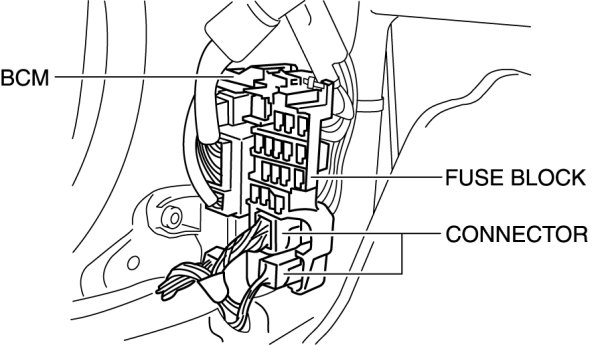
4. Remove tab A as shown in the figure, pull the fuse block in the direction of the arrow (1), and remove tab B.

5. Remove the fuse block.
6. Verify the part number indicated on the label on the BCM.
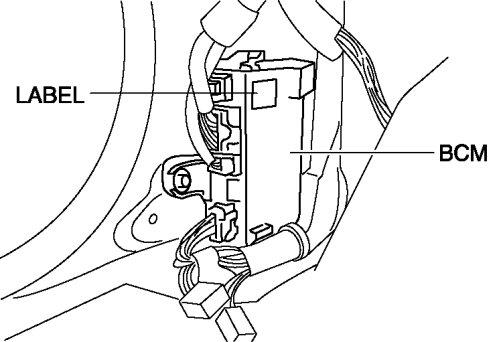
Setting procedure

Factory Service Tools
Use the Manual With the Right Hardware
Pair factory procedures with proven DIY tools so the instructions are easier to execute.
Disclosure: Verified tool recommendations may earn an affiliate commission at no cost to you.
When to See a Mechanic
Stop DIY work and contact a certified mechanic immediately if any of the following apply:
- • You smell fuel, burning insulation, or see smoke.
- • Brakes feel soft, pull hard to one side, or make grinding noises.
- • The engine overheats, stalls repeatedly, or misfires under load.
- • You are missing required tools, torque specs, or safe lifting equipment.
- • You are not confident in the next step or safety outcome.