
Safety Warning
DIY auto repair can cause serious injury, fire, or vehicle damage. These guides are for informational purposes only. Always follow OEM torque specs, wear PPE, and consult a certified mechanic if you are unsure. You are solely responsible for your safety.
2000 Lexus ES 300 V6-3.0L (1MZ-FE)FACTORY OEM SERVICE PROCEDURE
Keyless Entry Receiver: Service and Repair
1. REPLACE TRANSMITTER (LITHIUM) BATTERY
NOTE: Special caution should be taken for handling each component as they are precision electronic components.
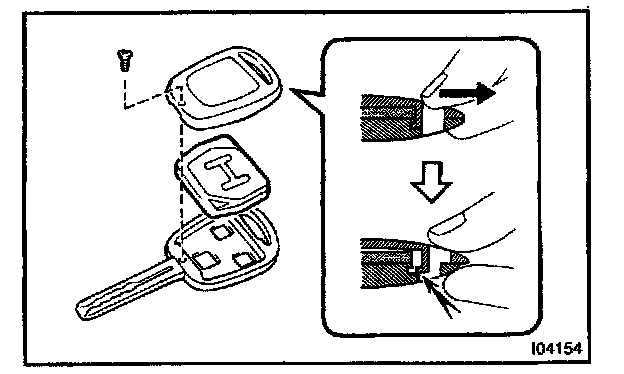
a. Using a screwdriver, remove the screw and cover.
NOTE: Do not pry out the cover forcibly.
HINT: Push the cover with a finger as shown in the illustration, so that there becomes clearance, then pry out the cover from that clearance.
b. Remove the transmitter.
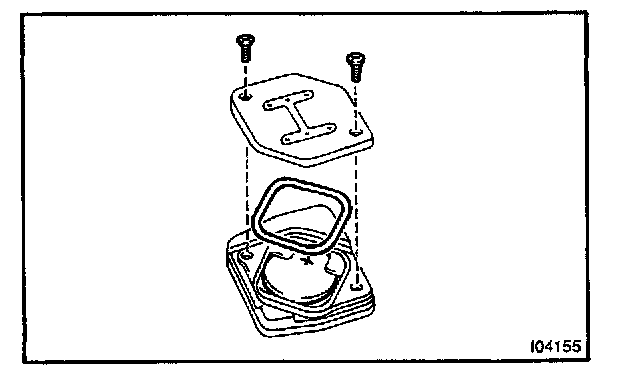
c. Using a screwdriver, remove the 2 screws and cover.
d. Remove the battery (lithium battery).
NOTE:
- Do not push the terminals with a finger.
- If prying up the battery (lithium battery) forcibly to remove, the terminals are deformed.
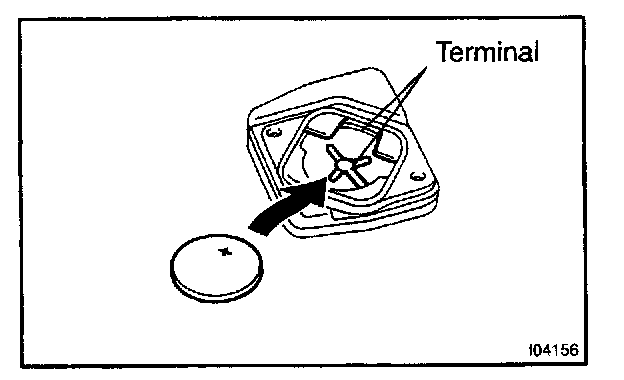
e. Install a battery (lithium battery) as shown in the illustration.
NOTE: Face the battery upward. Take care not to deform the terminals.
f. Check that O-ring is not distorted or slipped off, and install the cover.
g. Using a screwdriver, tighten the 2 screws.
NOTE: When the shrews are tightened loosely, it might cause faulty contact of battery (lithium battery) and terminals.
h. Assemble the transmitter to the key plate and the cover.
i. Using a screwdriver, tighten the screw.
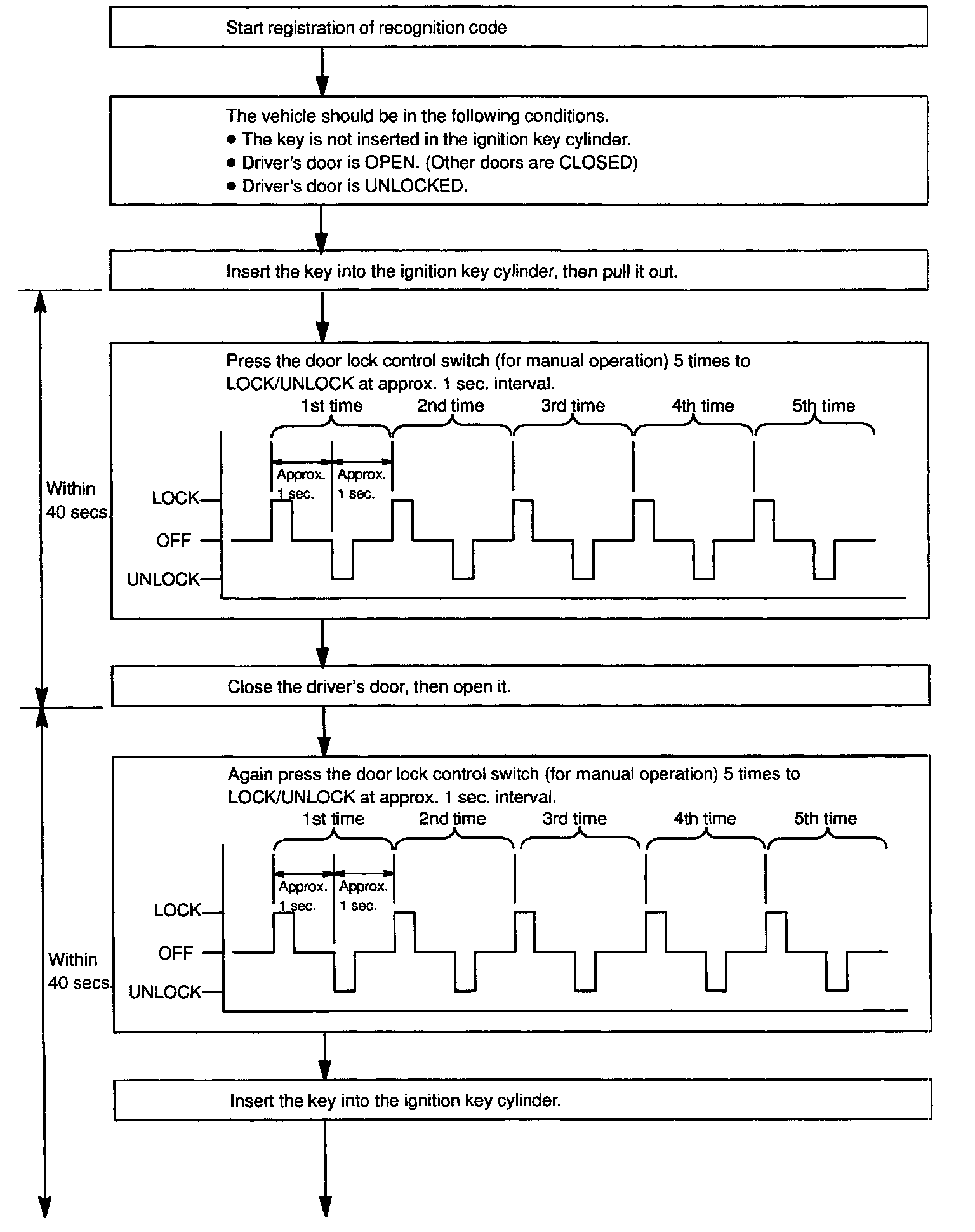
2. REPLACE DOOR CONTROL RECEIVER AND TRANSMITTER
NOTE: When replacing the door control receiver and transmitter, registration of recognition code is necessary because they are provided as single components.
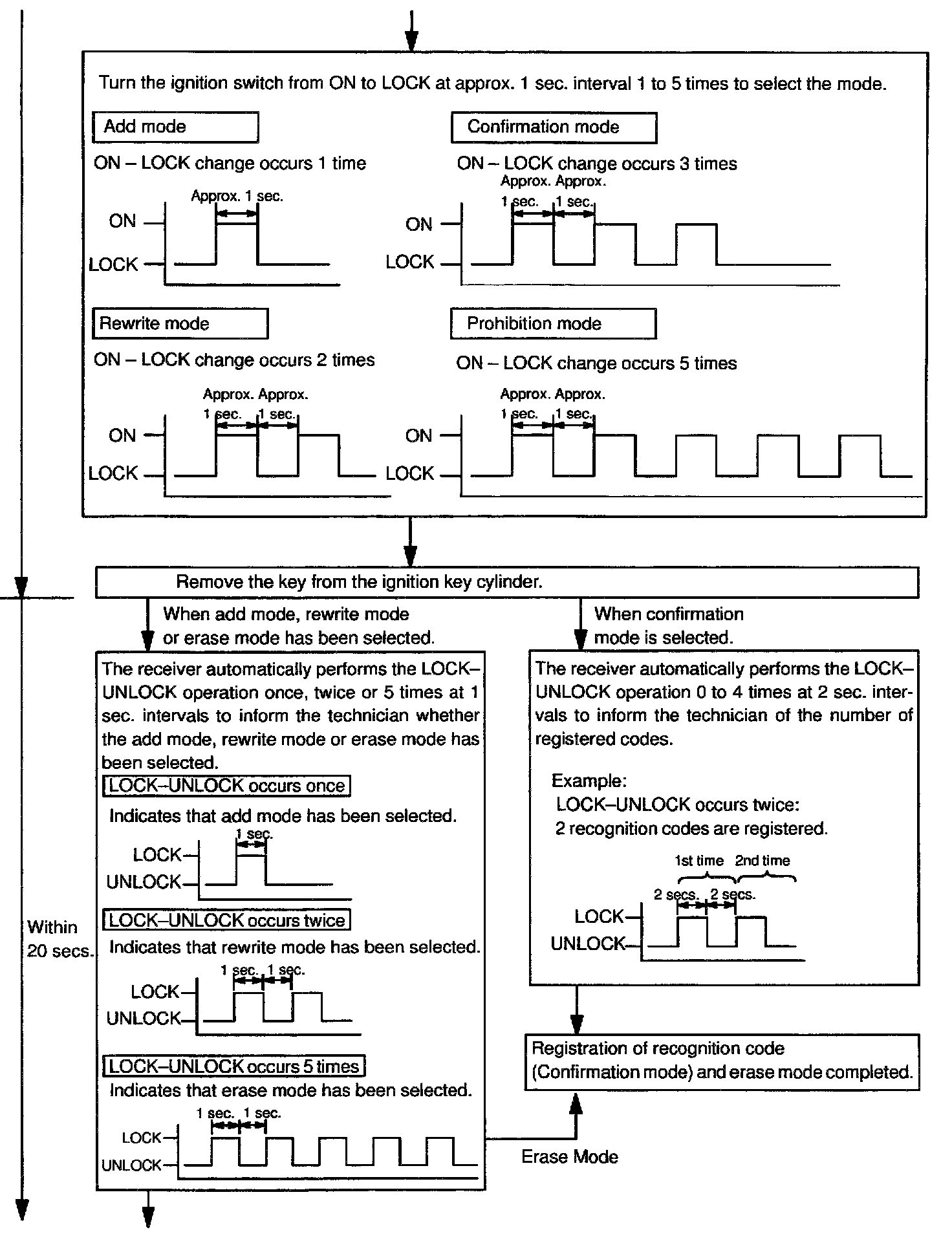
a. Select which operation mode should be performed from the following modes.
- Add mode
- Rewrite mode
- Prohibition mode
- Confirmation mode
HINT:
- The add mode is used to retain codes already registered while you register new recognition codes. This mode is used when adding a transmitter. However, if the number of registered codes exceeds 4 codes, previously registered codes are correspondingly erased in order, starting from the first registered code.
- The rewrite mode is used to erase all previously registered codes and register only new recognition codes.
- The prohibition mode is used to erase all registered codes and cancels the wireless door lock function. Use this mode when the transmitter is lost.
- The confirmation mode is for confirming how many recognition codes are already registered before you register additional recognition codes.
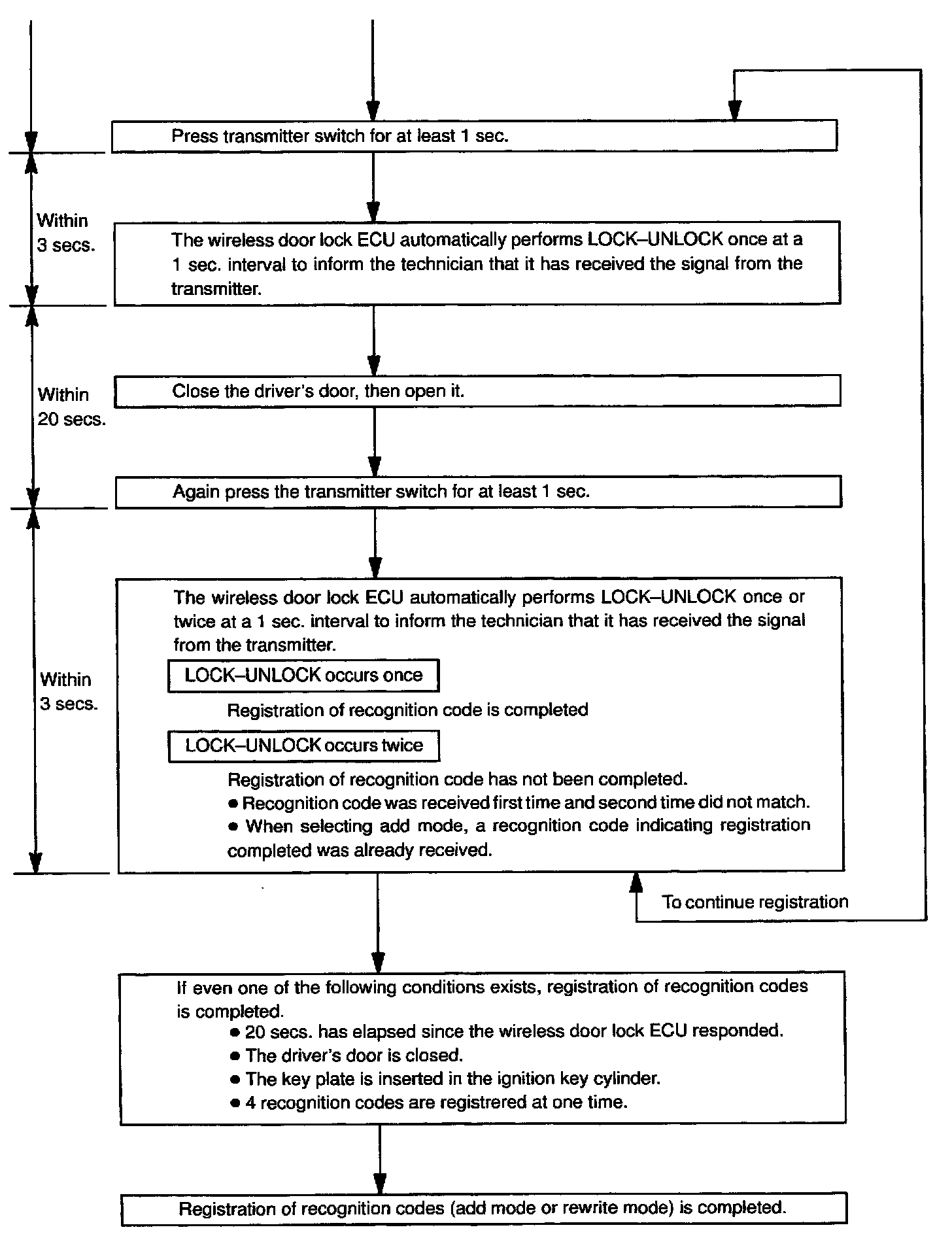
b. Follow the chart on the following pages to register the transmitter recognition code at the wireless door lock control receiver.
HINT:
- When procedure is out of the specified, the operation returns to normal operation.
- Maximum 4 recognition codes can be registered.
NOTE: Special caution should be taken for handling each component as they are precision electronic components.
a. Using a screwdriver, remove the screw and cover.
NOTE: Do not pry out the cover forcibly.
HINT: Push the cover with a finger as shown in the illustration, so that there becomes clearance, then pry out the cover from that clearance.
b. Remove the transmitter.
c. Using a screwdriver, remove the 2 screws and cover.
d. Remove the battery (lithium battery).
NOTE:
- Do not push the terminals with a finger.
- If prying up the battery (lithium battery) forcibly to remove, the terminals are deformed.
e. Install a battery (lithium battery) as shown in the illustration.
NOTE: Face the battery upward. Take care not to deform the terminals.
f. Check that O-ring is not distorted or slipped off, and install the cover.
g. Using a screwdriver, tighten the 2 screws.
NOTE: When the shrews are tightened loosely, it might cause faulty contact of battery (lithium battery) and terminals.
h. Assemble the transmitter to the key plate and the cover.
i. Using a screwdriver, tighten the screw.
Part 1 Of 3:
Part 2 Of 3:
Part 3 Of 3:
2. REPLACE DOOR CONTROL RECEIVER AND TRANSMITTER
NOTE: When replacing the door control receiver and transmitter, registration of recognition code is necessary because they are provided as single components.
a. Select which operation mode should be performed from the following modes.
- Add mode
- Rewrite mode
- Prohibition mode
- Confirmation mode
HINT:
- The add mode is used to retain codes already registered while you register new recognition codes. This mode is used when adding a transmitter. However, if the number of registered codes exceeds 4 codes, previously registered codes are correspondingly erased in order, starting from the first registered code.
- The rewrite mode is used to erase all previously registered codes and register only new recognition codes.
- The prohibition mode is used to erase all registered codes and cancels the wireless door lock function. Use this mode when the transmitter is lost.
- The confirmation mode is for confirming how many recognition codes are already registered before you register additional recognition codes.
b. Follow the chart on the following pages to register the transmitter recognition code at the wireless door lock control receiver.
HINT:
- When procedure is out of the specified, the operation returns to normal operation.
- Maximum 4 recognition codes can be registered.
Factory Service Tools
Use the Manual With the Right Hardware
Pair factory procedures with proven DIY tools so the instructions are easier to execute.
Disclosure: Verified tool recommendations may earn an affiliate commission at no cost to you.
When to See a Mechanic
Stop DIY work and contact a certified mechanic immediately if any of the following apply:
- • You smell fuel, burning insulation, or see smoke.
- • Brakes feel soft, pull hard to one side, or make grinding noises.
- • The engine overheats, stalls repeatedly, or misfires under load.
- • You are missing required tools, torque specs, or safe lifting equipment.
- • You are not confident in the next step or safety outcome.