
Safety Warning
DIY auto repair can cause serious injury, fire, or vehicle damage. These guides are for informational purposes only. Always follow OEM torque specs, wear PPE, and consult a certified mechanic if you are unsure. You are solely responsible for your safety.
2012 Kia Forte L4-2.4LFACTORY OEM SERVICE PROCEDURE
Campaign SA123 - Navigation System Software Update
NUMBER 037
GROUP Electrical
DATE June 2012
MODEL Forte, Forte Koup (TD) 2012MY
SUBJECT:
SERVICE ACTION: FORTE NAVIGATION SYSTEM (AVN) SOFTWARE UPDATE (SA123)
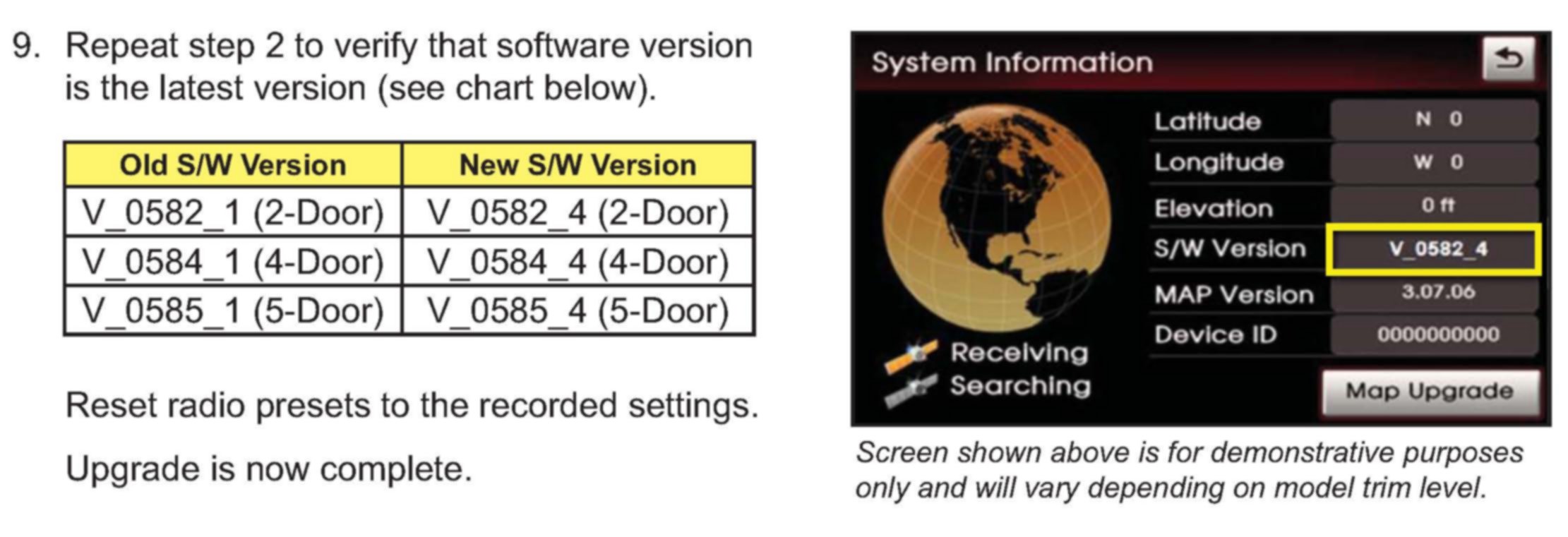
This bulletin describes the procedure to update the software in some 2012MY Forte vehicles produced from June 28, 2011 to March 9, 2012 equipped with navigation systems (AVN). The navigation software should be upgraded to the latest version (see chart below). If the navigation software is the old version, follow the procedure outlined in this TSB. Kia is requesting the completion of this Service Action on all affected vehicles in dealer stock prior to delivery. Before conducting this procedure, verify that the vehicle is included in the list of affected VINs.
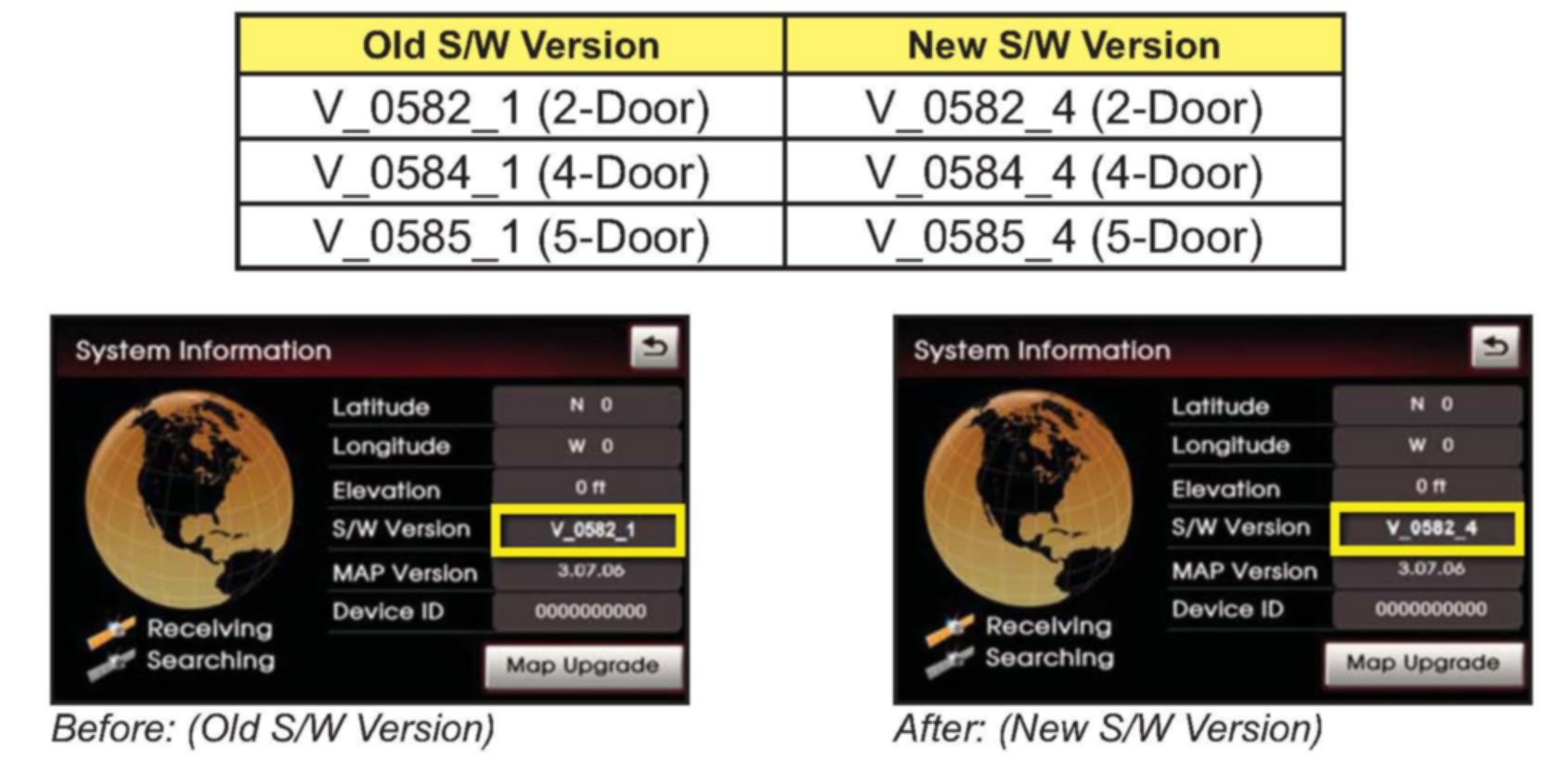
Old S/W Version - New S/W Version
NOTICE
A Service Action is a repair program without customer notification that is performed during the warranty period. Any dealer requesting to perform this repair outside the warranty period will require DPSM approval. Repair status for a VIN is provided on WebDCS (Service> Warranty Coverage> Warranty Coverage Inquiry> Campaign Information). Not completed Recall / Service Action reports are available on WebDCS (Consumer Affairs> Not Completed Recall> Recall VIN> Select Report), which includes a list of affected vehicles.
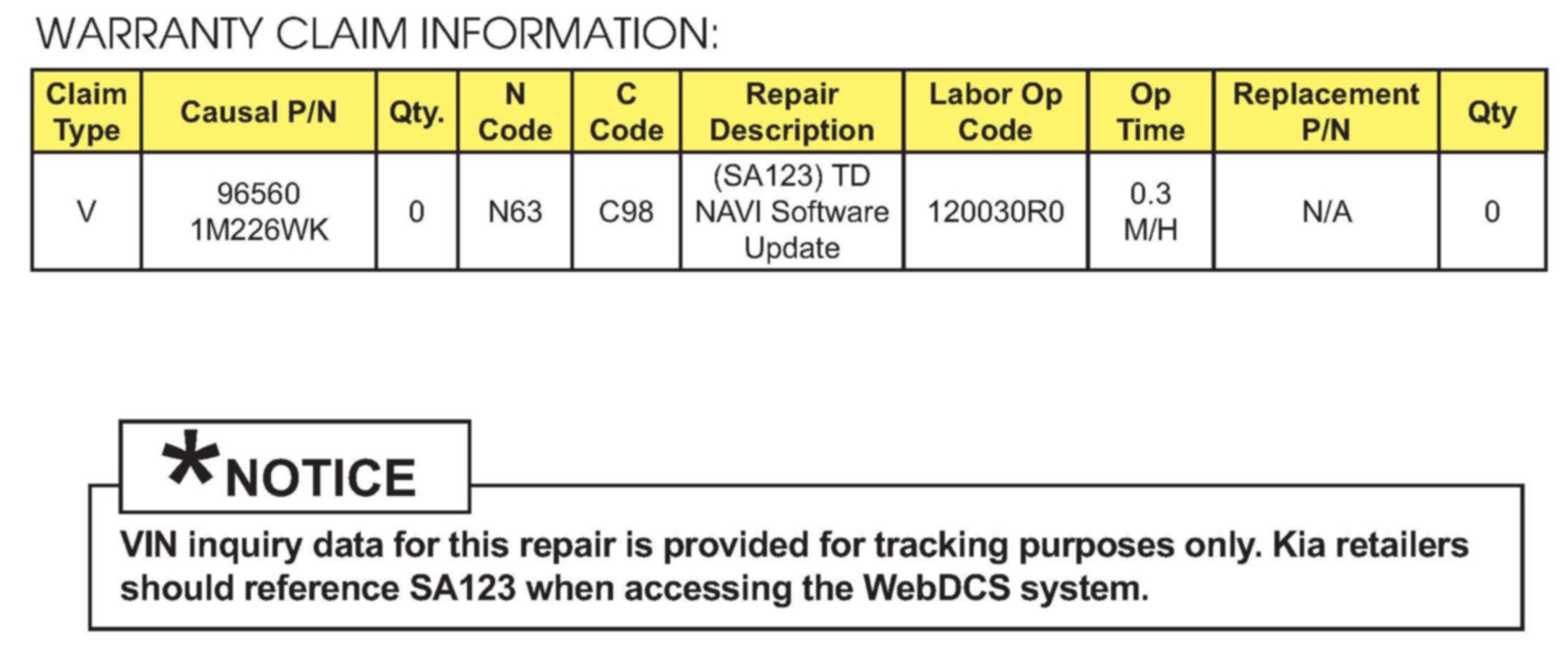
This issue number is SA123.
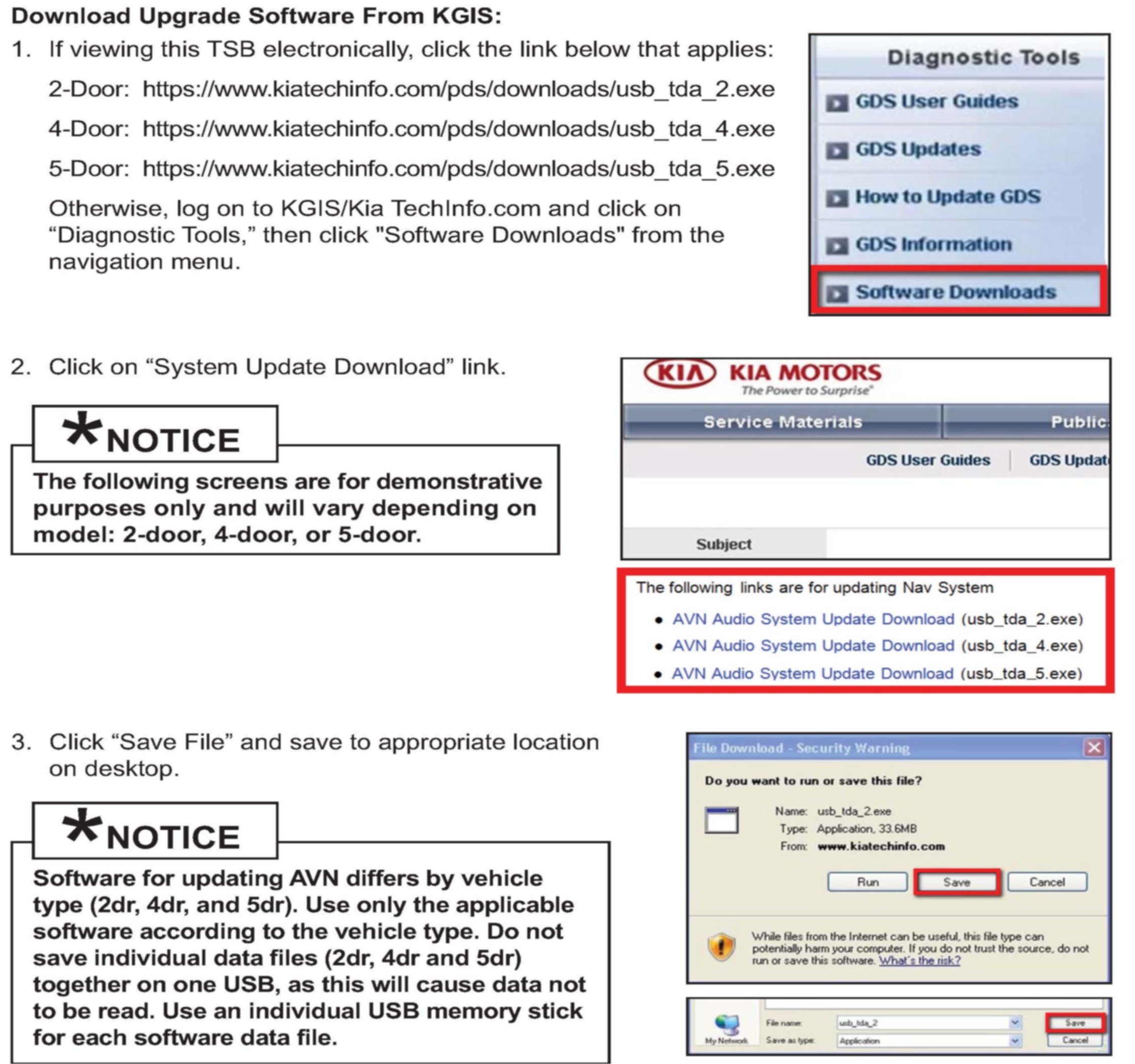
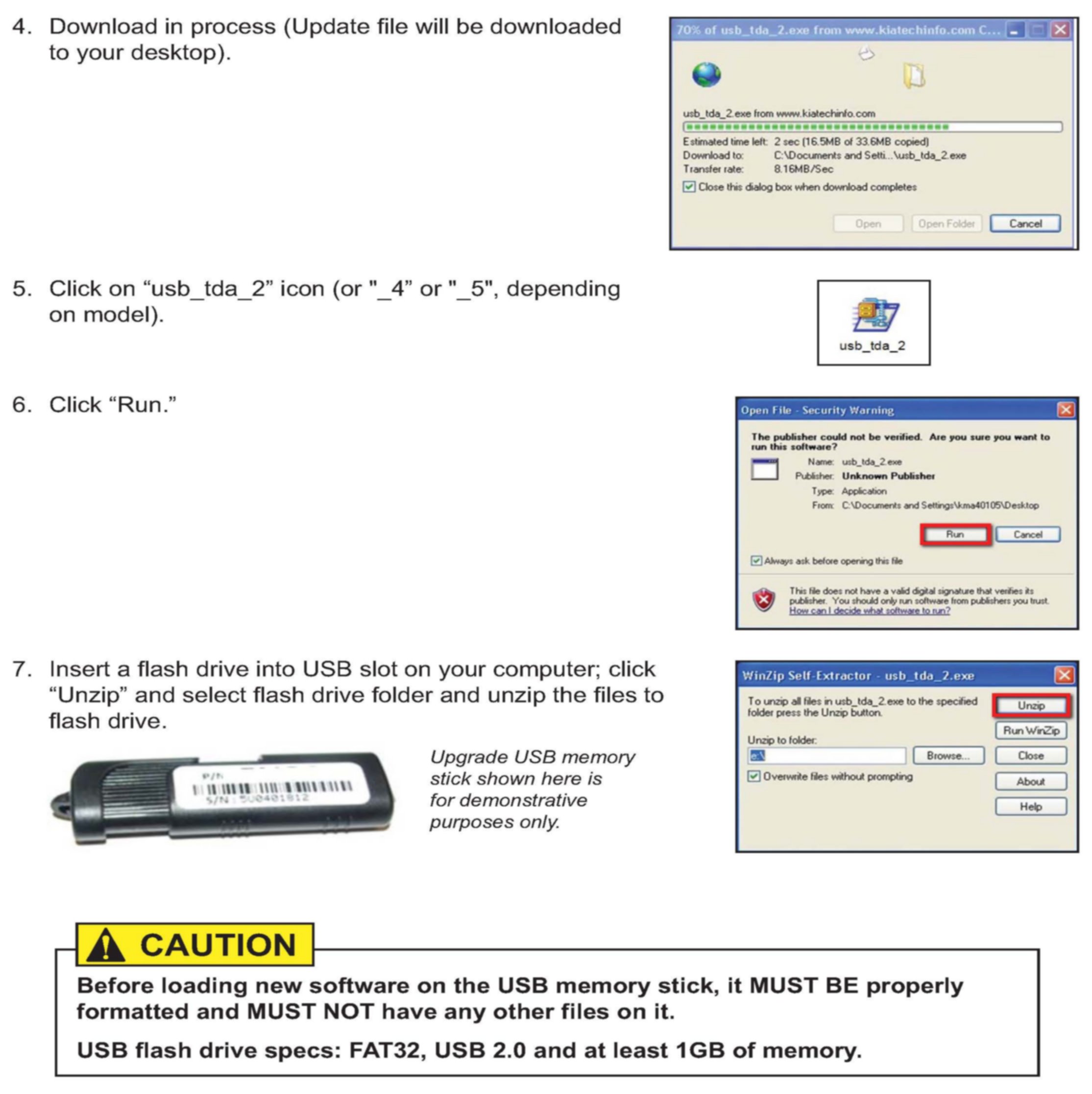
Download Upgrade Software From KGIS


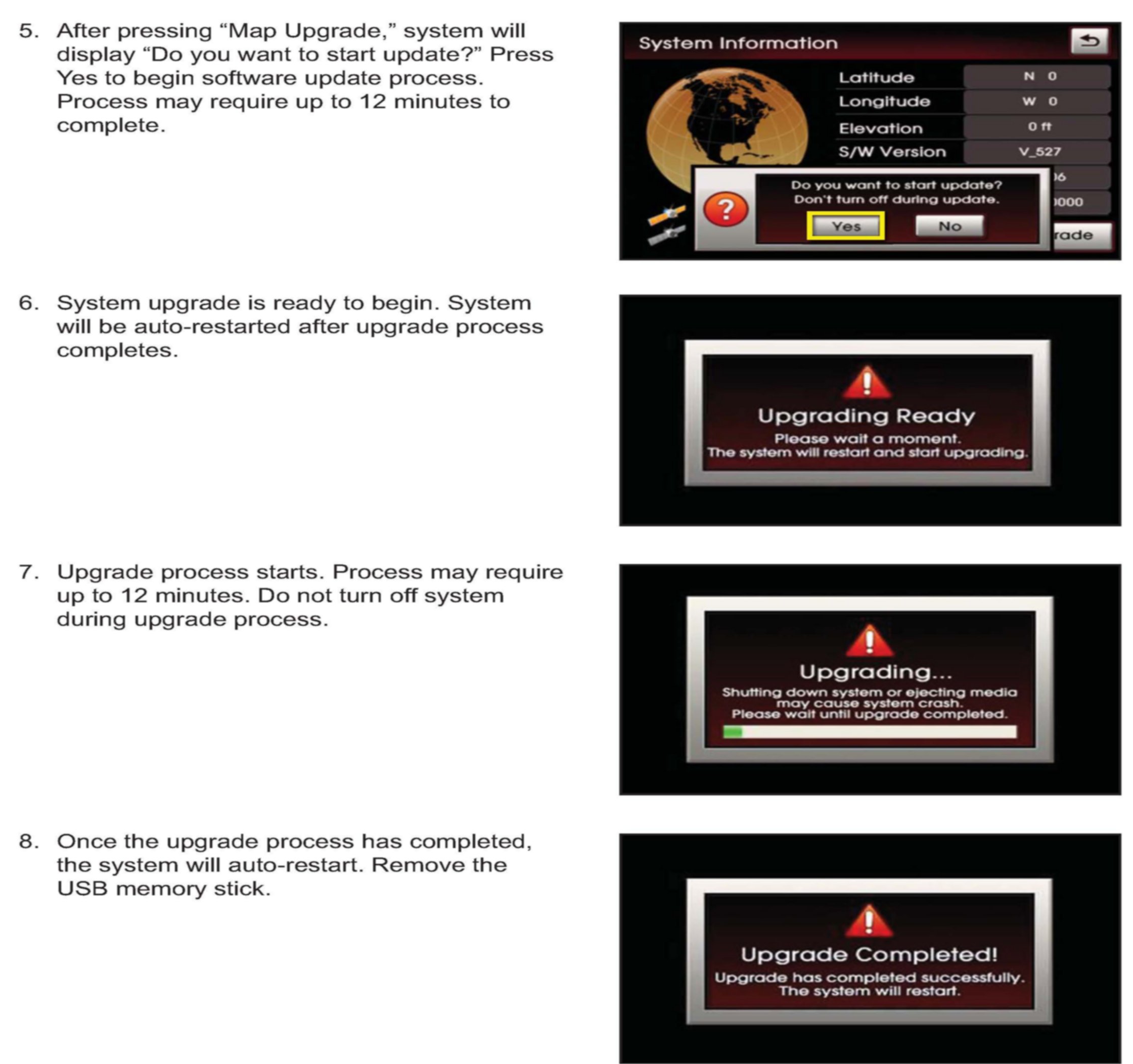
Software Upgrade Procedure

AFFECTED MODELS
WARRANTY CLAIM INFORMATION
GROUP Electrical
DATE June 2012
MODEL Forte, Forte Koup (TD) 2012MY
SUBJECT:
SERVICE ACTION: FORTE NAVIGATION SYSTEM (AVN) SOFTWARE UPDATE (SA123)
This bulletin describes the procedure to update the software in some 2012MY Forte vehicles produced from June 28, 2011 to March 9, 2012 equipped with navigation systems (AVN). The navigation software should be upgraded to the latest version (see chart below). If the navigation software is the old version, follow the procedure outlined in this TSB. Kia is requesting the completion of this Service Action on all affected vehicles in dealer stock prior to delivery. Before conducting this procedure, verify that the vehicle is included in the list of affected VINs.
Old S/W Version - New S/W Version
NOTICE
A Service Action is a repair program without customer notification that is performed during the warranty period. Any dealer requesting to perform this repair outside the warranty period will require DPSM approval. Repair status for a VIN is provided on WebDCS (Service> Warranty Coverage> Warranty Coverage Inquiry> Campaign Information). Not completed Recall / Service Action reports are available on WebDCS (Consumer Affairs> Not Completed Recall> Recall VIN> Select Report), which includes a list of affected vehicles.
This issue number is SA123.
Download Upgrade Software From KGIS
Software Upgrade Procedure
AFFECTED MODELS
WARRANTY CLAIM INFORMATION
Factory Service Tools
Use the Manual With the Right Hardware
Pair factory procedures with proven DIY tools so the instructions are easier to execute.
Disclosure: Verified tool recommendations may earn an affiliate commission at no cost to you.
When to See a Mechanic
Stop DIY work and contact a certified mechanic immediately if any of the following apply:
- • You smell fuel, burning insulation, or see smoke.
- • Brakes feel soft, pull hard to one side, or make grinding noises.
- • The engine overheats, stalls repeatedly, or misfires under load.
- • You are missing required tools, torque specs, or safe lifting equipment.
- • You are not confident in the next step or safety outcome.