
Safety Warning
DIY auto repair can cause serious injury, fire, or vehicle damage. These guides are for informational purposes only. Always follow OEM torque specs, wear PPE, and consult a certified mechanic if you are unsure. You are solely responsible for your safety.
2010 Kia Forte L4-2.0LFACTORY OEM SERVICE PROCEDURE
Campaign SA025 - PCM Update For MIL ON/DTC P0304
Model: Forte [TD]
Group: General Information(10)
Number: KT2009103002
Date: Friday, October 30, 2009
Area: N. America
Subject
Service Action: PCM Upgrade DTC P0304 Cylinder Mis-
Fire With 2.0l Engine And A/T Logic (SA025) (ENG 059)
- Description

KMA is conducting a Service Action in relation to some 2010 MY Forte Sedan and Koup with 2.0L engines and automatic transaxles. Some vehicles may experience a MIL ON with DTC P0304 stored in memory. In most cases the DTC is set only during a cold start and normally the customer does not notice any engine stumble, roughness or performance issues. This PCM upgrade
will eliminate the DTC from setting in the PCM on vehicles produced prior to November 2, 2009.


To correct this condition, the ECM and/or PCM should be reprogrammed using the GDS download as described in this bulletin.


ROM Tables:
- Effective Vehicle Information
AFFECTED VEHICLE PRODUCTION RANGE:
2010 Forte/Forte Koup vehicles equipped with 2.0L engine and automatic transaxle produced prior to 11/2/2009.
- Service Procedure

1. Connect the power supply cable to the GDS tool.

2. Connect the USB cable between the VCI and the GDS tool.
3. Connect the Main 16-pin DLC cable (GHDM - 241000) to the VCI.

4. Connect the Main 16-pin DLC cable (GHDM - 241000) to the OBD-II connector, located under the driver's side of the instrument panel.
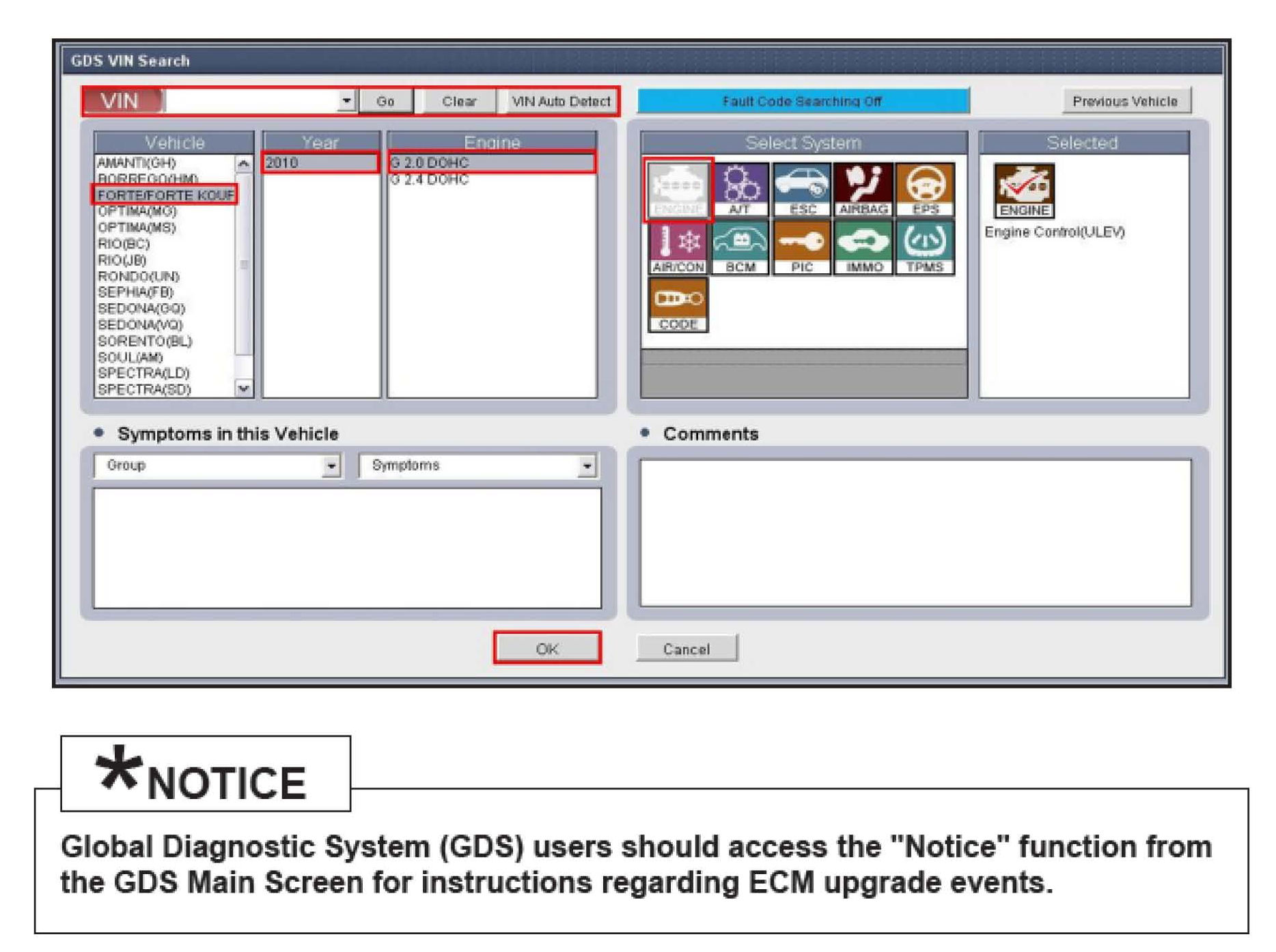
5. With the ignition key ON, turn ON the VCI and GDS tool. Access the GDS vehicle identification number (VIN) screen and configure the vehicle using the VIN AUTO DETECT Function.

6. Once back at the GDS Main Screen, select ECM upgrade from the bottom right-hand corner. Next, select Auto Mode, Engine.
Perform the ECM upgrade in accordance with normal tool ECM upgrade procedures.


MANUAL MODE ECM UPGRADE PASSWORDS:
* Do NOT perform Manual Mode ECM upgrade unless Auto Mode fails.
7. When the GDS tool reports that the ECM upgrade has been successfully completed, click OK, turn OFF the ignition key, and wait at least 10 seconds before attempting to start the engine.
8. Check for Diagnostic Trouble Codes using the GDS and erase any DTCs stored in the Engine module, EPS, ESC and TPMS due to CAN System.

WARRANTY CLAIM INFORMATION:
Group: General Information(10)
Number: KT2009103002
Date: Friday, October 30, 2009
Area: N. America
Subject
Service Action: PCM Upgrade DTC P0304 Cylinder Mis-
Fire With 2.0l Engine And A/T Logic (SA025) (ENG 059)
- Description
KMA is conducting a Service Action in relation to some 2010 MY Forte Sedan and Koup with 2.0L engines and automatic transaxles. Some vehicles may experience a MIL ON with DTC P0304 stored in memory. In most cases the DTC is set only during a cold start and normally the customer does not notice any engine stumble, roughness or performance issues. This PCM upgrade
will eliminate the DTC from setting in the PCM on vehicles produced prior to November 2, 2009.
To correct this condition, the ECM and/or PCM should be reprogrammed using the GDS download as described in this bulletin.
ROM Tables:
- Effective Vehicle Information
AFFECTED VEHICLE PRODUCTION RANGE:
2010 Forte/Forte Koup vehicles equipped with 2.0L engine and automatic transaxle produced prior to 11/2/2009.
- Service Procedure
1. Connect the power supply cable to the GDS tool.
2. Connect the USB cable between the VCI and the GDS tool.
3. Connect the Main 16-pin DLC cable (GHDM - 241000) to the VCI.
4. Connect the Main 16-pin DLC cable (GHDM - 241000) to the OBD-II connector, located under the driver's side of the instrument panel.
5. With the ignition key ON, turn ON the VCI and GDS tool. Access the GDS vehicle identification number (VIN) screen and configure the vehicle using the VIN AUTO DETECT Function.
6. Once back at the GDS Main Screen, select ECM upgrade from the bottom right-hand corner. Next, select Auto Mode, Engine.
Perform the ECM upgrade in accordance with normal tool ECM upgrade procedures.
MANUAL MODE ECM UPGRADE PASSWORDS:
* Do NOT perform Manual Mode ECM upgrade unless Auto Mode fails.
7. When the GDS tool reports that the ECM upgrade has been successfully completed, click OK, turn OFF the ignition key, and wait at least 10 seconds before attempting to start the engine.
8. Check for Diagnostic Trouble Codes using the GDS and erase any DTCs stored in the Engine module, EPS, ESC and TPMS due to CAN System.
WARRANTY CLAIM INFORMATION:
Factory Service Tools
Use the Manual With the Right Hardware
Pair factory procedures with proven DIY tools so the instructions are easier to execute.
Disclosure: Verified tool recommendations may earn an affiliate commission at no cost to you.
When to See a Mechanic
Stop DIY work and contact a certified mechanic immediately if any of the following apply:
- • You smell fuel, burning insulation, or see smoke.
- • Brakes feel soft, pull hard to one side, or make grinding noises.
- • The engine overheats, stalls repeatedly, or misfires under load.
- • You are missing required tools, torque specs, or safe lifting equipment.
- • You are not confident in the next step or safety outcome.