
Safety Warning
DIY auto repair can cause serious injury, fire, or vehicle damage. These guides are for informational purposes only. Always follow OEM torque specs, wear PPE, and consult a certified mechanic if you are unsure. You are solely responsible for your safety.
2006 Kia Spectra L4-2.0LFACTORY OEM SERVICE PROCEDURE
Engine Controls - MIL ON/DTC's P0030/P0031/P0032
Model: Spectra[LD]
Group: Fuel System(14)
Number: KT2007070101
Date: Sunday, July 01, 2007
Area: N. America
Subject:
MIL Illumination With Front Heated Oxygen Sensor Related DTCs: P0030, P0031 and P0032 (Engine - 030)
Description
This bulletin provides service procedures for 2004 - 2006 MY 2.0L SPECTRA vehicles with MIL on resulting from the front heated oxygen sensor related DTCs P0030, P0031 or P0032.
CORRECTIVE ACTION:
^ If a SPECTRA vehicle exhibits the above symptom for the first time, inspect the vehicle according to the INSPECTION CHECKLIST and then clear the related DTCs. No further action is required.
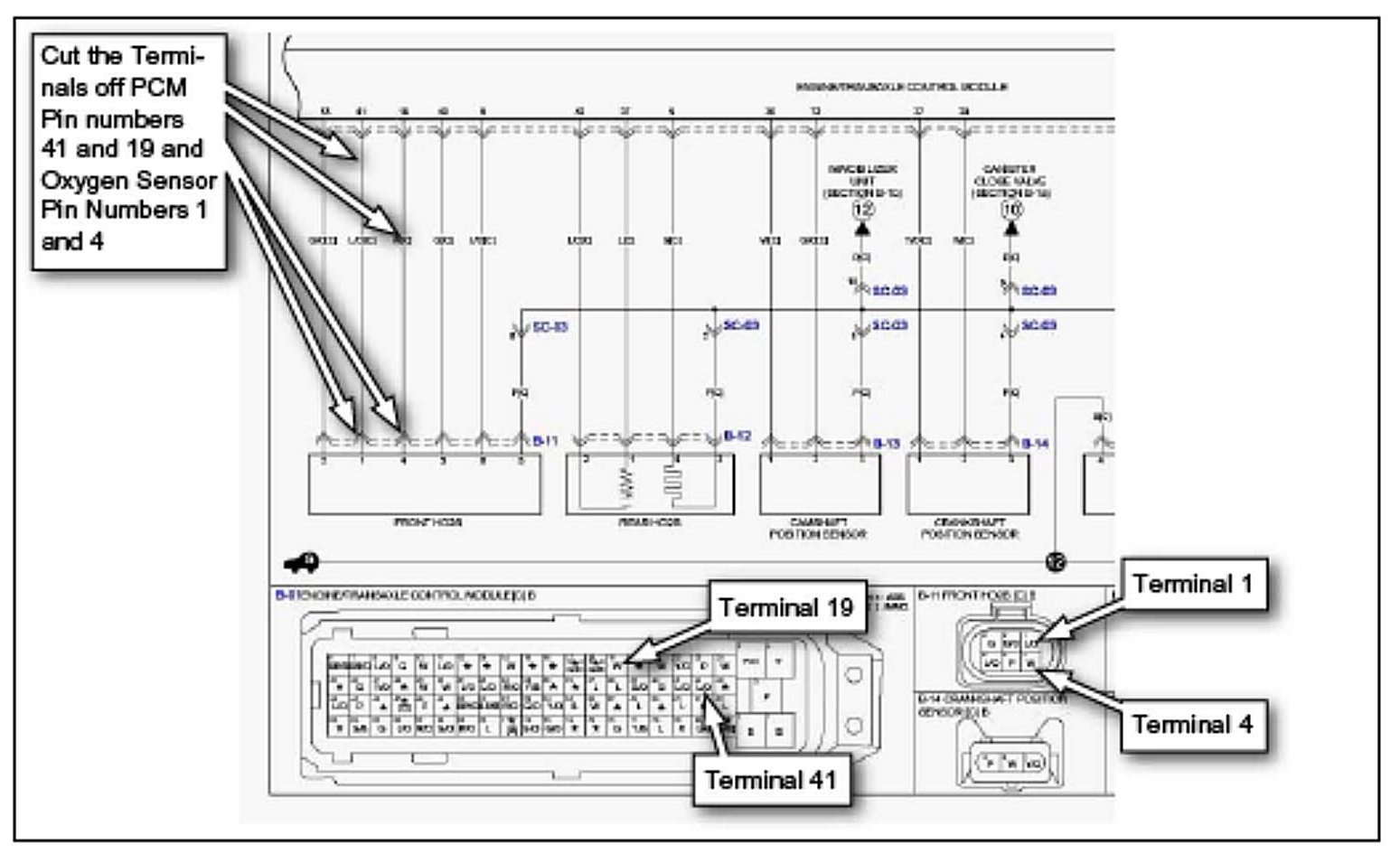
^ If the same symptom happens to the vehicle for the second time of if the vehicle has a prior history of front oxygen sensor-related DTC concerns, replace the four terminals between the PCM and the front oxygen sensor heater terminals as shown, and in the REPLACEMENT PROCEDURES section of this TSB.
Effective Vehicle Information
VEHICLES AFFECTED:
Model: Spectra 2.0L Model years 2004 through 2006
Parts Information
Service Procedure
INSPECTION CHECKLIST (FIRST TIME CONDITION):
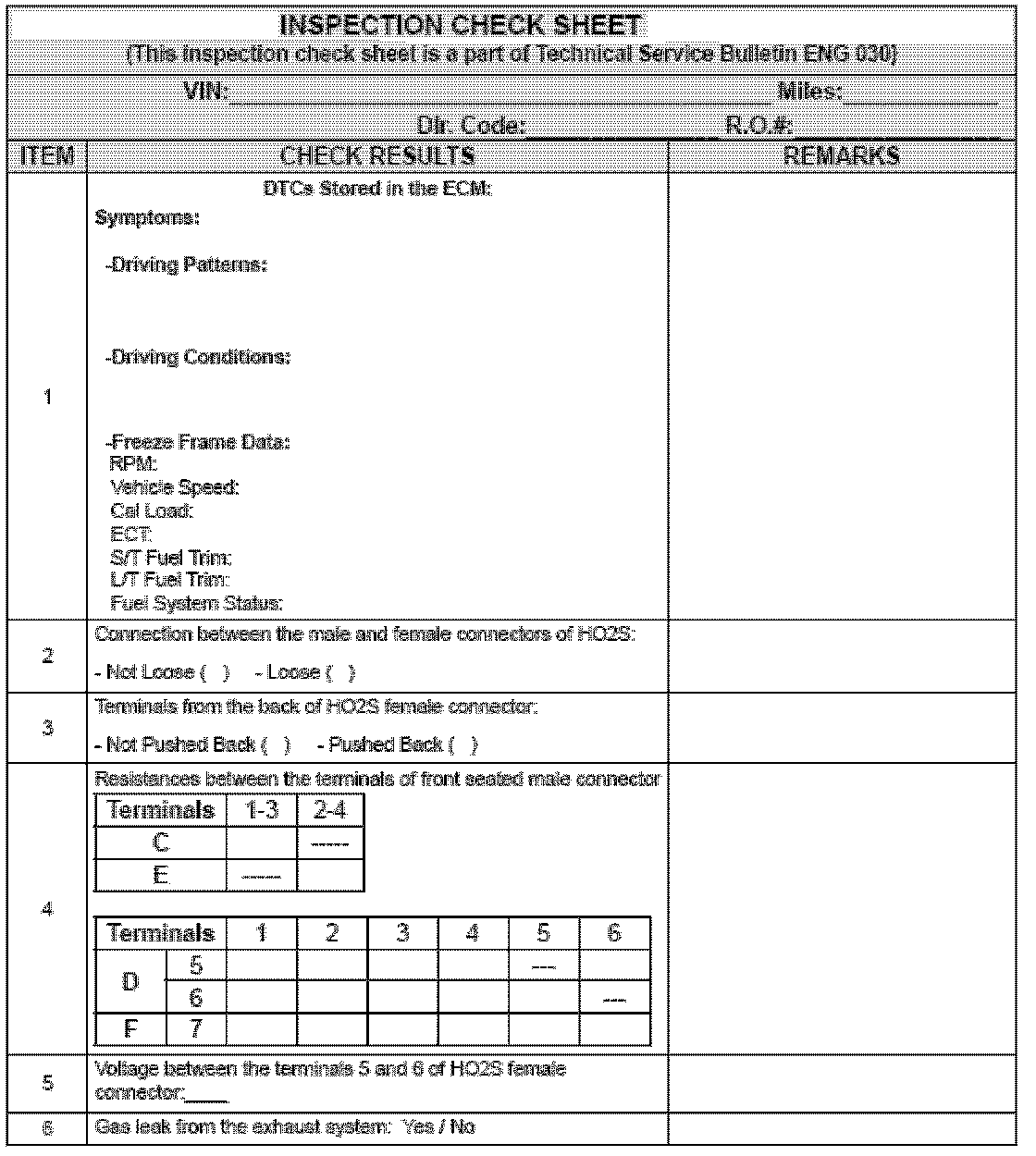
1. Retrieve any heated oxygen sensor related DTCs (P0030, P0031, P0032) with GDS. Record DTCs symptoms, driving patterns driving conditions and freeze frame data on the check sheet.
NOTICE:
The check sheet is shown. When completed, fax to Kia Motors America. KGIS users should download and print the check sheet.
2. Verify that the male connector of front oxygen sensor is completely inserted into the female connector end record results on the check sheet. If the connection between the male and female connectors is loose reconnect them completely and clear the related DTCs no further action is required.
3. Verify that the terminals in the female connector of front oxygen sensor are not pushed back and record results on the check sheet. If required fully seat and lock any loose terminals into each terminal cavity and clear the related DTCs. If the MIL illumination has been caused by the loose terminals no further action is required.
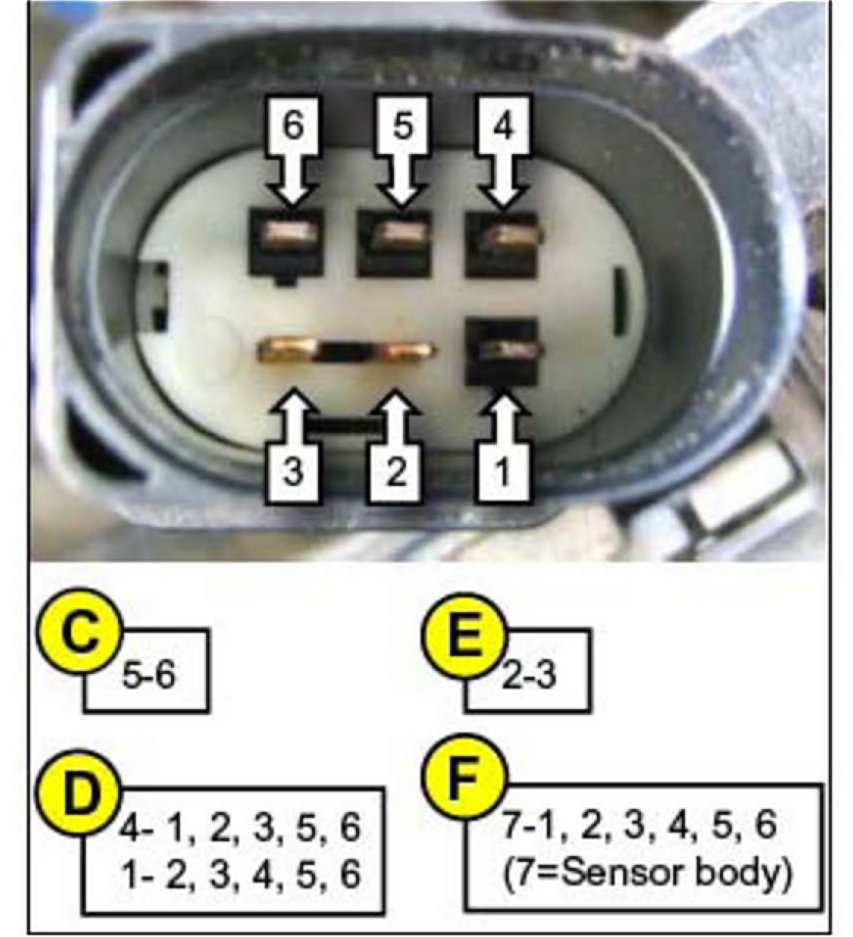
4. Measure the resistances between the terminals of the male connector of front oxygen sensor at room temperature (70°F) and record them on the check sheet.
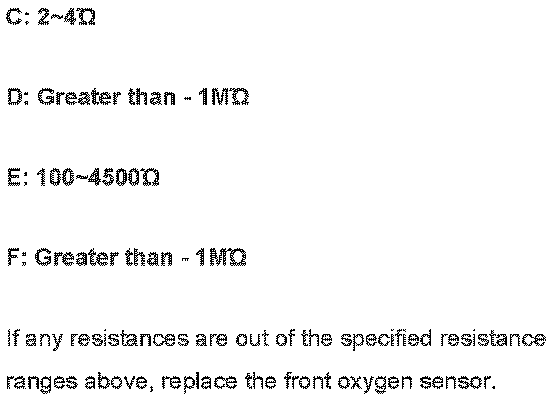
Normal resistance range
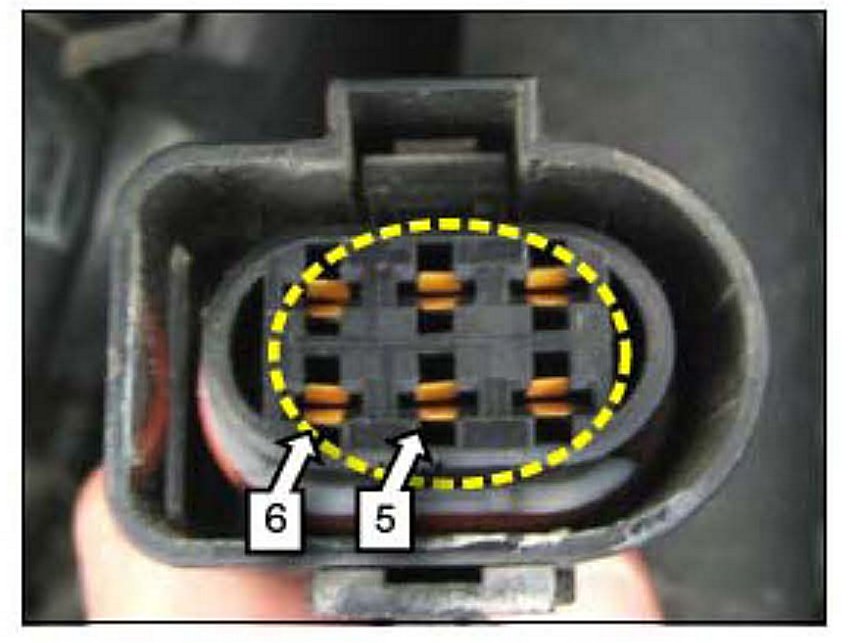
5. Measure the voltage between terminals 5 and 6 of the harness side of front oxygen sensor with the vehicle running and record it on the check sheet.
Normal voltage range: 12-14.5V (Voltage may fluctuate until warm)
6. Check for leaks in the exhaust manifold oxygen sensor fittings exhaust front pipe or catalytic converter and record results on the check sheet. If there is any gas leak repair the exhaust system and recheck the gas leak.
NOTICE:
If a vehicle returns (check repair history) with DTCs P0030, P0031 or P00323 after the inspection listed above, proceed with the front oxygen sensor and PCM terminal replacement procedure shown below.
REPLACEMENT OF FRONT OXYGEN SENSOR AND PCM TERMINALS
1. Record preset radio stations and disconnect the battery negative cable.
2. Remove the engine cover.
3. Disconnect the front oxygen sensor connector.
4. Remove the front oxygen sensor female connector and bracket.
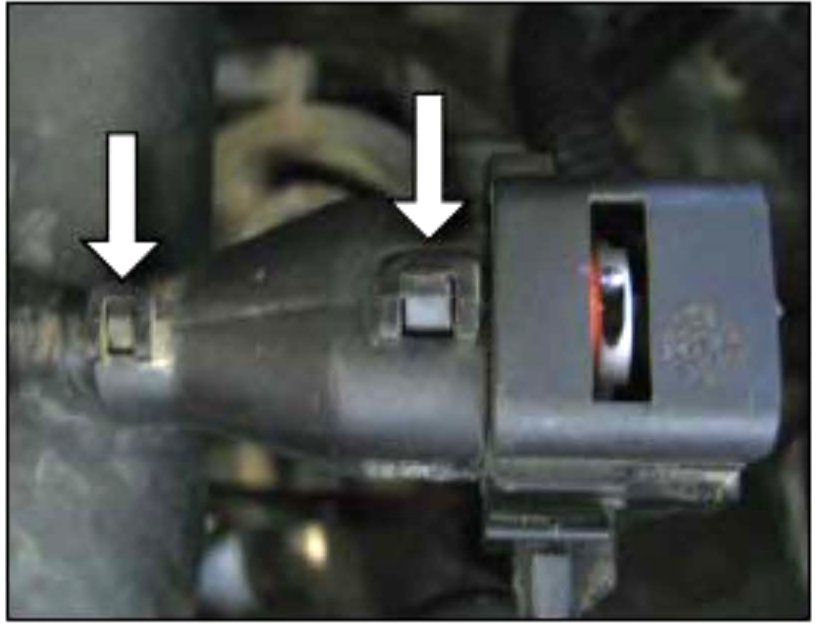
5. Remove the connector from the bracket. Be very careful not to damage the connector attaching clip. The connector must be secured after repair for proper oxygen sensor operation.
6. Remove the back cover from the connector by lifting the two tabs shown.
7. Peel the tape off the connector wiring harness back three or four inches.
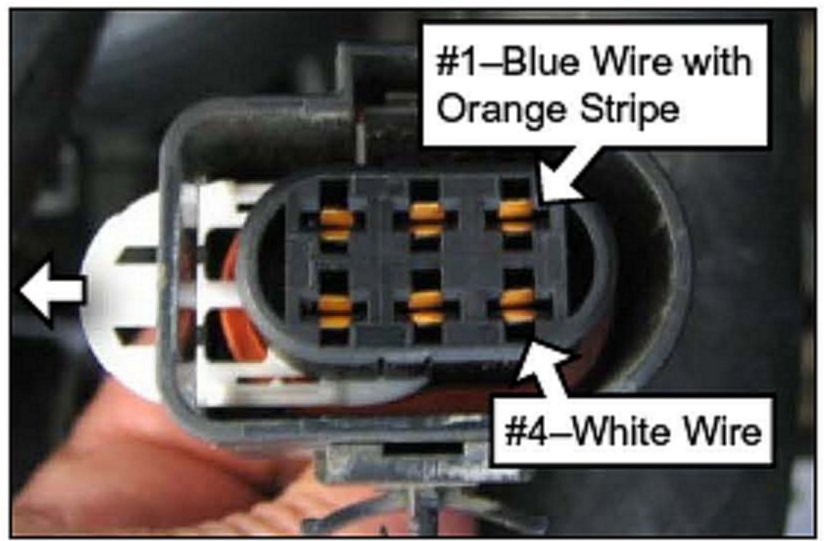
8. Remove the white plastic terminal retainer from the connector.
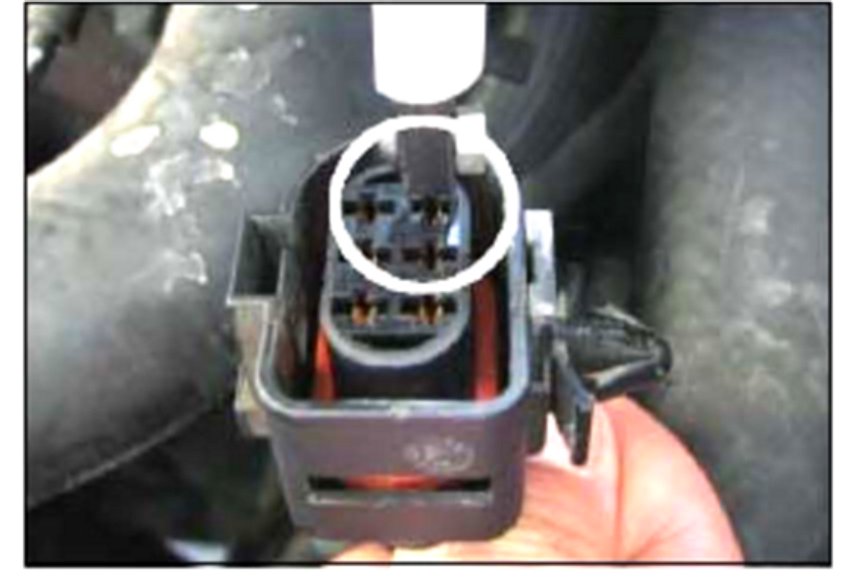
9. Remove the two terminals # 1 (Blue with orange stripe) and # 4 (White) using a two blade terminal removal tool. Locations of terminals 1 and 4 are shown in the picture above.
Recommended terminal removal tools are:
Blue-Point P/N-TT1212 from kit P/N-TT12KT.
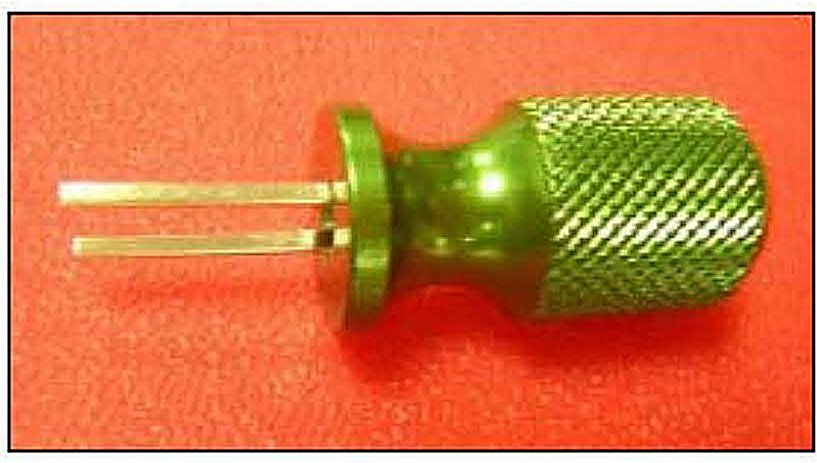
MAC Tools P/N-TT93060 (same as Blue-Point tool) from kit P/N-TT96030 (shown above)
*NOTICE:
Bend the ends of the tool blades in slightly to fit into the two release holes at the sides of each terminal.
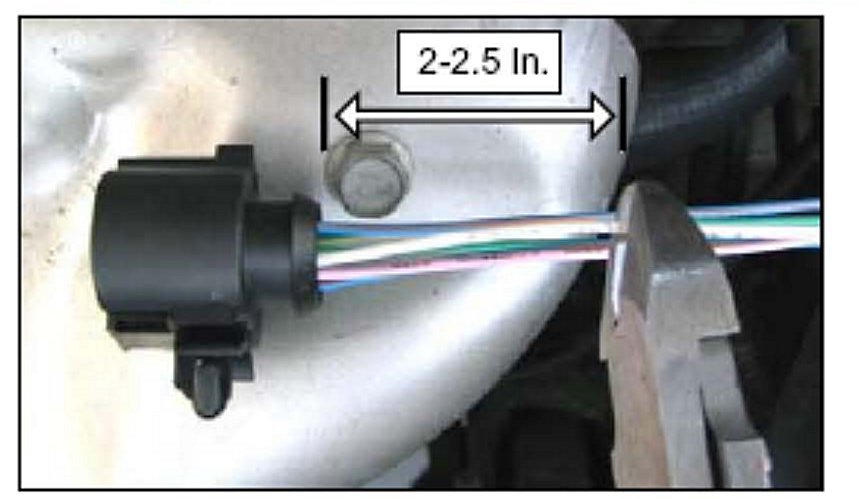
10. Cut the # 4 terminal wire (White) 2-2.5 inches from the terminal.
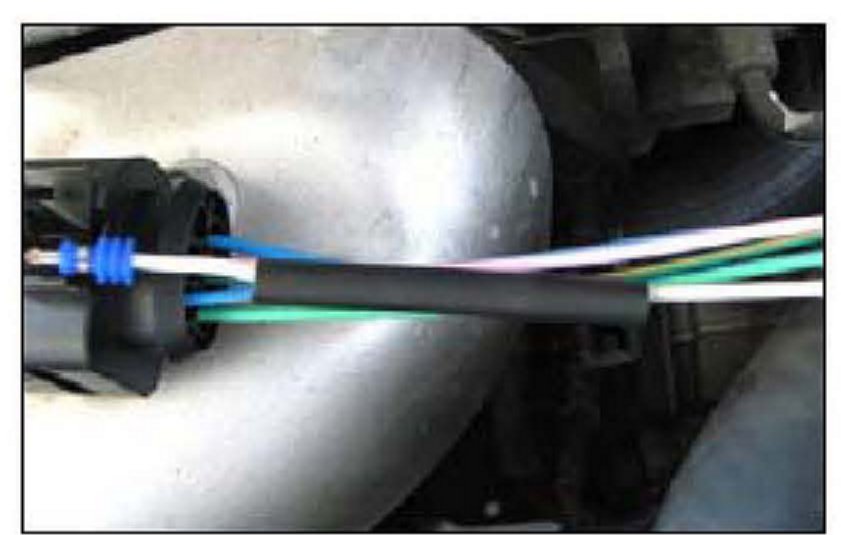
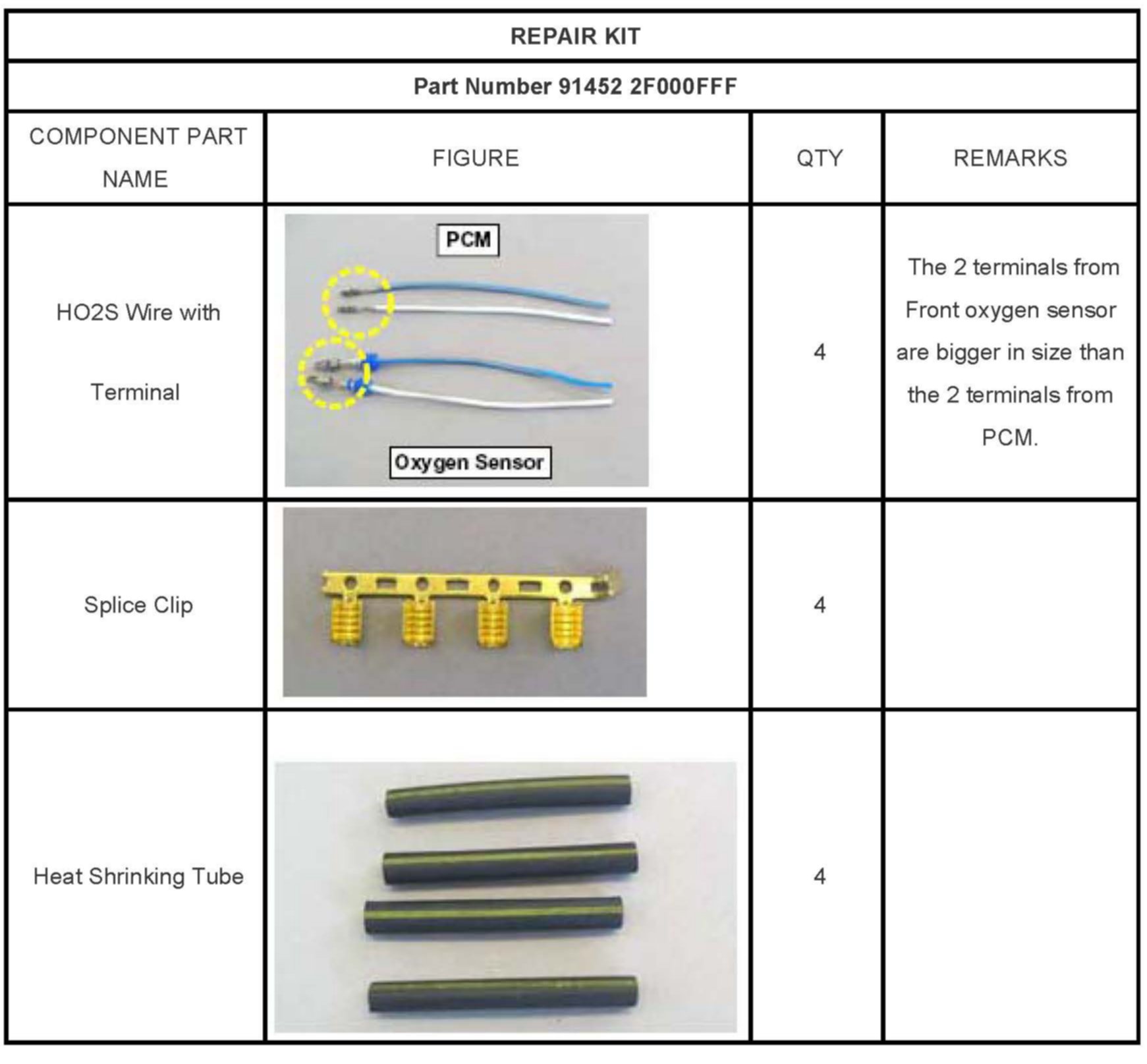
11. Prepare new same color wire with oxygen sensor connector terminal (larger than PCM side terminal) and slide the heat shrinking tube onto the wire allowing room to splice and solder.
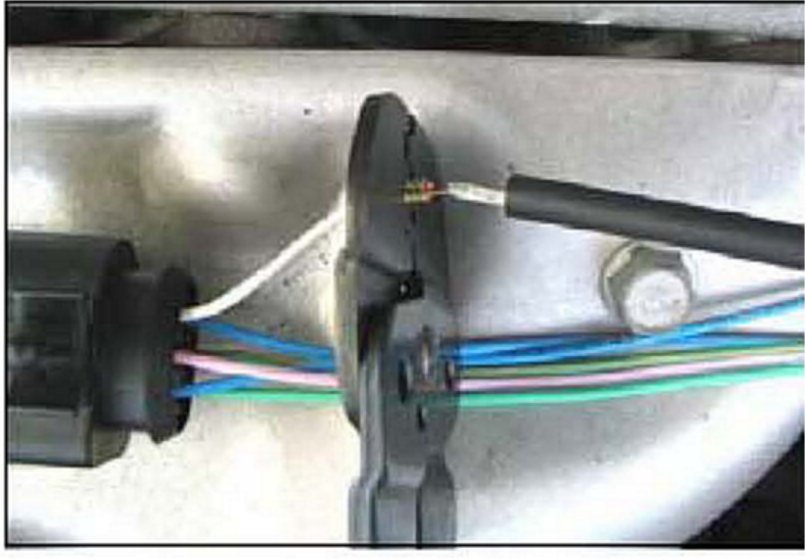
12. Strip the ends of wire insulations put a splice clip over the exposed wires and crimp it Solder the splice with low temperature solder being careful not to overheat the wires or heat shrinking tube.
*NOTICE:
Verify that the splice clip holds the exposed wires securely.
13. Slide heat shrinking tubes over the splice clips and apply heat to them.
NOTICE:
- Heating temperature required: (750°F)
- Center the heat shrinking tube over the crimped connection and heat it until glue melts out of each end.
- Be careful not to damage the tube and the wire insulation from excessive heating.
14. Repeat steps 10 through 13 on the # 1 terminal (Blue with orange stripe).
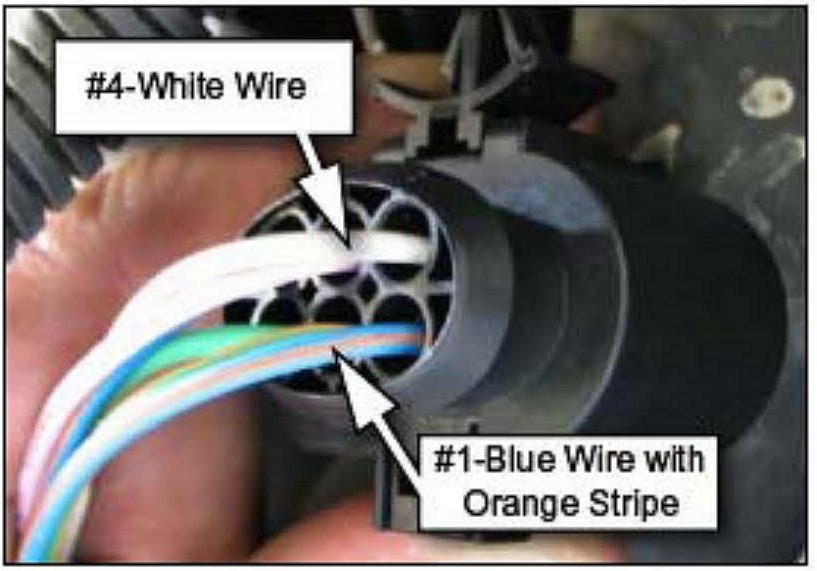
15. Turn the new terminal in the proper direction and insert into each terminal cavity install the white plastic retainer wrap electrical tape around harness and connector transition and install the connector and engine cover in reverse order of removal.
^ # 1 Blue with orange wire goes on connector lock side
^ # 4 - White wire goes on connector mounting clip side as shown
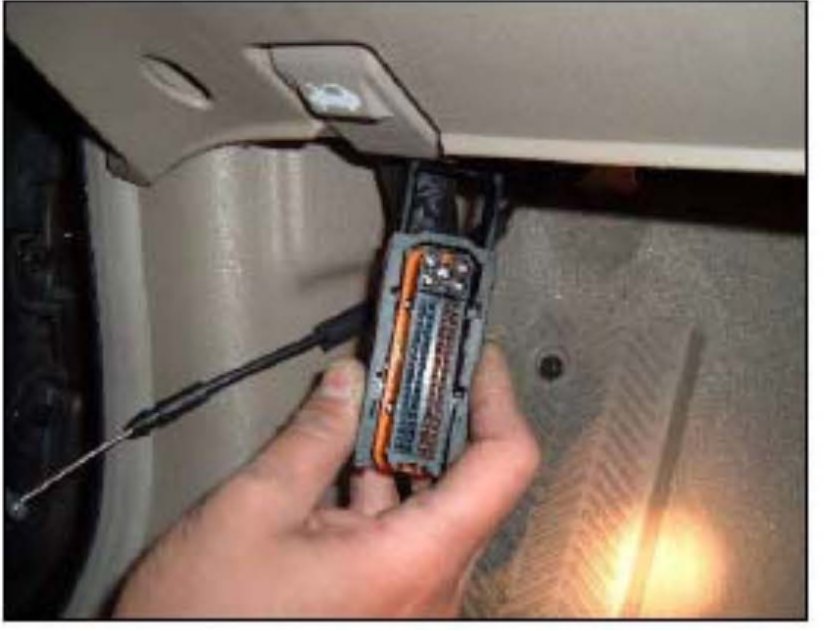
16. Disconnect the hood release cable for better access. Disconnect the PCM harness wire tie clip at the top of the PCM bracket. Disconnect the larger of the two PCM connectors from the PCM. Pull the connector down to allow access to work.
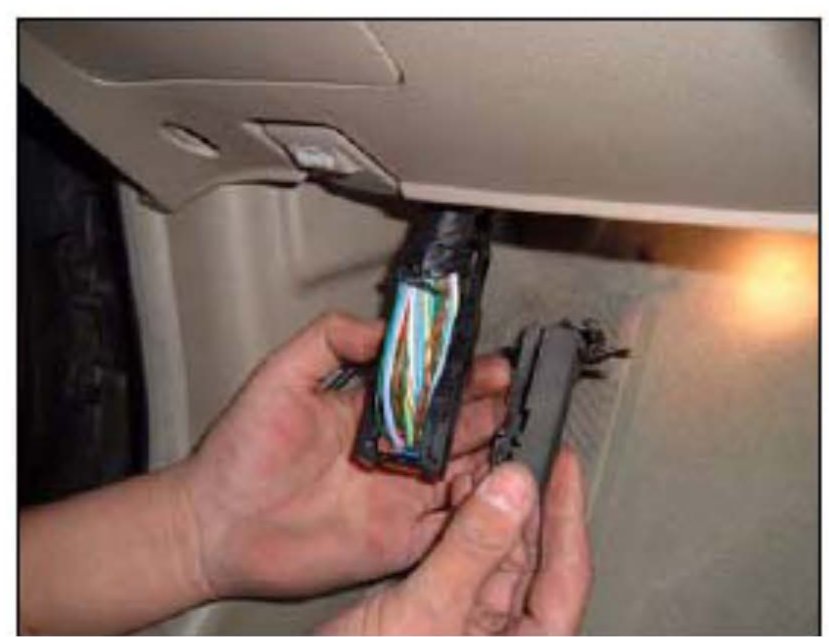
17. Cut the small tie strap and remove the tape from the harness above the PCM connector down and away from the harness. Don't pull up on the cover or the tabs will break.
CAUTION:
Don't pull up on the cover or the tabs will break.

18. Remove the blue terminal pack retainer from the connector.
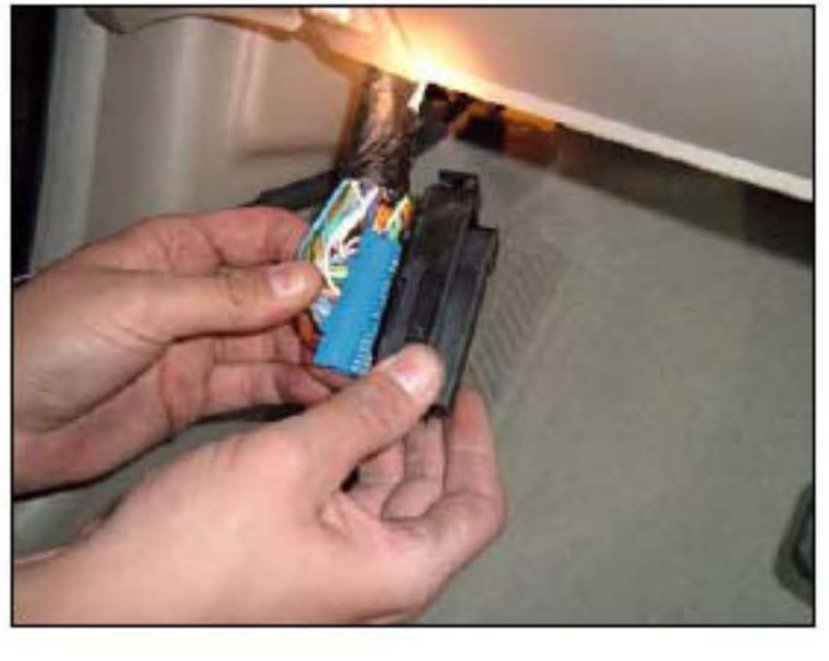
19. Release the two lock tabs at the top of the blue terminal pack and slide out of the main connector.
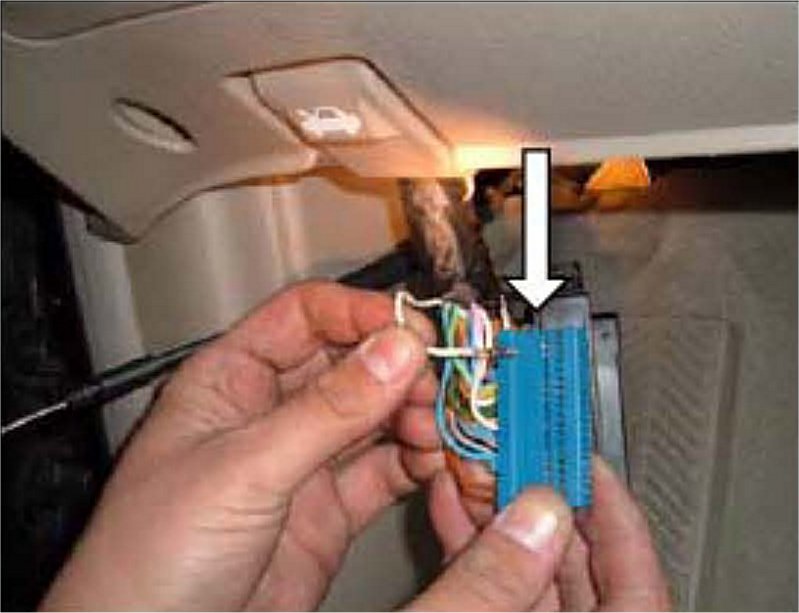
20. Release the terminal lock tabs on the side of terminal pack to remove the terminals # 19 (White) and # 41 (Blue with orange stripe). The terminal lock tabs are on the side of the silver terminal located through the small windows in the side of the terminal pack
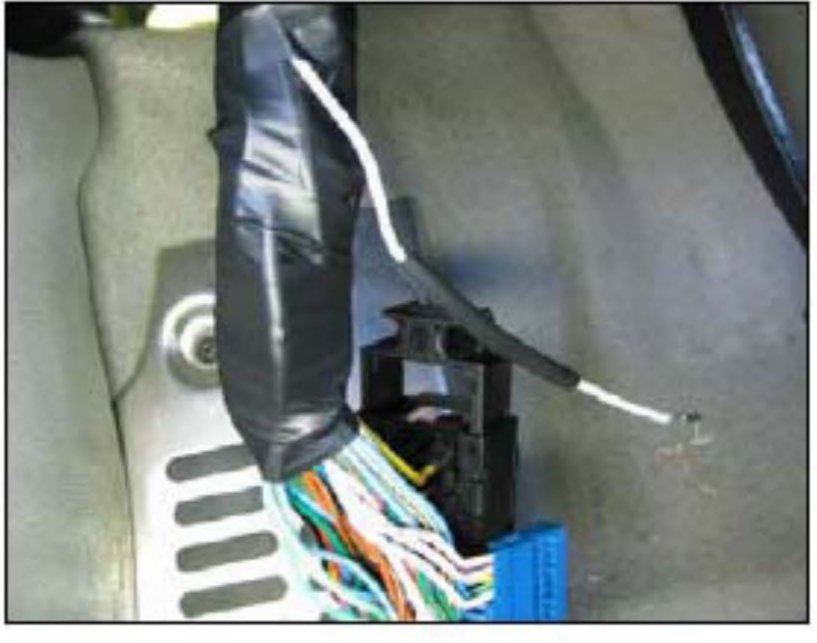
21. Repeat steps 10 through 13 on the # 19 and # 41 terminals (# 19 White shown).
NOTICE:
- Prepare the two PCM terminal wires from the repair kit.
- To avoid mixing up the two PCM wires it may be helpful to replace the terminals and install them in the PCM connector one at a time.
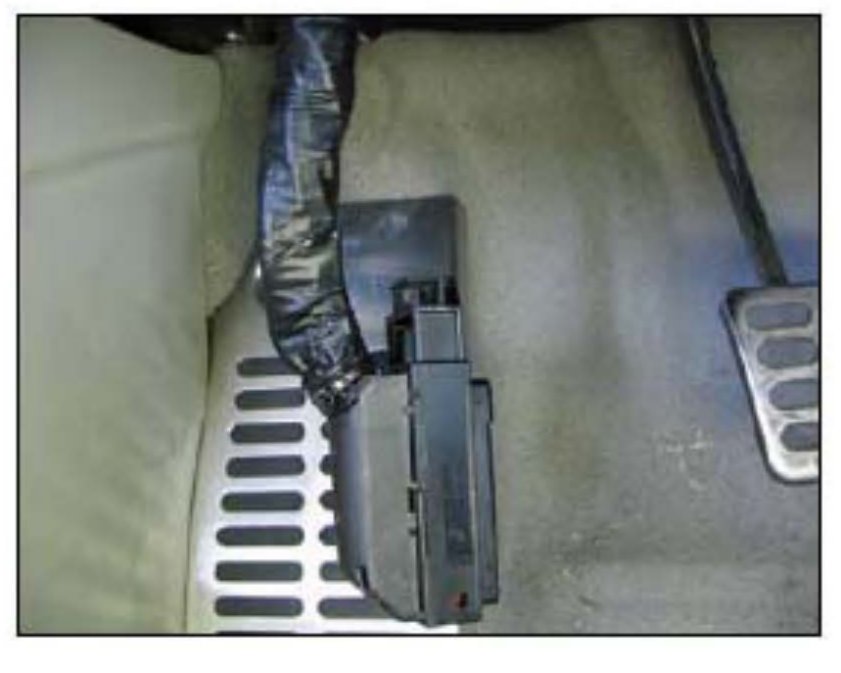
22. Fit the new terminals into each terminal cavity and install the connector pack into the connector housing securely. Install the blue terminal pack retainer removed in step 18. Wrap electrical tape around the wiring harness and place a small wire tie around the connector cover to secure it to the harness.
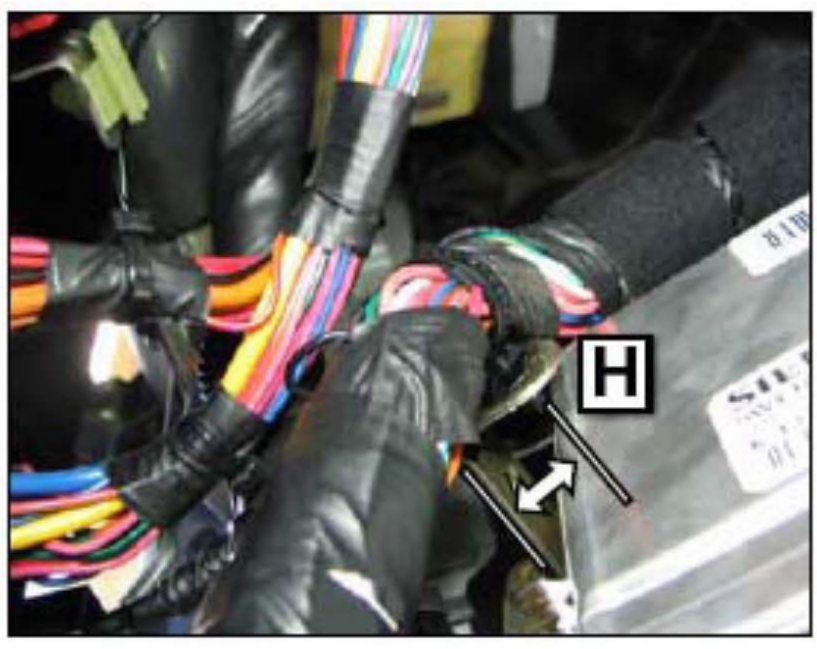
23. Slide the wiring harness down 0.8 inches through the wire tie at the PCM bracket (H) to relax the bend at the PCM connector and reconnect PCM connector. Reinstall the wire tie clip in the PCM bracket.
- Connect battery cable
- Reset radio stations
- Reinstall hood release cable
- Start engine and verify proper operation with no MIL on.

WARRANTY CLAIM INFORMATION
INSPECTION CHECK SHEET
Group: Fuel System(14)
Number: KT2007070101
Date: Sunday, July 01, 2007
Area: N. America
Subject:
MIL Illumination With Front Heated Oxygen Sensor Related DTCs: P0030, P0031 and P0032 (Engine - 030)
Description
This bulletin provides service procedures for 2004 - 2006 MY 2.0L SPECTRA vehicles with MIL on resulting from the front heated oxygen sensor related DTCs P0030, P0031 or P0032.
CORRECTIVE ACTION:
^ If a SPECTRA vehicle exhibits the above symptom for the first time, inspect the vehicle according to the INSPECTION CHECKLIST and then clear the related DTCs. No further action is required.
^ If the same symptom happens to the vehicle for the second time of if the vehicle has a prior history of front oxygen sensor-related DTC concerns, replace the four terminals between the PCM and the front oxygen sensor heater terminals as shown, and in the REPLACEMENT PROCEDURES section of this TSB.
Effective Vehicle Information
VEHICLES AFFECTED:
Model: Spectra 2.0L Model years 2004 through 2006
Parts Information
Service Procedure
INSPECTION CHECKLIST (FIRST TIME CONDITION):
1. Retrieve any heated oxygen sensor related DTCs (P0030, P0031, P0032) with GDS. Record DTCs symptoms, driving patterns driving conditions and freeze frame data on the check sheet.
NOTICE:
The check sheet is shown. When completed, fax to Kia Motors America. KGIS users should download and print the check sheet.
2. Verify that the male connector of front oxygen sensor is completely inserted into the female connector end record results on the check sheet. If the connection between the male and female connectors is loose reconnect them completely and clear the related DTCs no further action is required.
3. Verify that the terminals in the female connector of front oxygen sensor are not pushed back and record results on the check sheet. If required fully seat and lock any loose terminals into each terminal cavity and clear the related DTCs. If the MIL illumination has been caused by the loose terminals no further action is required.
4. Measure the resistances between the terminals of the male connector of front oxygen sensor at room temperature (70°F) and record them on the check sheet.
Normal resistance range
5. Measure the voltage between terminals 5 and 6 of the harness side of front oxygen sensor with the vehicle running and record it on the check sheet.
Normal voltage range: 12-14.5V (Voltage may fluctuate until warm)
6. Check for leaks in the exhaust manifold oxygen sensor fittings exhaust front pipe or catalytic converter and record results on the check sheet. If there is any gas leak repair the exhaust system and recheck the gas leak.
NOTICE:
If a vehicle returns (check repair history) with DTCs P0030, P0031 or P00323 after the inspection listed above, proceed with the front oxygen sensor and PCM terminal replacement procedure shown below.
REPLACEMENT OF FRONT OXYGEN SENSOR AND PCM TERMINALS
1. Record preset radio stations and disconnect the battery negative cable.
2. Remove the engine cover.
3. Disconnect the front oxygen sensor connector.
4. Remove the front oxygen sensor female connector and bracket.
5. Remove the connector from the bracket. Be very careful not to damage the connector attaching clip. The connector must be secured after repair for proper oxygen sensor operation.
6. Remove the back cover from the connector by lifting the two tabs shown.
7. Peel the tape off the connector wiring harness back three or four inches.
8. Remove the white plastic terminal retainer from the connector.
9. Remove the two terminals # 1 (Blue with orange stripe) and # 4 (White) using a two blade terminal removal tool. Locations of terminals 1 and 4 are shown in the picture above.
Recommended terminal removal tools are:
Blue-Point P/N-TT1212 from kit P/N-TT12KT.
MAC Tools P/N-TT93060 (same as Blue-Point tool) from kit P/N-TT96030 (shown above)
*NOTICE:
Bend the ends of the tool blades in slightly to fit into the two release holes at the sides of each terminal.
10. Cut the # 4 terminal wire (White) 2-2.5 inches from the terminal.
11. Prepare new same color wire with oxygen sensor connector terminal (larger than PCM side terminal) and slide the heat shrinking tube onto the wire allowing room to splice and solder.
12. Strip the ends of wire insulations put a splice clip over the exposed wires and crimp it Solder the splice with low temperature solder being careful not to overheat the wires or heat shrinking tube.
*NOTICE:
Verify that the splice clip holds the exposed wires securely.
13. Slide heat shrinking tubes over the splice clips and apply heat to them.
NOTICE:
- Heating temperature required: (750°F)
- Center the heat shrinking tube over the crimped connection and heat it until glue melts out of each end.
- Be careful not to damage the tube and the wire insulation from excessive heating.
14. Repeat steps 10 through 13 on the # 1 terminal (Blue with orange stripe).
15. Turn the new terminal in the proper direction and insert into each terminal cavity install the white plastic retainer wrap electrical tape around harness and connector transition and install the connector and engine cover in reverse order of removal.
^ # 1 Blue with orange wire goes on connector lock side
^ # 4 - White wire goes on connector mounting clip side as shown
16. Disconnect the hood release cable for better access. Disconnect the PCM harness wire tie clip at the top of the PCM bracket. Disconnect the larger of the two PCM connectors from the PCM. Pull the connector down to allow access to work.
17. Cut the small tie strap and remove the tape from the harness above the PCM connector down and away from the harness. Don't pull up on the cover or the tabs will break.
CAUTION:
Don't pull up on the cover or the tabs will break.
18. Remove the blue terminal pack retainer from the connector.
19. Release the two lock tabs at the top of the blue terminal pack and slide out of the main connector.
20. Release the terminal lock tabs on the side of terminal pack to remove the terminals # 19 (White) and # 41 (Blue with orange stripe). The terminal lock tabs are on the side of the silver terminal located through the small windows in the side of the terminal pack
21. Repeat steps 10 through 13 on the # 19 and # 41 terminals (# 19 White shown).
NOTICE:
- Prepare the two PCM terminal wires from the repair kit.
- To avoid mixing up the two PCM wires it may be helpful to replace the terminals and install them in the PCM connector one at a time.
22. Fit the new terminals into each terminal cavity and install the connector pack into the connector housing securely. Install the blue terminal pack retainer removed in step 18. Wrap electrical tape around the wiring harness and place a small wire tie around the connector cover to secure it to the harness.
23. Slide the wiring harness down 0.8 inches through the wire tie at the PCM bracket (H) to relax the bend at the PCM connector and reconnect PCM connector. Reinstall the wire tie clip in the PCM bracket.
- Connect battery cable
- Reset radio stations
- Reinstall hood release cable
- Start engine and verify proper operation with no MIL on.
WARRANTY CLAIM INFORMATION
INSPECTION CHECK SHEET
Factory Service Tools
Use the Manual With the Right Hardware
Pair factory procedures with proven DIY tools so the instructions are easier to execute.
Disclosure: Verified tool recommendations may earn an affiliate commission at no cost to you.
When to See a Mechanic
Stop DIY work and contact a certified mechanic immediately if any of the following apply:
- • You smell fuel, burning insulation, or see smoke.
- • Brakes feel soft, pull hard to one side, or make grinding noises.
- • The engine overheats, stalls repeatedly, or misfires under load.
- • You are missing required tools, torque specs, or safe lifting equipment.
- • You are not confident in the next step or safety outcome.
Rather have a pro handle this?
A certified mobile mechanic comes to your home or office. They bring the tools, you stay comfortable. No tow truck, no waiting room, no surprises.
Comes to youSame-day available12-month warranty
Get a Free QuoteNo obligation. See pricing before you book.