
Safety Warning
DIY auto repair can cause serious injury, fire, or vehicle damage. These guides are for informational purposes only. Always follow OEM torque specs, wear PPE, and consult a certified mechanic if you are unsure. You are solely responsible for your safety.
2012 Hyundai Tucson FWD L4-2.4LFACTORY OEM SERVICE PROCEDURE
1 of Part 2
Description

Function
Wiper Control
1. Control of front washer interlocking wiper

(1) In a state of IGN2 switch=ON, if WASHER switch is turned on during T1, Wiper low relay is turned ON T2 after Washer switch=ON, and Wiper low relay is OFF after T3.
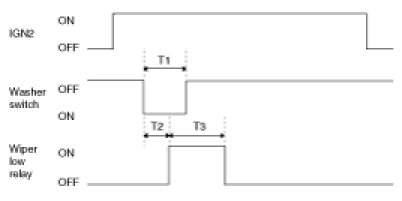
T1 : 0.06s ~ 0.2s, T2 : 0.3s ± 0.1s, T3 : 0.7s ± 0.1s
(2) In a state of IGN2 switch=ON, If Washer switch is ON during T1, Wiper low relay is turned ON T2 after Washer switch=ON. Wiper low relay is turned OFF T3 after Washer switch=OFF.

T1 : 0.2s (MIN), T2 : 0.3s ± 0.1s, T3 : 2.5s ~ 3.8s (2 - 3 Turn)
(3) If washer switch is ON T1 or more by Wiper INT switch during wiper operation, It operates item (2). And if washer switch is ON during T6, it operates Item (1).
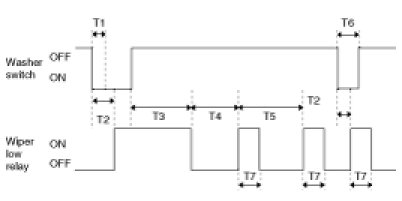
T1 : 0.2s (MIN), T2 : 0.3s ± 0.1s, T3 : 2.5s ~ 3.8s (2 - 3 Turn), T4 : T5 - 0.7s, T5 : INT TIME, T6 : 0.06s ~ 0.2s, T7 : 0.7s ± 0.1s
(4) Operation is cancelled in case of IGN=OFF during T3.
(5) Give priority to Washer interlocking wiper than speed sensing INT wiper function.
(6) Washer switch signal input shall be ignored at start-up (IGN1 ON& IGN2 OFF states).
(7) Switch ON time includes chattering time.
2. MIST wiper control

(1) When turning on wiper mist switch with IGN2 ON, turning ON wiper low relay output for 700ms.
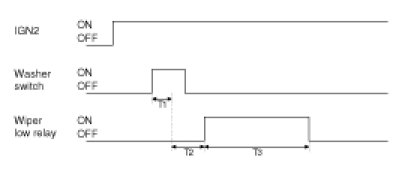
T1 : Min 60ms, T2: Max 100ms, T3 : 700±100ms
(2) If Wiper Mist switch input lasts for over 700ms, maintain Wiper low relay ON. IF Wiper Mist switch is OFF, turn ON Wiper low relay output for 700ms from it is turned OFF.
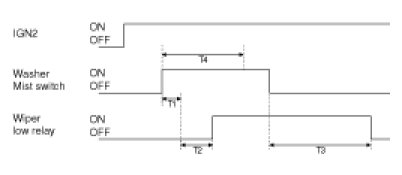
T1 : Min 60ms, T2: Max 100ms, T3 : 700±100ms, T4 : 700ms
3. INT wiper control

(1) Intermittent time of intermittent wiper is controlled dependent on the following conditions.
(1) Wiper low relay time is 0.7s ±0.1s.
(2) Intermittent time is from output ON to the next output ON.
(3) Wiper low relay output is continued for remaining ON time if INT switch is turned OFF during output.
(4) Intermittent time is restarted when IGN2 switch is ON and Wiper INT switch is changed from OFF to ON.
(5) Intermittent time is restarted when Wiper INT switch is ON and IGN2 switch is changed from OFF to ON.
(6) 2.5V is used when VOLUME value is 2.5V or more.

T1 : 0.7s ± 0.1s, T2 : INT TIME (2.2 ± 0.2s ~ 10 ± 1s)
4. Rear wiper control
(1) If IGN2 switch=ON and Rear washer switch is turned on during T2, Rear wiper relay is turned ON T1 after Rear washer switch=ON. And Rear wiper relay is OFF after T3.

T1 : 0.3s, T2 : 0.2 - 0.59s, T3 : 0.7s
(2) If IGN2 switch=ON and Rear washer switch is ON more than T2, Rear wiper relay is turned ON later T1 after Rear washer switch=ON. And Rear wiper relay is turned OFF after T3 from Rear washer switch=OFF.

T1 : 0.3s, T2 : MIN 0.6s, T3 : 2.5s ~ 3.8s
(3) If IGN2 switch=`N and Rear wiper INT switch=ON is, Rear wiper relay outputs ON.At this time, If IGN2 switch=OFF or Rear wiper INT switch=OFF, Rear wiper relay outputs OFF.

(4) If IGN2 switch=ON and Rear wiper INT switch=ON, Rear wiper relay outputs T1(ON)/T2(OFF) cycle. At this time, if IGN2 switch=OFF or Rear wiper INT switch=OFF, Rear wiper relay outputs OFF.

T1 : 0.7s, T2 : 5.3s
Buzzer Control
1. Buzzer control

2. Buzzer sound
(1) Buzzer sound specification

(2) Buzzer output to estimate BCM INT Buzzer in cluster, and data transmission.
3. Seat belt reminder (Driver seat)

(1) From IGN1 switch ON, Warning lamp for 1sec(DUTY 50%) and Chime buzzer for 6 time every 1sec. (in case of S/BELT unfastened state) But, within 6sec in the S/BELT fastened, the Chime buzzer output is stop, and Warning lamp is the remaining time.
(2) Lamp and Chime buzzer become output stop when IGN1 is turned OFF within 6sec-output.
(3) If vehicle speed over 10Km/h, Warning lamp and Chime buzzer are work for 1time when Seat belt unfastened after IGN ON.
(4) If vehicle speed below 5Km/h or IGN OFF or seat belt fastened, pattern is stop when pattern is running.
(5) Seat belt fastened->unfastened when IGN1=ON state : if vehicle speed over 10Km/h,1time output. And if vehicle speed 5 - 10Km/h, Warning lamp for 1s(DUTY 50%) and Chime buzzer for 6 every 1s. If vehicle speed less than 5Km/h, Warning lamp for 6 every 1s(DUTY 50%)
4. Seat belt reminder (Assist seat)

(1) Warning lamp lights continuously every 1sec(DUTY 50%) for 6sec when IGN is turned ON under unfastened seat belt.
(2) Warning lamp is turned OFF when IGN is turned OFF within in time.
(3) When IGN is ON under unfastened seat belt, the warning lamp lights. The lamp continues to light for remaining time of 6sec when seat belt is fastened within 6sec. The lamp is OFF if seat belt is fastened after 6sec.
(4) When IGN is ON and vehicle speed becomes 10Km or more and unfastened seat belt, warning lights ON continuously.
(5) Under the (4)state, warning lamp is stopped when seat belt is unfastened or vehicle speed becomes under 5Km/h or IGN is turned OFF.
5. Key operated warning

(1) INT buzzer every 0.6sec when Driver door switch is ON under key in ON.
(2) If key in=OFF or driver door switch=close, buzzer output is OFF.
(3) If IGN1=ON, output is OFF.

T1 : 0.6 ± 0.1 sec
6. ID OUT Warning (SMK)

(1) If ID OUT warning (CAN)=ON, warning buzzer output for the time.
(2) Warning buzzer output=STOP, when receive OFF signal.

7. SSB switch warning (SMK)

(1) If SSB warning(CAN)=ON, warning buzzer output for the time.
(2) Warning buzzer output=STOP, when receive OFF signal.

T1 : 0.6 ± 0.1 sec
8. Parking start warning
If vehicle speed is 5Km/h or above and Parking brake switch=ON, Buzzer is alarming at T2 cycle.

9. Key teaching sound (KEYLESS ONLY)
When key teaching by code saving unit or GDS(K-LINE), outputs 0.6s (800Hz) diminution sounds once.
10. Vehicle NOT P warning (SMK)
(1) When vehicle NOT P warning(CAN) signal=ON, warning buzzer output for the time.
(2) Warning buzzer output=STOP, when receive OFF signal.

T1 : 0.6 ± 0.1 sec
Defogger & deicer timer control
1. Deicer timer
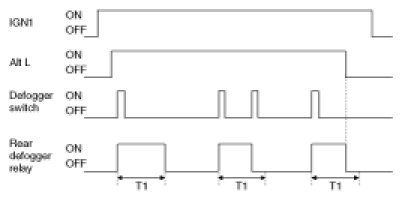
(1) Front deicer relay is turned ON for 20 min, if defogger switch=ON after Alt L=ON & IGN1=ON.
(2) Front deicer relay is turned OFF, if defogger switch=ON during front deicer relay=ON.
(3) Front deicer relay is turned OFF, if Alt L=OFF or IGN1=OFF during front deicer relay=ON.
(4) Front deicer relay OFF, if Alt L=ON after defogger switch=ON.

2. Defogger timer
(1) Defogger relay is turned ON for 20min, if defogger switch=ON after Alt L=ON & IGN1=ON.
(2) Defogger relay is turned OFF, if defogger switch=ON during defogger relay=ON.
(3) Defogger relay is turned OFF if Alt L=OFF or IGN1=OFF during defogger relay=ON.
(4) Defogger relay OFF, if Alt L=ON after defogger switch=ON.
Deiced Room Lamp
1. Data flow

2. Description of state
(1) Room Lamp off


(2) Room Lamp on

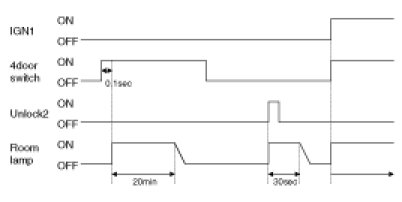
(3) Room Lamp Decaying


(4) Room Lamp on for 30s


NOTE:
1. The flickering of lamp is not allowed even though IGN1 ON.
2. The resolution of Decayed Room Lamp must be more than 32 step.



(5) Room Lamp Decaying


(6) Room Lamp on for 20min


Power Window Timer
1. Data flow

2. Function
(1) Turn ON Power window if IGN2 switch ON.
(2) Power window output is maintained for 30 seconds and OFF if IGN2 switch is OFF.
(3) The output is immediately OFF if Driver door open switch ON or Assist door open switch ON in the (2) above.
(4) If IGN2 is OFF with Driver door open switch ON or Assist door open switch ON, Power window is OFF.

T1 : 30±1sec
Rear Seat Heater Relay Control
1. Rear left seat heater relay is ON for T1 if IGN=ON & Rear left seat heater switch=ON.
Rear left seat heater relay is OFF if IGN=OFF & Rear left seat heater switch=ON(again) within T1.

T1 : 20minute ± 1minute
2. Rear right seat heater relay is ON for T1 if IGN=ON & Rear right seat heater switch=ON.
Rear right seat heater relay is OFF if IGN=OFF & Rear right seat heater switch=ON(again) within T1.

T1 : 20minute ± 1minute
Factory Service Tools
Use the Manual With the Right Hardware
Pair factory procedures with proven DIY tools so the instructions are easier to execute.
Disclosure: Verified tool recommendations may earn an affiliate commission at no cost to you.
When to See a Mechanic
Stop DIY work and contact a certified mechanic immediately if any of the following apply:
- • You smell fuel, burning insulation, or see smoke.
- • Brakes feel soft, pull hard to one side, or make grinding noises.
- • The engine overheats, stalls repeatedly, or misfires under load.
- • You are missing required tools, torque specs, or safe lifting equipment.
- • You are not confident in the next step or safety outcome.