
Safety Warning
DIY auto repair can cause serious injury, fire, or vehicle damage. These guides are for informational purposes only. Always follow OEM torque specs, wear PPE, and consult a certified mechanic if you are unsure. You are solely responsible for your safety.
2011 Hyundai Azera V6-3.3LFACTORY OEM SERVICE PROCEDURE
Navigation System - Software Update Purchase Procedure
GROUP
Body
Electrical
NUMBER
12-BE-017
DATE
OCTOBER 2012
MODEL
ALL MODELS
2012 NAVIGATION SOFTWARE UPDATE PURCHASE PROCEDURE
Description:
This bulletin provides information for specific Navigation Software updates for the Point of Purchase (POP) program running from October 1, 2012 through December 31, 2012.
The Point of Purchase kit was created to support the sale of Hyundai Navigation System Map Updates. Each Hyundai Dealer was sent two kits. Additional kits can be purchased through MAPNSOFT.
Point Of Purchase kit contains:
^ 2 - USBs labeled 6U02 and 6U03
^ 1 DVD (6H01) - Navigation System Map Updates for 2008MY, 2009MY and 2010MY Hyundai Sonata and any Genesis Sedan with Touch Screen Navigation System (non-DIS)
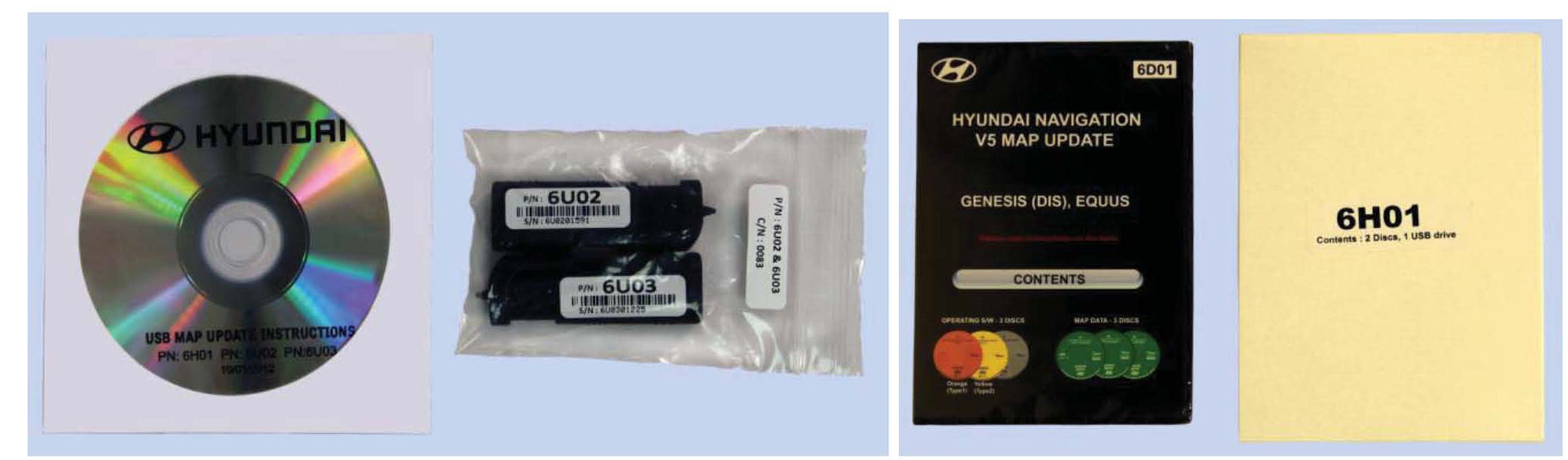
^ 6 Disc DVD set (1 orange, 1 yellow, 1 grey, and 3 green discs) - Navigation Map and Operating System Update for Hyundai Genesis and Equus models equipped with the DIS Navigation System.
Additional Information
1. A CD for USB update instructions is provided for P/Ns 6H01, 6U02, and 6U03.
2. All Compact Flash Map Update drives and USB Map Updates for other vehicles need to be ordered by the dealer online.
3. All USB and DVD updates require an activation code.
^ Dealers can place orders for activation codes for DVDs, Compact Flash drives and USB drives through the the dealer or by calling the Hyundai MAPNSOFT Customer Support.
^ Hyundai MAPNSOFT Customer Support hours are:
Monday through Friday 6:00 AM to 5:00 PM and Saturday 6:00 AM to 12:00 PM PST
^ All NAVIGATION, BLUETOOTH AND AUDIO SETTINGS (PREVIOUS DESTINATIONS, HOME ADDRESSES, PHONE NUMBERS, RADIO PRESETS, ETC) WILL BE ERASED DURING THE MAP UPDATE.
USB Drives NOT in the POP Kit:
^ Part# 6U10: Veloster, MY: 2012
^ Part# 6U20: Elantra, MY: 2010 (Partitioned Flash Drive)
^ Part# 6U21: Elantra, MY: 2010 (Non-Partitioned Flash Drive)
DVD + USB Drives NOT in the POP Kit:
^ Part# 6H02 (1 DVD disc + 1 USB): Genesis with Touch Screen, MY: 2010, 2011, 2012
Software Update Versions:
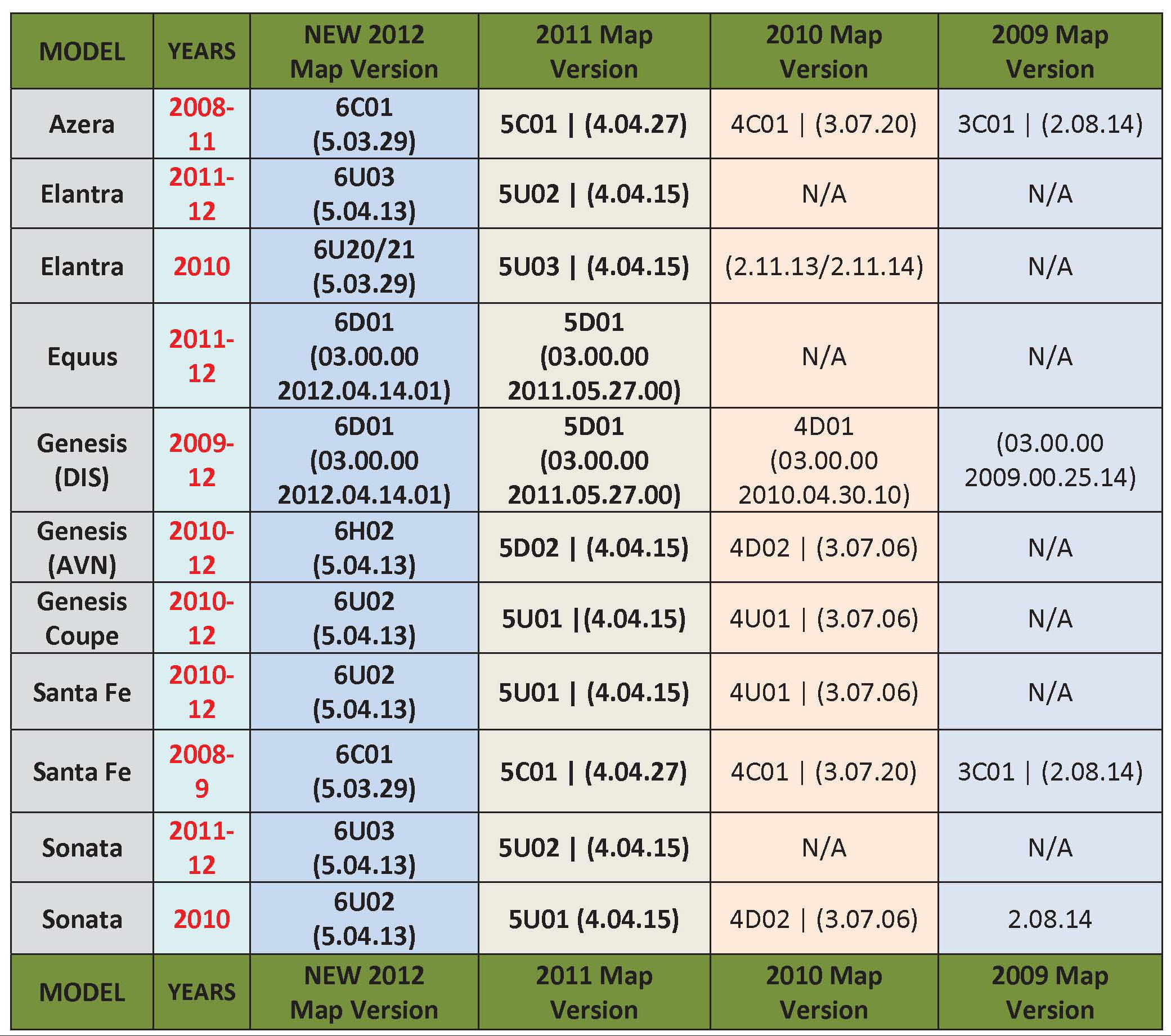
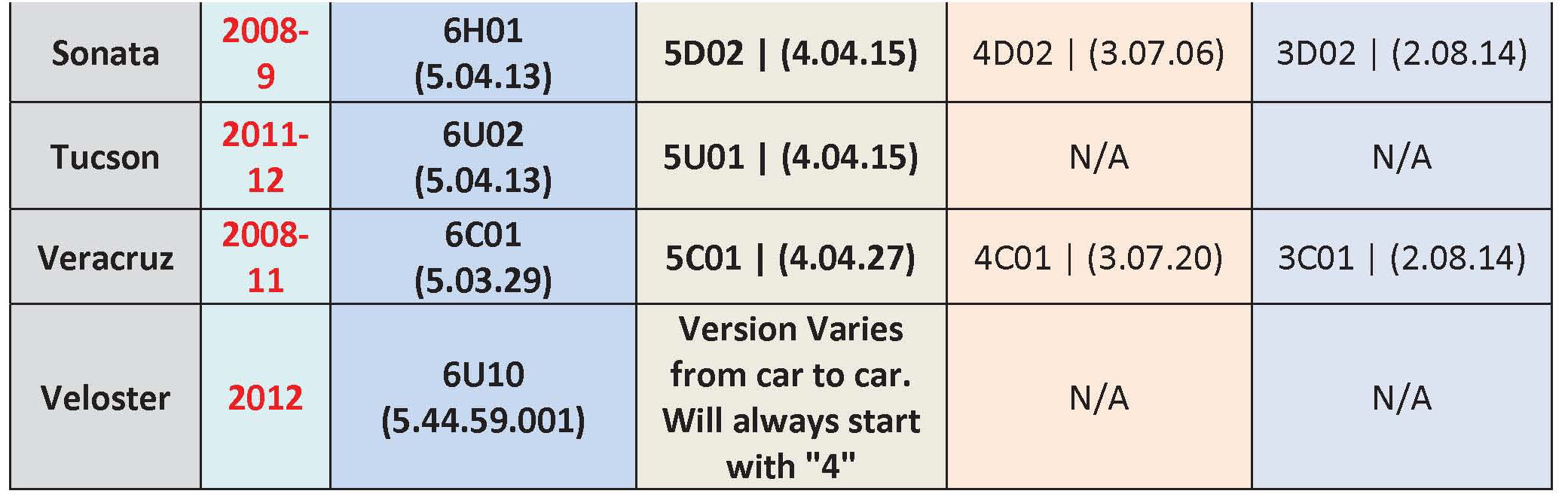
Use the chart to confirm the previous and new software versions. Use caution in determining the correct software for each model and year of vehicle. Installing the incorrect software may lead to Head Unit lock-up and require Head Unit replacement. Other precautions include:
^ Turn the vehicle ON and let the engine idle before starting the software upload.
^ Use TSB 12-BE-016 for the proper installation instructions for Equus and Genesis DIS units.
^ Use the chart below to confirm the proper software before uploading into the vehicles navigation unit:
Vehicles Affected:
All Models
Body
Electrical
NUMBER
12-BE-017
DATE
OCTOBER 2012
MODEL
ALL MODELS
2012 NAVIGATION SOFTWARE UPDATE PURCHASE PROCEDURE
Description:
This bulletin provides information for specific Navigation Software updates for the Point of Purchase (POP) program running from October 1, 2012 through December 31, 2012.
The Point of Purchase kit was created to support the sale of Hyundai Navigation System Map Updates. Each Hyundai Dealer was sent two kits. Additional kits can be purchased through MAPNSOFT.
Point Of Purchase kit contains:
^ 2 - USBs labeled 6U02 and 6U03
^ 1 DVD (6H01) - Navigation System Map Updates for 2008MY, 2009MY and 2010MY Hyundai Sonata and any Genesis Sedan with Touch Screen Navigation System (non-DIS)
^ 6 Disc DVD set (1 orange, 1 yellow, 1 grey, and 3 green discs) - Navigation Map and Operating System Update for Hyundai Genesis and Equus models equipped with the DIS Navigation System.
Additional Information
1. A CD for USB update instructions is provided for P/Ns 6H01, 6U02, and 6U03.
2. All Compact Flash Map Update drives and USB Map Updates for other vehicles need to be ordered by the dealer online.
3. All USB and DVD updates require an activation code.
^ Dealers can place orders for activation codes for DVDs, Compact Flash drives and USB drives through the the dealer or by calling the Hyundai MAPNSOFT Customer Support.
^ Hyundai MAPNSOFT Customer Support hours are:
Monday through Friday 6:00 AM to 5:00 PM and Saturday 6:00 AM to 12:00 PM PST
^ All NAVIGATION, BLUETOOTH AND AUDIO SETTINGS (PREVIOUS DESTINATIONS, HOME ADDRESSES, PHONE NUMBERS, RADIO PRESETS, ETC) WILL BE ERASED DURING THE MAP UPDATE.
USB Drives NOT in the POP Kit:
^ Part# 6U10: Veloster, MY: 2012
^ Part# 6U20: Elantra, MY: 2010 (Partitioned Flash Drive)
^ Part# 6U21: Elantra, MY: 2010 (Non-Partitioned Flash Drive)
DVD + USB Drives NOT in the POP Kit:
^ Part# 6H02 (1 DVD disc + 1 USB): Genesis with Touch Screen, MY: 2010, 2011, 2012
Software Update Versions:
Use the chart to confirm the previous and new software versions. Use caution in determining the correct software for each model and year of vehicle. Installing the incorrect software may lead to Head Unit lock-up and require Head Unit replacement. Other precautions include:
^ Turn the vehicle ON and let the engine idle before starting the software upload.
^ Use TSB 12-BE-016 for the proper installation instructions for Equus and Genesis DIS units.
^ Use the chart below to confirm the proper software before uploading into the vehicles navigation unit:
Vehicles Affected:
All Models
Factory Service Tools
Use the Manual With the Right Hardware
Pair factory procedures with proven DIY tools so the instructions are easier to execute.
Disclosure: Verified tool recommendations may earn an affiliate commission at no cost to you.
When to See a Mechanic
Stop DIY work and contact a certified mechanic immediately if any of the following apply:
- • You smell fuel, burning insulation, or see smoke.
- • Brakes feel soft, pull hard to one side, or make grinding noises.
- • The engine overheats, stalls repeatedly, or misfires under load.
- • You are missing required tools, torque specs, or safe lifting equipment.
- • You are not confident in the next step or safety outcome.