
Safety Warning
DIY auto repair can cause serious injury, fire, or vehicle damage. These guides are for informational purposes only. Always follow OEM torque specs, wear PPE, and consult a certified mechanic if you are unsure. You are solely responsible for your safety.
2004 Hyundai Tiburon L4-2.0LFACTORY OEM SERVICE PROCEDURE
Security System - Keyless Remote Programming
Group
90 - ELECTRICAL
Number
03-90-020
Date
October, 2003
Model
Elantra 2001-2004, Santa Fe 2001-2004, Sonata 2002-2004, Tiburon 2003-2004, XG 300 2001 and XG 350 2002-2004
Subject
SECURITY SYSTEM KEYLESS ADAPTER CABLE
This bulletin supersedes TSB # 02-90-001.
DESCRIPTION:
The security system keyless adapter cable (SPX/Kent-Moore P/N 09900-21300) is a special service tool (SST) that is used for programming new keyless entry remote transmitters to the factory security systems. The keyless adapter is used in conjunction with the Hi-Scan Pro (with Hi-Scan SOL Pro Software Version 09-29-03 or newer) and Data Link Connector (DLC) Cable.
SERVICE INFORMATION:
The keyless adapter cable can be used on the following vehicles:
^ 2001 -2004 MY Elantra
^ 2001-2004 MY SantaFe
^ 2002 - 2004 MY Sonata
^ 2001 - 2004 MY XG300/350
NOTE
^ The 2003 - 2004 MY Tiburon does not need the Keyless Adapter Cable to add keyless entry remotes to the factory security system. Instead, the Hi-Scan Pro connects to the vehicle using only the DLC cable. See page BE-60 in the 2004 MY Tiburon Shop Manual for the latest instructions.
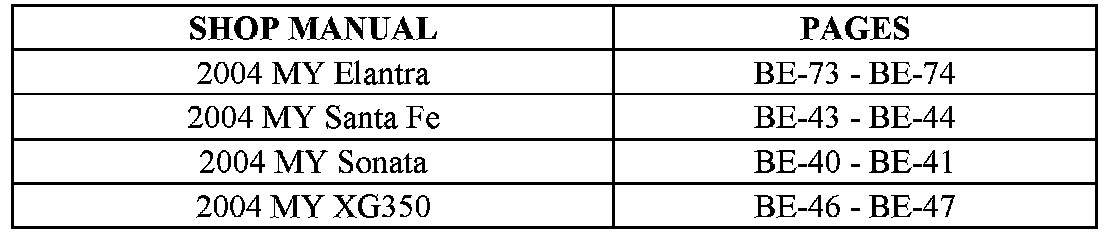
^ The most current Keyless Adapter Cable Instructions are available in the shop manuals shown.
KEYLESS ADAPTER CABLE INSTRUCTIONS:
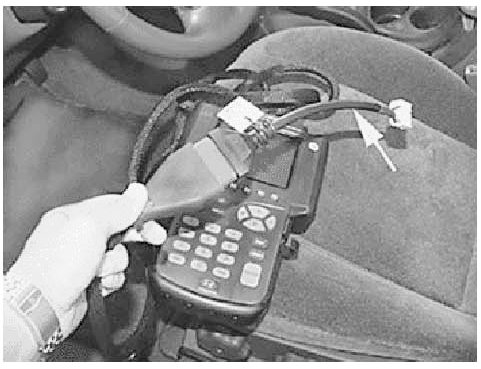

1. Connect the keyless adapter cable to the Hi-Scan Pro DLC cable.
2. Plug the keyless adapter into the vehicle's 10-pin multi-purpose connector located behind the driver's side lower instrument panel (next to the DLC).
NOTE
Sample vehicle shown is the Santa Fe.
3. Turn the Hi-Scan Pro ON and press ENTER.

NOTE
"Release date 29. Sep. 2003" OR LATER must appear on this screen. To update your SOL card with the latest software go to www.hmaservice.com and refer to TSB 00-00-001.
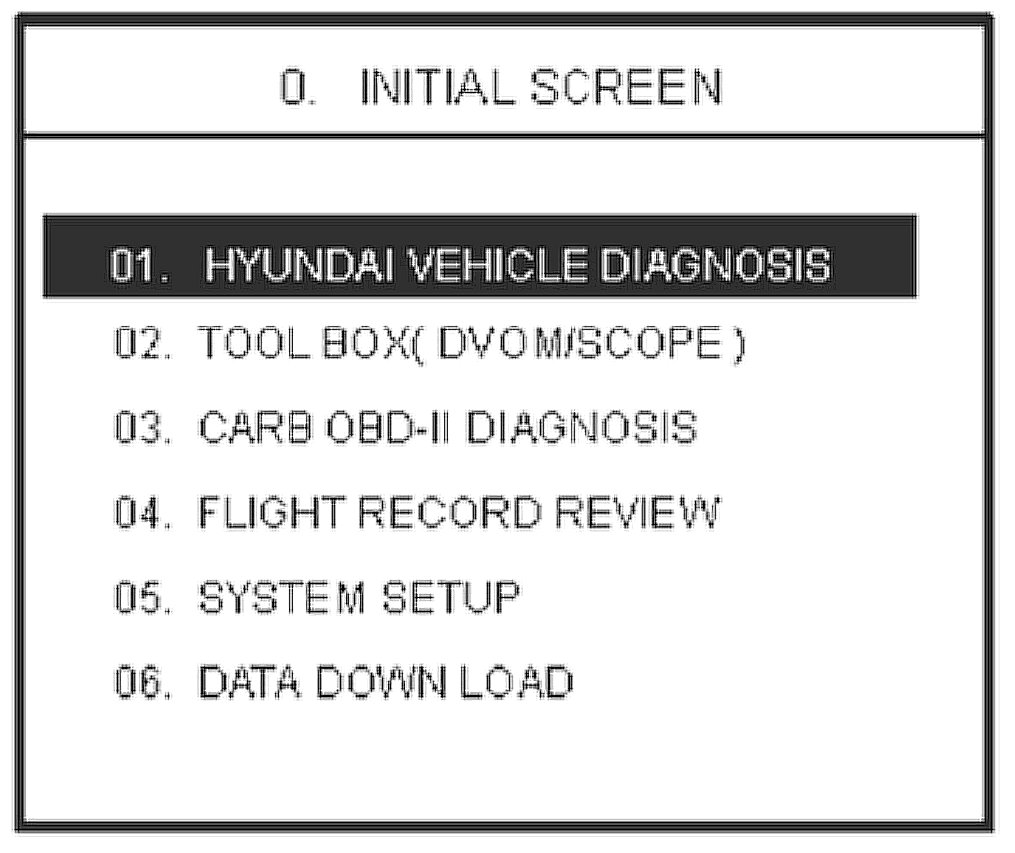
4. Select option "HYUNDAI VEHICLE DIAGNOSIS" and press ENTER.

5. Select vehicle model and press ENTER.

6. Select option "TRANSMITTER CODE SAVING" and press ENTER.
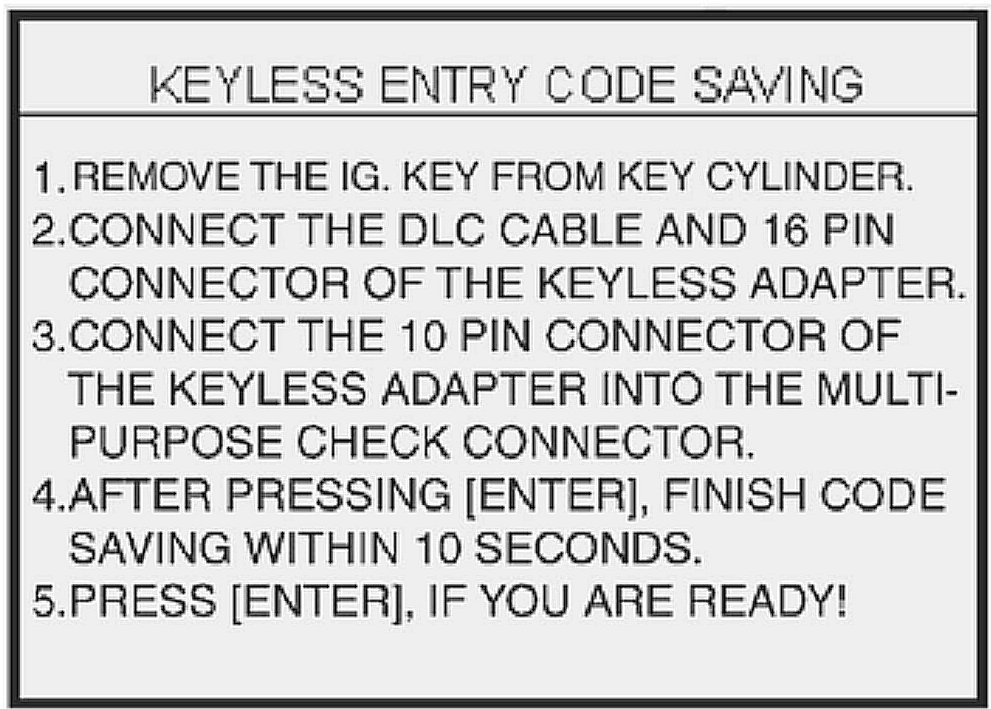
7. Ensure that the key has been removed from the ignition cylinder before proceeding.

8. Follow the steps noted on the Hi-Scan Pro screen to program the remote(s).
NOTE
The factory security system can only be programmed to accept two remote transmitters and MUST be programmed for both remote transmitters at the same time.
9. Press ESC on the Hi-Scan Pro and verify that the remote(s) are functioning properly.
10. Turn the Hi-Scan Pro OFF and disconnect the adapter cable from the multipurpose connector.

PARTS INFORMATION
90 - ELECTRICAL
Number
03-90-020
Date
October, 2003
Model
Elantra 2001-2004, Santa Fe 2001-2004, Sonata 2002-2004, Tiburon 2003-2004, XG 300 2001 and XG 350 2002-2004
Subject
SECURITY SYSTEM KEYLESS ADAPTER CABLE
This bulletin supersedes TSB # 02-90-001.
DESCRIPTION:
The security system keyless adapter cable (SPX/Kent-Moore P/N 09900-21300) is a special service tool (SST) that is used for programming new keyless entry remote transmitters to the factory security systems. The keyless adapter is used in conjunction with the Hi-Scan Pro (with Hi-Scan SOL Pro Software Version 09-29-03 or newer) and Data Link Connector (DLC) Cable.
SERVICE INFORMATION:
The keyless adapter cable can be used on the following vehicles:
^ 2001 -2004 MY Elantra
^ 2001-2004 MY SantaFe
^ 2002 - 2004 MY Sonata
^ 2001 - 2004 MY XG300/350
NOTE
^ The 2003 - 2004 MY Tiburon does not need the Keyless Adapter Cable to add keyless entry remotes to the factory security system. Instead, the Hi-Scan Pro connects to the vehicle using only the DLC cable. See page BE-60 in the 2004 MY Tiburon Shop Manual for the latest instructions.
^ The most current Keyless Adapter Cable Instructions are available in the shop manuals shown.
KEYLESS ADAPTER CABLE INSTRUCTIONS:
1. Connect the keyless adapter cable to the Hi-Scan Pro DLC cable.
2. Plug the keyless adapter into the vehicle's 10-pin multi-purpose connector located behind the driver's side lower instrument panel (next to the DLC).
NOTE
Sample vehicle shown is the Santa Fe.
3. Turn the Hi-Scan Pro ON and press ENTER.
NOTE
"Release date 29. Sep. 2003" OR LATER must appear on this screen. To update your SOL card with the latest software go to www.hmaservice.com and refer to TSB 00-00-001.
4. Select option "HYUNDAI VEHICLE DIAGNOSIS" and press ENTER.
5. Select vehicle model and press ENTER.
6. Select option "TRANSMITTER CODE SAVING" and press ENTER.
7. Ensure that the key has been removed from the ignition cylinder before proceeding.
8. Follow the steps noted on the Hi-Scan Pro screen to program the remote(s).
NOTE
The factory security system can only be programmed to accept two remote transmitters and MUST be programmed for both remote transmitters at the same time.
9. Press ESC on the Hi-Scan Pro and verify that the remote(s) are functioning properly.
10. Turn the Hi-Scan Pro OFF and disconnect the adapter cable from the multipurpose connector.
PARTS INFORMATION
Factory Service Tools
Use the Manual With the Right Hardware
Pair factory procedures with proven DIY tools so the instructions are easier to execute.
Disclosure: Verified tool recommendations may earn an affiliate commission at no cost to you.
When to See a Mechanic
Stop DIY work and contact a certified mechanic immediately if any of the following apply:
- • You smell fuel, burning insulation, or see smoke.
- • Brakes feel soft, pull hard to one side, or make grinding noises.
- • The engine overheats, stalls repeatedly, or misfires under load.
- • You are missing required tools, torque specs, or safe lifting equipment.
- • You are not confident in the next step or safety outcome.