
Safety Warning
DIY auto repair can cause serious injury, fire, or vehicle damage. These guides are for informational purposes only. Always follow OEM torque specs, wear PPE, and consult a certified mechanic if you are unsure. You are solely responsible for your safety.
2001 Hyundai Santa Fe L4-2.4LFACTORY OEM SERVICE PROCEDURE
Automatic Reprogramming Procedure
DOWNLOADING REPROGRAMMING SOFTWARE:
1. Reprogramming software pack 06-05-01 is required for this procedure.
2. If you do not already have this software, log on to the Hyundai Service Technology Web Site (www.hmaservice.com) and click on "Hi-Scan Updates".
3. Click "Latest Software".
4. Scroll down to "Reprogramming Software Pack 06-05-01". This software package contains the program required for this procedure plus all previous reprogramming programs.
5. Right click on "Reprogramming Software Pack 06-05-01" and then click on "Open".
6. Select "Run this program from its current location" and click "OK".
7. After about 20 minutes, the program will open. Just click the "Start" button and the program will automatically copy the file to the correct location.
NOTE:
A Warning message may appear stating "Do you want to install and run R-Repro Pack 06-05-01 .exe from www.hmaservice.com". If so, click the "Yes" button and the program will continue as mentioned in step 7.
8. To update the reprogramming card in the Hi-Scan, refer to TSB 00-00-001 for instructions.
IMPORTANT:
BE SURE TO USE THE NEW 16MB REPROGRAMMING SOFTWARE CARD (WITH YELLOW LABEL) WHICH WAS MAILED ALONG WITH THE NEW CONNECTOR SETS AND TSB 01-36-007 "XG300 PCM REPROGRAMMING".
CAUTION:
Before conducting reprogramming:
1. Conduct reprogramming with the ignition key in the "ON" position.
^ Be careful not to disconnect any cables connected to the vehicle or the Hi-Scan Pro during reprogramming.
WARNING:
If reprogramming is interrupted, the manual update procedure must be used.
^ Do not start the engine during reprogramming.
^ Do not turn the ignition key OFF during reprogramming.
NOTES:
^ Both the ECM and TCM are reprogrammed during this procedure.
^ If the vehicle is equipped with a manual transaxle, only the ECM will be reprogrammed.
^ Verify that the vehicle is one of the affected vehicles by identifying the vehicle production date.
9. Remove the Data Link Connector (DLC) cable from the Hi-Scan Pro and attach the Hi-Scan Reprogramming Adapter.
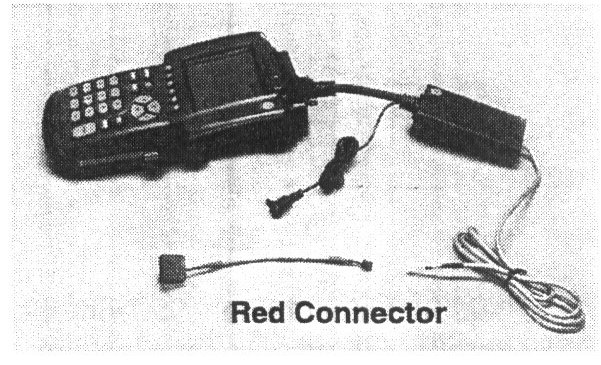
10. Connect the RED 10-pin connector to the Reprogramming Adapter.
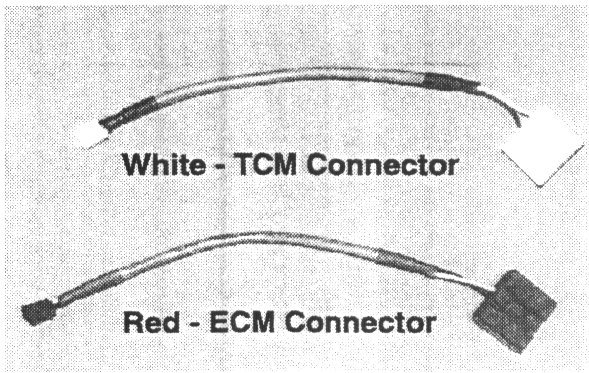
NOTE:
Two different 10-pin connectors are required for reprogramming:
- Red (for ECM reprogramming)
- White (for TCM reprogramming)
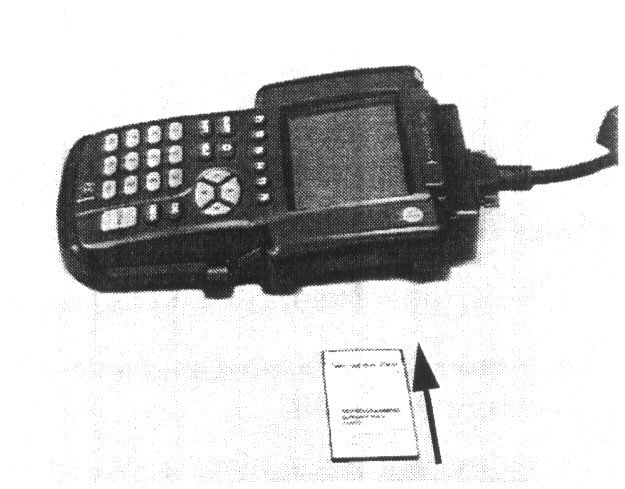
11. Remove the current system software card from the Hi-Scan and insert the 16 MB Reprogramming Software Card (yellow label) into the Hi-Scan Pro top slot.
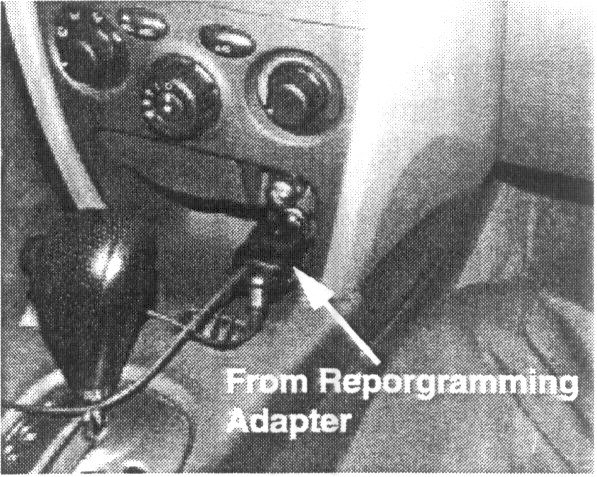
12. Insert the Hi-Scan Pro cigarette power adapter.
13. Plug the power connector from the reprogramming adapter into the cigarette adapter.
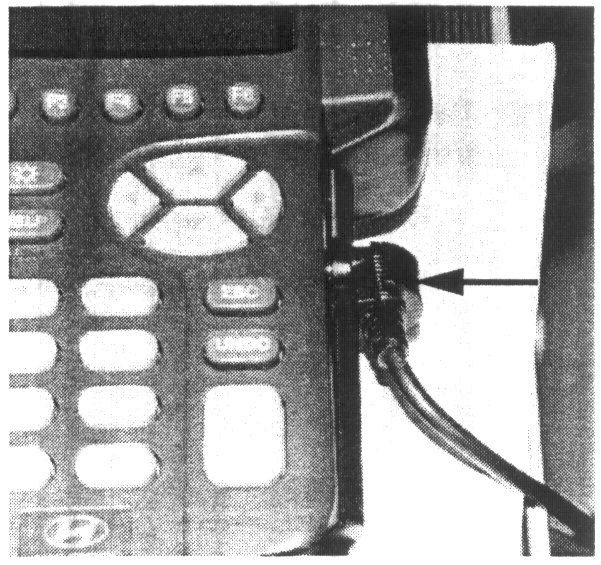
14. Plug the power connector from the cigarette adapter into the Hi-Scan.
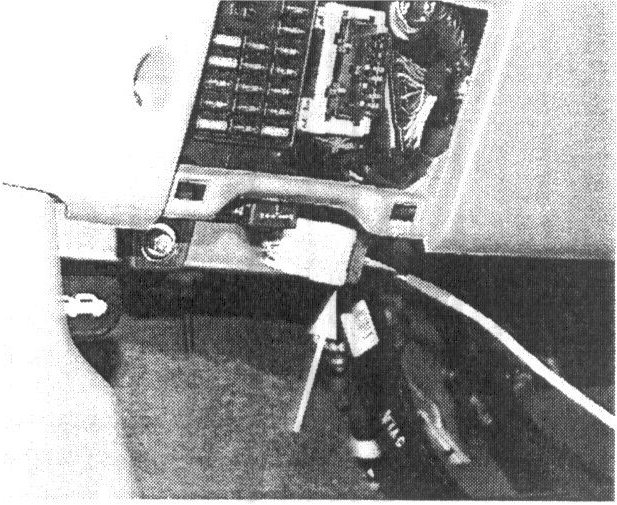
15. Connect the RED 10-pin connector from the reprogramming adapter into the white connector near the Data Link Connector (DLC).
Location: Under left side of instrument panel near fuse box.
16. Turn the ignition to the "ON" position.
17. Turn the Hi-Scan ON and press ENTER.
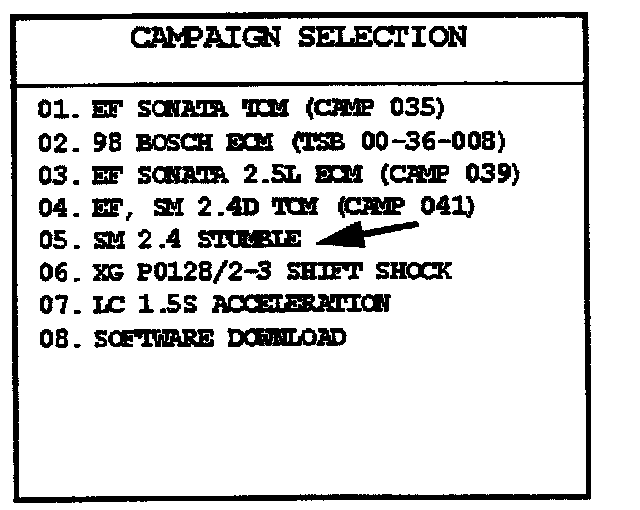
18. Select option "05. SM 2.4 STUMBLE" and press ENTER.

19. Select option "01. SM 2.4 STUMBLE (AUTO)" and press ENTER.
This option automatically detects the ECM type and TCM type and downloads the correct programs.
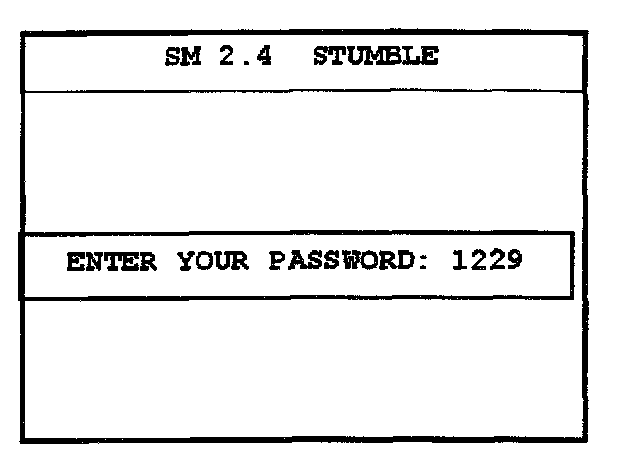
20. Enter "1229" as the password and press ENTER.
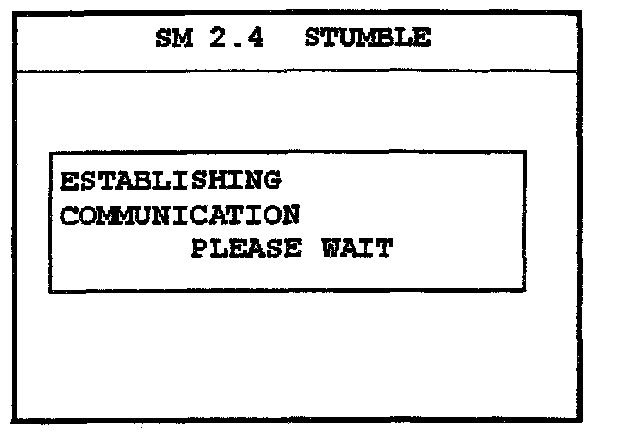
21. The Hi-Scan Pro will establish communication and check the ECM ID.
NOTE:
The Hi-Scan Pro reprograms the ECM first, then the TCM (if vehicle is equipped with an automatic transaxle).
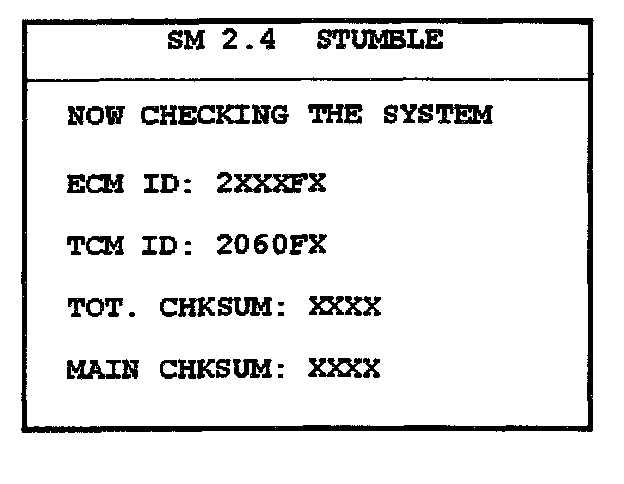
NOTES:

^ Hi-Scan Pro detects the current ECM ID and TCM ID, then displays them for about 1 second.
^ If a manual transaxle is fitted to the vehicle, the TCM ID will not be displayed.

22. The boot program will download first, next the main program and then the interrupt vector program.
NOTE:
An error message may appear after the Boot Program is downloaded. The Hi-Scan will automatically retry the download process. It is not necessary to do anything at this time. If the Hi-Scan tries several times and does not download the program, go to the Manual Update Procedure on pages 11-16.
WARNING:
Do not interrupt the reprogramming at any time. The ECM and/or the TCM may be rendered inoperative if the program does not download completely.

23. Hi-Scan re-initializes the system.
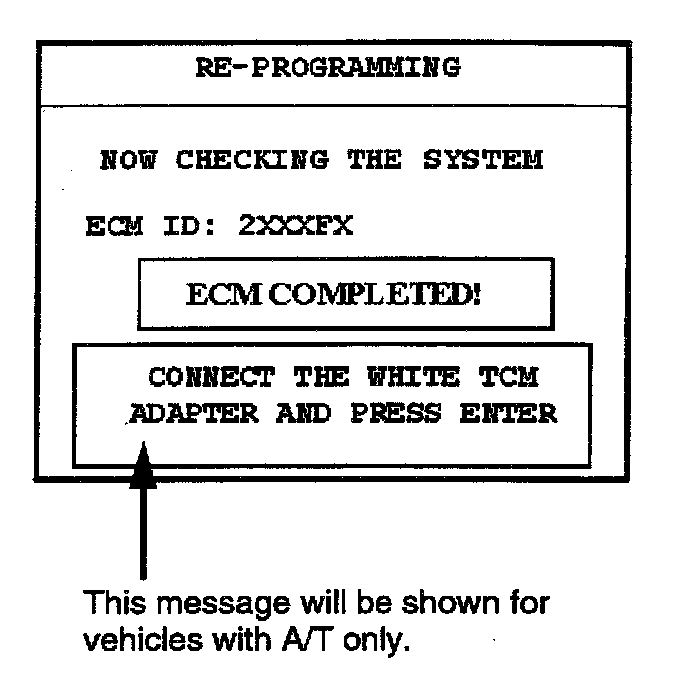
24. When the "ECM COMPLETED" message is displayed, the ECM reprogramming process is finished.
25. If a vehicle is equipped with an automatic transaxle, disconnect the RED 10-pin connector from the Hi-Scan Reprogramming Adapter and the vehicle.
IMPORTANT:
DO NOT TURN THE HI-SCAN OR THE IGNITION OFF AT THIS TIME.
For vehicles with manual transaxles, the process is complete; turn the Hi-Scan and ignition OFF. Start the engine to check for proper operation.
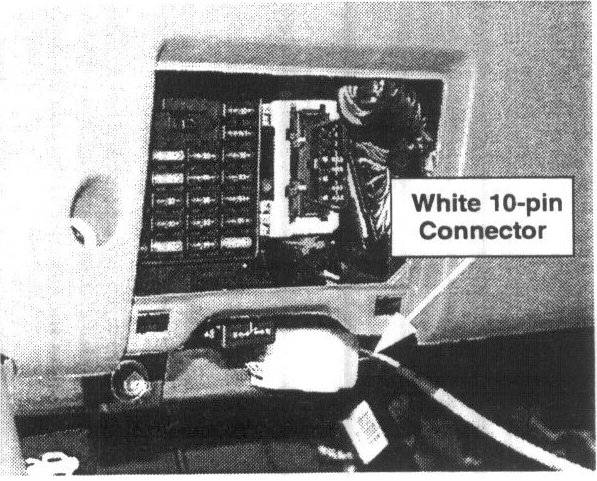
26. Connect the WHITE 10-pin connector to the Hi-Scan Reprogramming Adapter and then into the white connector near the Data Link Connector (DLC).
Location: Under left side of instrument panel near fuse box.
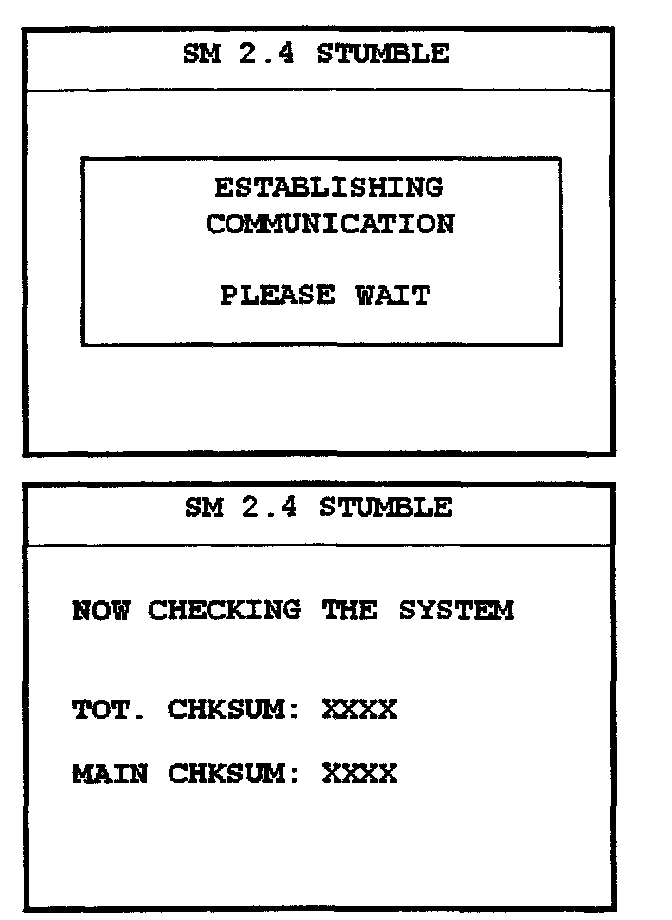
27. Press ENTER and the Hi-Scan Pro will establish communication and check the TCM ID.
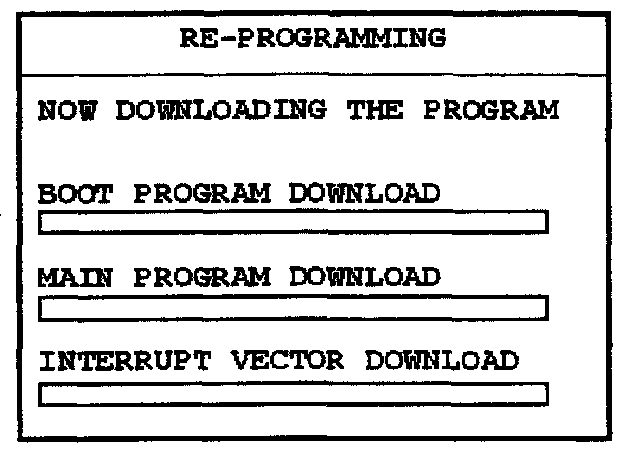
28. The boot program will download first, next the main program and then the interrupt vector program.
NOTE:
An error message may appear after the Boot Program is downloaded. The Hi-Scan will automatically retry the download process. It is not necessary to do anything at this time. lithe Hi-Scan tries several times and does not download the program, go to the Manual Update Procedure on pages 11-16.
WARNING:
Do not interrupt the reprogramming at any time. The ECM and/or the TCM may be rendered inoperative if the program does not download completely.

29. Hi-Scan Pro re-initializes the system.
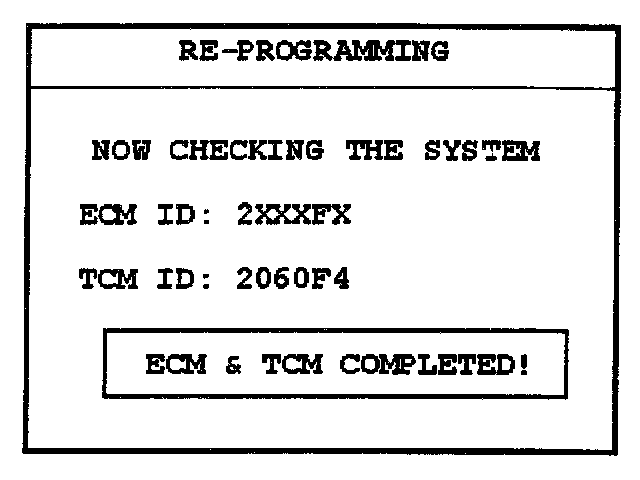
30. When the "ECM & TCM COMPLETED" message is displayed, the TCM reprogramming process is finished.
NOTES:
^ The new ECM and TCM IDs are displayed when the new TCM software download process is finished.
^ Before turning the Hi-Scan Pro OFF, check the new ECM & TCM IDs displayed on the Hi-Scan Pro screen to verify that the correct ECM and TCM software have been downloaded.
^ Refer to the ECM and TCM specification table shown in this TSB.
31. Start the engine to check for proper operation.
1. Reprogramming software pack 06-05-01 is required for this procedure.
2. If you do not already have this software, log on to the Hyundai Service Technology Web Site (www.hmaservice.com) and click on "Hi-Scan Updates".
3. Click "Latest Software".
4. Scroll down to "Reprogramming Software Pack 06-05-01". This software package contains the program required for this procedure plus all previous reprogramming programs.
5. Right click on "Reprogramming Software Pack 06-05-01" and then click on "Open".
6. Select "Run this program from its current location" and click "OK".
7. After about 20 minutes, the program will open. Just click the "Start" button and the program will automatically copy the file to the correct location.
NOTE:
A Warning message may appear stating "Do you want to install and run R-Repro Pack 06-05-01 .exe from www.hmaservice.com". If so, click the "Yes" button and the program will continue as mentioned in step 7.
8. To update the reprogramming card in the Hi-Scan, refer to TSB 00-00-001 for instructions.
IMPORTANT:
BE SURE TO USE THE NEW 16MB REPROGRAMMING SOFTWARE CARD (WITH YELLOW LABEL) WHICH WAS MAILED ALONG WITH THE NEW CONNECTOR SETS AND TSB 01-36-007 "XG300 PCM REPROGRAMMING".
CAUTION:
Before conducting reprogramming:
1. Conduct reprogramming with the ignition key in the "ON" position.
^ Be careful not to disconnect any cables connected to the vehicle or the Hi-Scan Pro during reprogramming.
WARNING:
If reprogramming is interrupted, the manual update procedure must be used.
^ Do not start the engine during reprogramming.
^ Do not turn the ignition key OFF during reprogramming.
NOTES:
^ Both the ECM and TCM are reprogrammed during this procedure.
^ If the vehicle is equipped with a manual transaxle, only the ECM will be reprogrammed.
^ Verify that the vehicle is one of the affected vehicles by identifying the vehicle production date.
9. Remove the Data Link Connector (DLC) cable from the Hi-Scan Pro and attach the Hi-Scan Reprogramming Adapter.
10. Connect the RED 10-pin connector to the Reprogramming Adapter.
NOTE:
Two different 10-pin connectors are required for reprogramming:
- Red (for ECM reprogramming)
- White (for TCM reprogramming)
11. Remove the current system software card from the Hi-Scan and insert the 16 MB Reprogramming Software Card (yellow label) into the Hi-Scan Pro top slot.
12. Insert the Hi-Scan Pro cigarette power adapter.
13. Plug the power connector from the reprogramming adapter into the cigarette adapter.
14. Plug the power connector from the cigarette adapter into the Hi-Scan.
15. Connect the RED 10-pin connector from the reprogramming adapter into the white connector near the Data Link Connector (DLC).
Location: Under left side of instrument panel near fuse box.
16. Turn the ignition to the "ON" position.
17. Turn the Hi-Scan ON and press ENTER.
18. Select option "05. SM 2.4 STUMBLE" and press ENTER.
19. Select option "01. SM 2.4 STUMBLE (AUTO)" and press ENTER.
This option automatically detects the ECM type and TCM type and downloads the correct programs.
20. Enter "1229" as the password and press ENTER.
21. The Hi-Scan Pro will establish communication and check the ECM ID.
NOTE:
The Hi-Scan Pro reprograms the ECM first, then the TCM (if vehicle is equipped with an automatic transaxle).
NOTES:
^ Hi-Scan Pro detects the current ECM ID and TCM ID, then displays them for about 1 second.
^ If a manual transaxle is fitted to the vehicle, the TCM ID will not be displayed.
22. The boot program will download first, next the main program and then the interrupt vector program.
NOTE:
An error message may appear after the Boot Program is downloaded. The Hi-Scan will automatically retry the download process. It is not necessary to do anything at this time. If the Hi-Scan tries several times and does not download the program, go to the Manual Update Procedure on pages 11-16.
WARNING:
Do not interrupt the reprogramming at any time. The ECM and/or the TCM may be rendered inoperative if the program does not download completely.
23. Hi-Scan re-initializes the system.
24. When the "ECM COMPLETED" message is displayed, the ECM reprogramming process is finished.
25. If a vehicle is equipped with an automatic transaxle, disconnect the RED 10-pin connector from the Hi-Scan Reprogramming Adapter and the vehicle.
IMPORTANT:
DO NOT TURN THE HI-SCAN OR THE IGNITION OFF AT THIS TIME.
For vehicles with manual transaxles, the process is complete; turn the Hi-Scan and ignition OFF. Start the engine to check for proper operation.
26. Connect the WHITE 10-pin connector to the Hi-Scan Reprogramming Adapter and then into the white connector near the Data Link Connector (DLC).
Location: Under left side of instrument panel near fuse box.
27. Press ENTER and the Hi-Scan Pro will establish communication and check the TCM ID.
28. The boot program will download first, next the main program and then the interrupt vector program.
NOTE:
An error message may appear after the Boot Program is downloaded. The Hi-Scan will automatically retry the download process. It is not necessary to do anything at this time. lithe Hi-Scan tries several times and does not download the program, go to the Manual Update Procedure on pages 11-16.
WARNING:
Do not interrupt the reprogramming at any time. The ECM and/or the TCM may be rendered inoperative if the program does not download completely.
29. Hi-Scan Pro re-initializes the system.
30. When the "ECM & TCM COMPLETED" message is displayed, the TCM reprogramming process is finished.
NOTES:
^ The new ECM and TCM IDs are displayed when the new TCM software download process is finished.
^ Before turning the Hi-Scan Pro OFF, check the new ECM & TCM IDs displayed on the Hi-Scan Pro screen to verify that the correct ECM and TCM software have been downloaded.
^ Refer to the ECM and TCM specification table shown in this TSB.
31. Start the engine to check for proper operation.
Factory Service Tools
Use the Manual With the Right Hardware
Pair factory procedures with proven DIY tools so the instructions are easier to execute.
Disclosure: Verified tool recommendations may earn an affiliate commission at no cost to you.
When to See a Mechanic
Stop DIY work and contact a certified mechanic immediately if any of the following apply:
- • You smell fuel, burning insulation, or see smoke.
- • Brakes feel soft, pull hard to one side, or make grinding noises.
- • The engine overheats, stalls repeatedly, or misfires under load.
- • You are missing required tools, torque specs, or safe lifting equipment.
- • You are not confident in the next step or safety outcome.