
Safety Warning
DIY auto repair can cause serious injury, fire, or vehicle damage. These guides are for informational purposes only. Always follow OEM torque specs, wear PPE, and consult a certified mechanic if you are unsure. You are solely responsible for your safety.
2012 Honda Accord L4-2.4LFACTORY OEM SERVICE PROCEDURE
Navigation Module: Service and Repair
Navigation Unit Removal/Installation
NOTE:
- Before you replace the navigation unit, back-up the customer data using the Save Users Memory under the Functional Set up.
- If the navigation unit is replaced or disconnected, a Map Matching must be done.
1. Turn the ignition switch to ON (II).
2. Eject the DVD from the original navigation unit Service and Repair. To avoid scratching or damaging the DVD, temporarily place the DVD in a jewel case.
NOTE: If the DVD does not eject, refer to Navigation unit does not eject or accept the navigation DVD troubleshooting.
3. Turn the ignition switch to LOCK (0).
4. Remove the bolts (A) from the navigation unit (B).
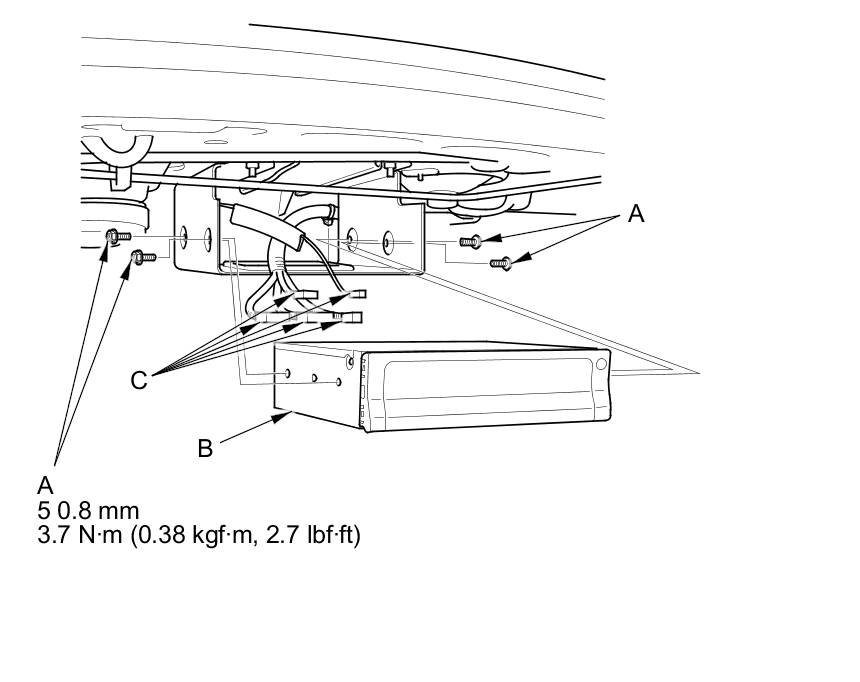
5. Disconnect the navigation unit connectors (C).
6. Install the unit in the reverse order of removal.
7. Turn the ignition switch to ON (II), then reinstall the customer's original navigation DVD, verifying that the DVD is free of scratches or smudges.
8. Check any official Honda service website for more service information about patches for the navigation system. Apply any prescribed patches to the new navigation unit.
NOTE:
- Simply transferring the navigation DVD from the original navigation unit to the new navigation unit does not assure the correct software for the vehicle will be loaded into the new navigation unit. Doing the navigation DVD transfer without doing software patches may cause the new navigation unit to appear to be malfunctioning.
- The latest navigation software does not come loaded in a new navigation unit. If you load the original navigation DVD into the new navigation unit and an error message stating that the DVD is outdated appears on screen, it means that there is a newer DVD available. When the navigation unit was built, the manufacturer installed a higher version number in the units memory. There are two methods to resolve the issue:
- Have the customer purchase a new navigation DVD
- Download the software from the original navigation DVD. See the downloading procedure under the Version
9. Enter the new navigation anti-theft code.
10. Park the vehicle outside, and do the GPS initialization.
11. Give the new navigation anti-theft code to the customer.
Factory Service Tools
Use the Manual With the Right Hardware
Pair factory procedures with proven DIY tools so the instructions are easier to execute.
Disclosure: Verified tool recommendations may earn an affiliate commission at no cost to you.
When to See a Mechanic
Stop DIY work and contact a certified mechanic immediately if any of the following apply:
- • You smell fuel, burning insulation, or see smoke.
- • Brakes feel soft, pull hard to one side, or make grinding noises.
- • The engine overheats, stalls repeatedly, or misfires under load.
- • You are missing required tools, torque specs, or safe lifting equipment.
- • You are not confident in the next step or safety outcome.