
Safety Warning
DIY auto repair can cause serious injury, fire, or vehicle damage. These guides are for informational purposes only. Always follow OEM torque specs, wear PPE, and consult a certified mechanic if you are unsure. You are solely responsible for your safety.
2006 Honda S2000 L4-2.2LFACTORY OEM SERVICE PROCEDURE
ECM Reset
HDS Clear Command
The ECM stores various specific data to correct the system even if there is no electrical power such as when the battery negative terminal or ACGS (15 A) fuse are disconnected. Stored data based on failed parts should be cleared by using the "CLEAR COMMAND" of the HDS, if parts are replaced.
The HDS has three kinds of clear commands to meet this purpose. They are DTC clear, ECM reset, and CKP pattern clear. DTC clear command erases all stored DTC codes, freeze data, readiness codes, and on-board snapshot. This must be done with the HDS after reproducing the DTC during troubleshooting. The ECM reset command erases all stored DTC codes, freeze data, readiness codes, on-board snapshot, and all specific data to correct the system except CKP pattern. If the CKP pattern data in the ECM was cleared, you must do the CKP pattern learn procedure. The CKP pattern clear command erases only CKP pattern data. This command is for repair of a misfire or the CKP sensor.
Scan Tool Clear Command
If you are using a generic scan tool to clear commands, be aware that there is only one setting for clearing the ECM, and it clears all commands at the same time (CKP pattern learn, idle learn, readiness codes, freeze data, on-board snapshot, and DTCs). After you clear all commands, you then need to do these procedures, in this order: ECM idle learn procedure; CKP pattern learn procedure; Test-drive to set readiness codes to complete.
DTC Clear
1. Clear the DTC with the HDS while the engine is stopped.
2. Turn the ignition switch OFF.
3. Turn the ignition switch ON (II), and wait 30 seconds.
4. Turn the ignition switch OFF, and disconnect the HDS from the DLC.
ECM Reset
1. Reset the ECM with the HDS while the engine is stopped.
2. Turn the ignition switch OFF.
3. Turn the ignition switch ON (II), and wait 30 seconds.
4. Turn the ignition switch OFF, and disconnect the HDS from the DLC.
5. Do the ECM idle learn procedure.
Crank (CKP) Pattern Clear/Crank (CKP) Pattern Learn
Clear/Learn Procedure (with the HDS)
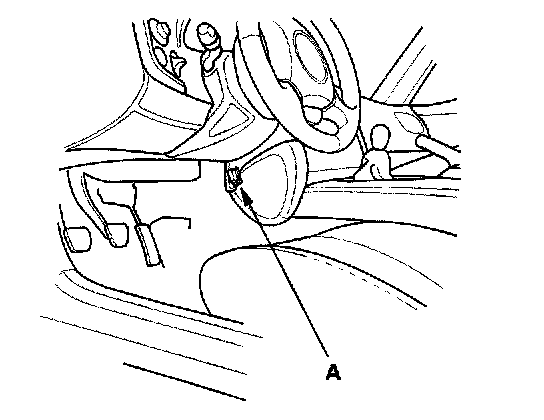
1. Connect the HDS to the data link connector (DLC) (A) located behind the driver's side of the front console.
2. Turn the ignition switch ON (II).
3. Make sure the HDS communicates with the ECM. If it doesn't, go to the DLC circuit troubleshooting.
4. Select CRANK PATTERN in the ADJUSTMENT MENU with the HDS.
5. Select CRANK PATTERN LEARNING with the HDS, and follow the screen prompts.
Learn Procedure (without the HDS)
1. Start the engine. Hold the engine speed at 3,000 rpm without load (in neutral) until the radiator fan comes on.
2. Test-drive the vehicle on a level road: Decelerate (with the throttle fully closed) from an engine speed of 2,500 rpm down to 1,000 rpm with the transmission in 1st gear.
3. Repeat step 2 several times.
4. Turn the ignition switch OFF.
5. Turn the ignition switch ON (II), and wait 30 seconds. The CKP pattern learn procedure is complete.
How to End a Troubleshooting Session (required after any troubleshooting)
1. Reset the ECM with the HDS.
2. Do the ECM idle learn procedure.
3. Turn the ignition switch OFF.
4. Disconnect the HDS from the DLC.
NOTE: The ECM is part of the immobilizer system. If you replace the ECM, it will have a different immobilizer code. In order for the engine to start, you must rewrite the immobilizer code with the HDS.
The ECM stores various specific data to correct the system even if there is no electrical power such as when the battery negative terminal or ACGS (15 A) fuse are disconnected. Stored data based on failed parts should be cleared by using the "CLEAR COMMAND" of the HDS, if parts are replaced.
The HDS has three kinds of clear commands to meet this purpose. They are DTC clear, ECM reset, and CKP pattern clear. DTC clear command erases all stored DTC codes, freeze data, readiness codes, and on-board snapshot. This must be done with the HDS after reproducing the DTC during troubleshooting. The ECM reset command erases all stored DTC codes, freeze data, readiness codes, on-board snapshot, and all specific data to correct the system except CKP pattern. If the CKP pattern data in the ECM was cleared, you must do the CKP pattern learn procedure. The CKP pattern clear command erases only CKP pattern data. This command is for repair of a misfire or the CKP sensor.
Scan Tool Clear Command
If you are using a generic scan tool to clear commands, be aware that there is only one setting for clearing the ECM, and it clears all commands at the same time (CKP pattern learn, idle learn, readiness codes, freeze data, on-board snapshot, and DTCs). After you clear all commands, you then need to do these procedures, in this order: ECM idle learn procedure; CKP pattern learn procedure; Test-drive to set readiness codes to complete.
DTC Clear
1. Clear the DTC with the HDS while the engine is stopped.
2. Turn the ignition switch OFF.
3. Turn the ignition switch ON (II), and wait 30 seconds.
4. Turn the ignition switch OFF, and disconnect the HDS from the DLC.
ECM Reset
1. Reset the ECM with the HDS while the engine is stopped.
2. Turn the ignition switch OFF.
3. Turn the ignition switch ON (II), and wait 30 seconds.
4. Turn the ignition switch OFF, and disconnect the HDS from the DLC.
5. Do the ECM idle learn procedure.
Crank (CKP) Pattern Clear/Crank (CKP) Pattern Learn
Clear/Learn Procedure (with the HDS)
1. Connect the HDS to the data link connector (DLC) (A) located behind the driver's side of the front console.
2. Turn the ignition switch ON (II).
3. Make sure the HDS communicates with the ECM. If it doesn't, go to the DLC circuit troubleshooting.
4. Select CRANK PATTERN in the ADJUSTMENT MENU with the HDS.
5. Select CRANK PATTERN LEARNING with the HDS, and follow the screen prompts.
Learn Procedure (without the HDS)
1. Start the engine. Hold the engine speed at 3,000 rpm without load (in neutral) until the radiator fan comes on.
2. Test-drive the vehicle on a level road: Decelerate (with the throttle fully closed) from an engine speed of 2,500 rpm down to 1,000 rpm with the transmission in 1st gear.
3. Repeat step 2 several times.
4. Turn the ignition switch OFF.
5. Turn the ignition switch ON (II), and wait 30 seconds. The CKP pattern learn procedure is complete.
How to End a Troubleshooting Session (required after any troubleshooting)
1. Reset the ECM with the HDS.
2. Do the ECM idle learn procedure.
3. Turn the ignition switch OFF.
4. Disconnect the HDS from the DLC.
NOTE: The ECM is part of the immobilizer system. If you replace the ECM, it will have a different immobilizer code. In order for the engine to start, you must rewrite the immobilizer code with the HDS.
Factory Service Tools
Use the Manual With the Right Hardware
Pair factory procedures with proven DIY tools so the instructions are easier to execute.
Disclosure: Verified tool recommendations may earn an affiliate commission at no cost to you.
When to See a Mechanic
Stop DIY work and contact a certified mechanic immediately if any of the following apply:
- • You smell fuel, burning insulation, or see smoke.
- • Brakes feel soft, pull hard to one side, or make grinding noises.
- • The engine overheats, stalls repeatedly, or misfires under load.
- • You are missing required tools, torque specs, or safe lifting equipment.
- • You are not confident in the next step or safety outcome.
Rather have a pro handle this?
A certified mobile mechanic comes to your home or office. They bring the tools, you stay comfortable. No tow truck, no waiting room, no surprises.
Comes to youSame-day available12-month warranty
Get a Free QuoteNo obligation. See pricing before you book.