
Safety Warning
DIY auto repair can cause serious injury, fire, or vehicle damage. These guides are for informational purposes only. Always follow OEM torque specs, wear PPE, and consult a certified mechanic if you are unsure. You are solely responsible for your safety.
2006 Honda Civic L4-1.3L HybridFACTORY OEM SERVICE PROCEDURE
How to Update the MCM
How to Update the MCM
NOTE:
^ To ensure the latest programs are installed, do an MCM update whenever the MCM is substituted or replaced.
^ Select IMA motor and/or IMA battery in the HIM MCM update menu.
^ You can not update an MCM with the program it already has. It will only accept a new program.
^ Before you update the MCM, make sure the vehicle's battery is fully charged.
^ To prevent MCM damage, do not operate anything electrical (audio system, brakes, A/C, power windows, door locks, etc.) during the update.
^ If you need to diagnose the Honda interface module (HIM) because the HIM's red (# 3) light came on or was flashing during the update, leave the ignition switch in the ON (II) position when you disconnect the HIM from the data link connector (DLC). This will prevent MCM damage.
1. Turn the ignition switch ON (II). Do not start the engine.
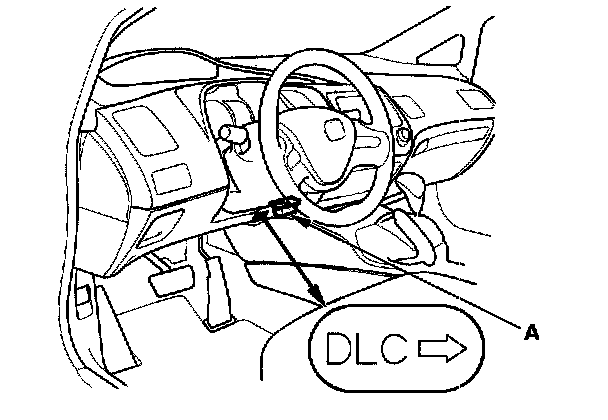
2. Connect the HDS or the Honda Interface Module (HIM) to the data link connector (DLC) (A) located under the driver's side of dashboard.
3. Do the MCM update procedure as described on the HIM label and in the MCM update system.
4. Do the PCM idle learn procedure.
NOTE:
^ To ensure the latest programs are installed, do an MCM update whenever the MCM is substituted or replaced.
^ Select IMA motor and/or IMA battery in the HIM MCM update menu.
^ You can not update an MCM with the program it already has. It will only accept a new program.
^ Before you update the MCM, make sure the vehicle's battery is fully charged.
^ To prevent MCM damage, do not operate anything electrical (audio system, brakes, A/C, power windows, door locks, etc.) during the update.
^ If you need to diagnose the Honda interface module (HIM) because the HIM's red (# 3) light came on or was flashing during the update, leave the ignition switch in the ON (II) position when you disconnect the HIM from the data link connector (DLC). This will prevent MCM damage.
1. Turn the ignition switch ON (II). Do not start the engine.
2. Connect the HDS or the Honda Interface Module (HIM) to the data link connector (DLC) (A) located under the driver's side of dashboard.
3. Do the MCM update procedure as described on the HIM label and in the MCM update system.
4. Do the PCM idle learn procedure.
Factory Service Tools
Use the Manual With the Right Hardware
Pair factory procedures with proven DIY tools so the instructions are easier to execute.
Disclosure: Verified tool recommendations may earn an affiliate commission at no cost to you.
When to See a Mechanic
Stop DIY work and contact a certified mechanic immediately if any of the following apply:
- • You smell fuel, burning insulation, or see smoke.
- • Brakes feel soft, pull hard to one side, or make grinding noises.
- • The engine overheats, stalls repeatedly, or misfires under load.
- • You are missing required tools, torque specs, or safe lifting equipment.
- • You are not confident in the next step or safety outcome.