
Safety Warning
DIY auto repair can cause serious injury, fire, or vehicle damage. These guides are for informational purposes only. Always follow OEM torque specs, wear PPE, and consult a certified mechanic if you are unsure. You are solely responsible for your safety.
2011 Ford Fiesta L4-1.6LFACTORY OEM SERVICE PROCEDURE
Pinpoint Test H: The Front Control/Display Interface Module (FCDIM) Does Not Respond To The Scan Tool
Communications Network
Pinpoint Test H: The Front Control/Display Interface Module (FCDIM) Does Not Respond To The Scan Tool
Refer to Wiring Diagram Set 14, Module Communications Network for schematic and connector information. Diagrams By Number
Refer to Wiring Diagram Set 130, Audio System/Navigation for schematic and connector information. Diagrams By Number
Normal Operation
The Front Control/Display Interface Module (FCDIM) communicates with the scan tool through the Medium Speed Controller Area Network (MS-CAN) and with other modules through the Infotainment Controller Area Network (ICAN).
This pinpoint test is intended to diagnose the following:
- Fuse
- Wiring, terminals or connectors
- FCDIM
PINPOINT TEST H: THE FCDIM DOES NOT RESPOND TO THE SCAN TOOL
NOTICE: Use the correct probe adapter(s) when making measurements. Failure to use the correct probe adapter(s) may damage the connector.
NOTE: Failure to disconnect the battery when instructed will result in false resistance readings. Refer to Battery, Mounting and Cables Battery Disconnect.
-------------------------------------------------
H1 CHECK THE FCDIM VOLTAGE SUPPLY CIRCUITS FOR AN OPEN
- Ignition OFF.
- Disconnect: FCDIM C2123.
- Ignition ON.
- Measure the voltage between the FCDIM C2123-1, circuit SBP07 (WH/RD), harness side and ground.
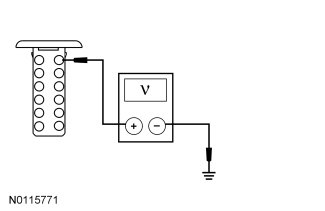
- Are the voltages greater than 10 volts?
Yes
GO to H2.
No
VERIFY the Central Junction Box (CJB) fuse 7 (7.5A) is OK. If OK, REPAIR the circuit. If not OK, REFER to the Wiring Diagrams to identify the possible causes of the circuit short. CLEAR the DTCs. REPEAT the network test with the scan tool. Diagrams By Number
-------------------------------------------------
H2 CHECK THE FCDIM GROUND CIRCUIT FOR AN OPEN
- Ignition OFF.
- Disconnect: Negative Battery Cable.
- Measure the resistance between the FCDIM C2123-7, circuit GD115 (BK/GY), harness side and ground.

- Is the resistance less than 5 ohms?
Yes
GO to H3.
No
REPAIR the circuit. CLEAR the DTCs. REPEAT the network test with the scan tool.
-------------------------------------------------
H3 CHECK THE MS-CAN CIRCUITS BETWEEN THE FCDIM AND THE DLC FOR AN OPEN
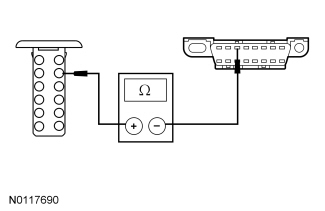
- Measure the resistance between the FCDIM C2123-2, circuit VDB06 (GY/OG), harness side and the DLC C251-3, circuit VDB06 (GY/OG), harness side.
- Measure the resistance between the FCDIM C2123-3, circuit VDB07 (VT/OG), harness side and the DLC C251-11, circuit VDB07 (VT/OG), harness side.
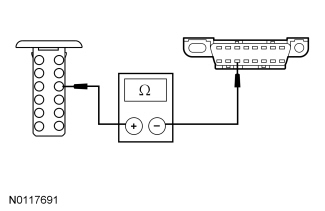
- Are the resistances less than 5 ohms?
Yes
GO to H4.
No
REPAIR the circuit in question. CLEAR the DTCs. REPEAT the network test with the scan tool.
-------------------------------------------------
H4 CHECK THE ICAN CIRCUITS BETWEEN THE FCDIM AND THE DLC FOR AN OPEN
- Measure the resistance between the FCDIM C2123-4, circuit VDB06 (GY/OG), harness side and the DLC C251-1, circuit VDB06 (GY/OG), harness side.
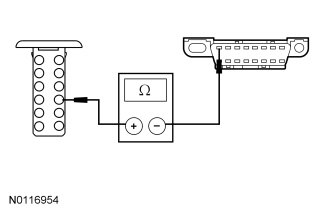
- Measure the resistance between the FCDIM C2123-5, circuit VDB07 (VT/OG), harness side and the DLC C251-9, circuit VDB07 (VT/OG), harness side.
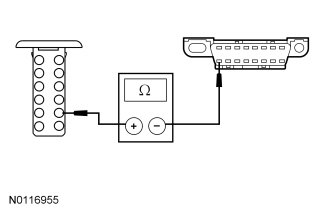
- Are the resistances less than 5 ohms?
Yes
CONNECT the negative battery cable. GO to H5.
No
REPAIR the circuit in question. CLEAR the DTCs. REPEAT the network test with the scan tool.
-------------------------------------------------
H5 CHECK FOR CORRECT FCDIM OPERATION
- Disconnect the FCDIM connector.
- Check for:
- corrosion
- damaged pins
- pushed-out pins
- Connect the FCDIM connector and make sure it seats correctly.
- Operate the system and verify the concern is still present.
- Is the concern still present?
Yes
INSTALL a new FCDIM. REFER to Information and Entertainment Systems Front Controls/Display Interface Module (FCDIM). CLEAR the DTCs. REPEAT the network test with the scan tool.
No
The system is operating correctly at this time. The concern may have been caused by a loose or corroded connector. CLEAR the DTCs. REPEAT the network test with the scan tool.
-------------------------------------------------
Factory Service Tools
Use the Manual With the Right Hardware
Pair factory procedures with proven DIY tools so the instructions are easier to execute.
Disclosure: Verified tool recommendations may earn an affiliate commission at no cost to you.
When to See a Mechanic
Stop DIY work and contact a certified mechanic immediately if any of the following apply:
- • You smell fuel, burning insulation, or see smoke.
- • Brakes feel soft, pull hard to one side, or make grinding noises.
- • The engine overheats, stalls repeatedly, or misfires under load.
- • You are missing required tools, torque specs, or safe lifting equipment.
- • You are not confident in the next step or safety outcome.