
Safety Warning
DIY auto repair can cause serious injury, fire, or vehicle damage. These guides are for informational purposes only. Always follow OEM torque specs, wear PPE, and consult a certified mechanic if you are unsure. You are solely responsible for your safety.
2011 Ford Expedition 2WD V8-5.4LFACTORY OEM SERVICE PROCEDURE
Catalyst Monitor Sensor
Catalyst Monitor Sensor
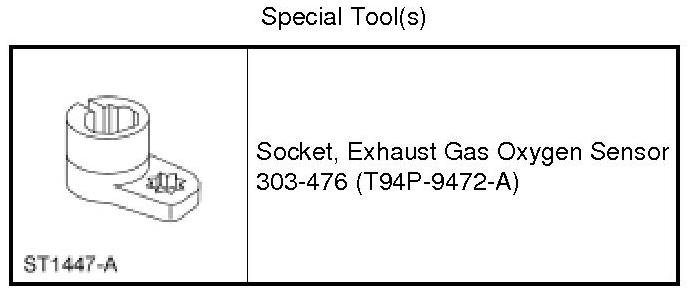
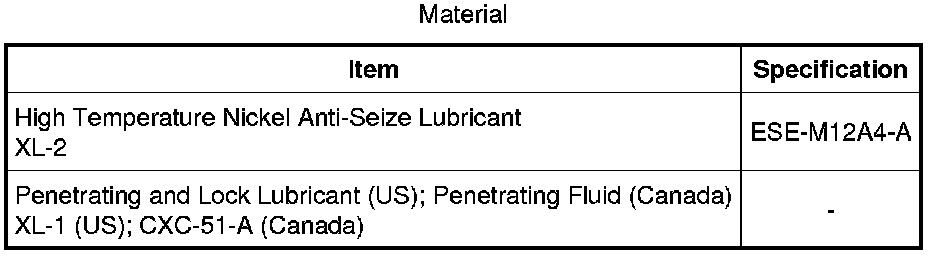
Removal
1. With the vehicle in NEUTRAL, position it on a hoist. For additional information, refer to Jacking and Lifting Service and Repair.
2. Disconnect the Catalyst Monitor Sensor (CMS) electrical connector.
3. Using the Exhaust Gas Oxygen Sensor Socket, remove the CMS.
- Apply penetrating lubricant to the CMS to assist in removal.

Installation
1. Install the CMS.
- Apply a light coat of high temperature nickel anti-seize lubricant to the CMS threads prior to installation.
- Calculate the correct torque wrench setting for the following torque. Refer to the Torque Wrench Adapter Formulas in the Appendix.
- Using the Exhaust Gas Oxygen Sensor Socket, tighten to 46 Nm (34 lb-ft).
2. Connect the CMS electrical connector.
Factory Service Tools
Use the Manual With the Right Hardware
Pair factory procedures with proven DIY tools so the instructions are easier to execute.
Disclosure: Verified tool recommendations may earn an affiliate commission at no cost to you.
When to See a Mechanic
Stop DIY work and contact a certified mechanic immediately if any of the following apply:
- • You smell fuel, burning insulation, or see smoke.
- • Brakes feel soft, pull hard to one side, or make grinding noises.
- • The engine overheats, stalls repeatedly, or misfires under load.
- • You are missing required tools, torque specs, or safe lifting equipment.
- • You are not confident in the next step or safety outcome.