
Safety Warning
DIY auto repair can cause serious injury, fire, or vehicle damage. These guides are for informational purposes only. Always follow OEM torque specs, wear PPE, and consult a certified mechanic if you are unsure. You are solely responsible for your safety.
2000 Chrysler Intrepid (CANADA) V6-3.2LFACTORY OEM SERVICE PROCEDURE
Using the DRB III
USING THE DRB III
The TCM and other components have the ability to interface over the communication bus. The DRB III Scantool connects to a Data Link Connector located in the passenger compartment. This allows communication with the TCM.
Refer to the DRB III user's guide for instructions and assistance with reading DTCs, erasing DTCs, and otherDRB III functions.
DRB ERROR MESSAGES
Under normal operation, the DRB III will display one of only two error messages:
User-Requested WARM Boot
User-Requested COLD Boot
If the DRB III should display any other error message, record the entire display and call the MDS Hotline, or call for information and assistance at 1-800-825-8737. This is a sample of such an error message display:
ver: 2.14
date: 26 Jul93
file: key_itf.cc
date: Jul 26 1993
line: 548
err: Ox1
User-Requested COLD Boot
Press MORE to switch between this display and the application screen.
Press F4 when done noting information.
DRB III DOES NOT POWER UP (BLANK SCREEN)
If the LED's do not light or no sound is emitted at start up, check for loose cable connections or a bad cable. Check the vehicle battery voltage. A minimum of 11 volts is required to adequately power the DRB III.
If all connections are proper between the DRB III and the vehicle or other devices, and the vehicle battery is fully charged, an inoperative DRB III may be the result of faulty cable or vehicle wiring. For a blank screen, refer to the appropriate Body Diagnostic manual.
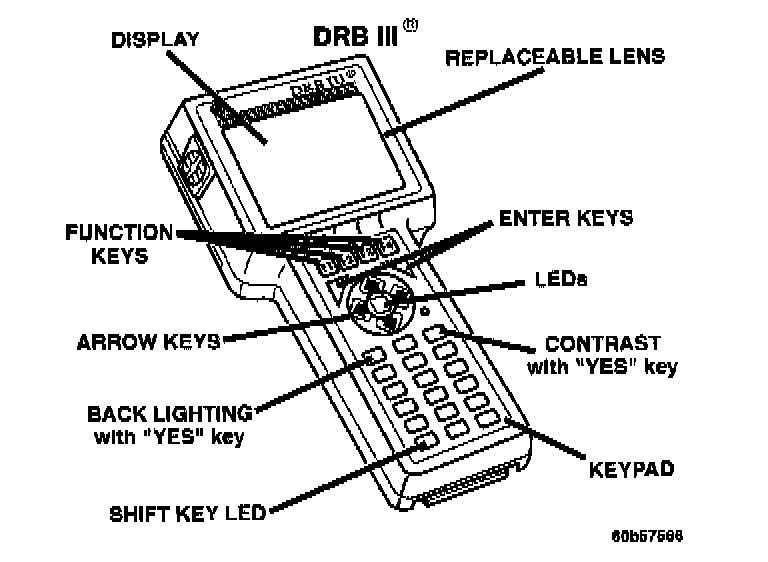
DISPLAY IS NOT VISIBLE
Low temperatures will affect the visibility of the display. Adjust the contrast to compensate for this condition.
The TCM and other components have the ability to interface over the communication bus. The DRB III Scantool connects to a Data Link Connector located in the passenger compartment. This allows communication with the TCM.
Refer to the DRB III user's guide for instructions and assistance with reading DTCs, erasing DTCs, and otherDRB III functions.
DRB ERROR MESSAGES
Under normal operation, the DRB III will display one of only two error messages:
User-Requested WARM Boot
User-Requested COLD Boot
If the DRB III should display any other error message, record the entire display and call the MDS Hotline, or call for information and assistance at 1-800-825-8737. This is a sample of such an error message display:
ver: 2.14
date: 26 Jul93
file: key_itf.cc
date: Jul 26 1993
line: 548
err: Ox1
User-Requested COLD Boot
Press MORE to switch between this display and the application screen.
Press F4 when done noting information.
DRB III DOES NOT POWER UP (BLANK SCREEN)
If the LED's do not light or no sound is emitted at start up, check for loose cable connections or a bad cable. Check the vehicle battery voltage. A minimum of 11 volts is required to adequately power the DRB III.
If all connections are proper between the DRB III and the vehicle or other devices, and the vehicle battery is fully charged, an inoperative DRB III may be the result of faulty cable or vehicle wiring. For a blank screen, refer to the appropriate Body Diagnostic manual.
DRB III Scan Tool:
DISPLAY IS NOT VISIBLE
Low temperatures will affect the visibility of the display. Adjust the contrast to compensate for this condition.
Factory Service Tools
Use the Manual With the Right Hardware
Pair factory procedures with proven DIY tools so the instructions are easier to execute.
Disclosure: Verified tool recommendations may earn an affiliate commission at no cost to you.
When to See a Mechanic
Stop DIY work and contact a certified mechanic immediately if any of the following apply:
- • You smell fuel, burning insulation, or see smoke.
- • Brakes feel soft, pull hard to one side, or make grinding noises.
- • The engine overheats, stalls repeatedly, or misfires under load.
- • You are missing required tools, torque specs, or safe lifting equipment.
- • You are not confident in the next step or safety outcome.