
Safety Warning
DIY auto repair can cause serious injury, fire, or vehicle damage. These guides are for informational purposes only. Always follow OEM torque specs, wear PPE, and consult a certified mechanic if you are unsure. You are solely responsible for your safety.
2007 Chevrolet Optra (CANADA) L4-2.0LFACTORY OEM SERVICE PROCEDURE
Tech 2 Tool Update - ABS Module Inspection
Service Procedure
Tech 2 Tool Update
Ensure that your Tech 2 is updated with software version 32.005 or higher. You can obtain this in the Software Download section of TIS2Web.
ABS Module Inspection
1. Park the vehicle on a flat, level surface.
2. Apply the parking brake.
3. Connect scan tool.
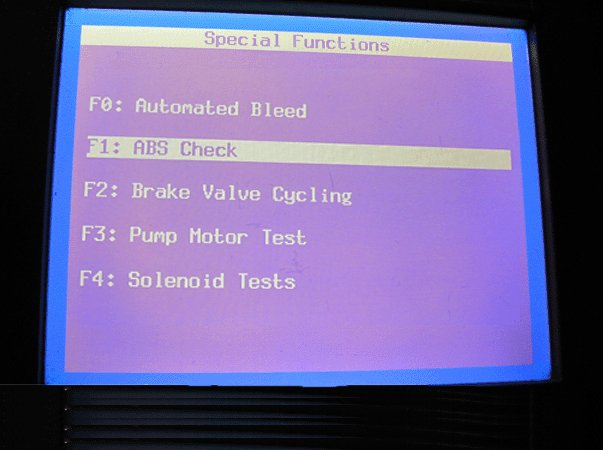
4. Select "F1: ABS Check" in Special Functions.
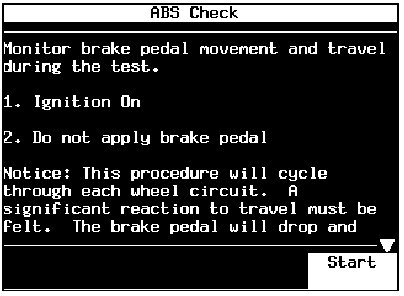
5. Start ABS valve check.

6. The Waiting for Data screen will appear.
While this screen is displayed, the pump motor is running (1 sec)
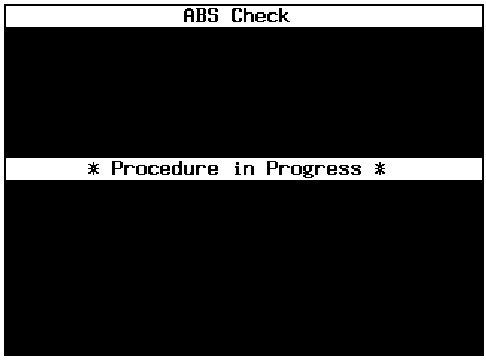
7. The "Procedure in Progress" message will appear on the ABS Check screen.
When the Tech 2 screen is prompted to "Apply and Hold the Brake Pedal," the technician should apply and hold heavy brake force during ABS Check
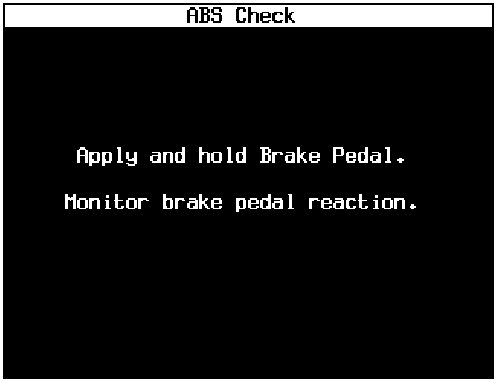
With the valve open, the pedal will drop for 2 seconds. With the motor pumping, the pedal will push back for 3 seconds.
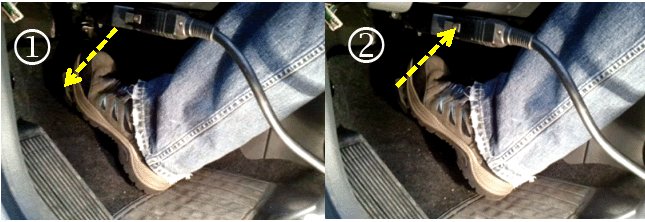
Note
The Tech 2 test sequence is left front, right front, left rear and right rear during steps 8 through 23.
- If the ABS/ESC module test passes all 4 procedures (4 pedal drops and 4 push backs are "YES"), replace the brake fluid with Delco Supreme 11 Brake Fluid (P/N 19299818 USA, P/N 19299819 Canada). Flush the brake system. Refer to Brake Valve Cycling in this bulletin and proceed to Brake Valve Cycling on the Tech 2.
- If any of the answers are "NO", replace the ABS/ESC HCU and brake fluid with Delco Supreme 11 Brake Fluid (P/N 19299818 USA, P/N 19299819 Canada). Refer to Chevrolet Optra Brake Pressure Modulator Replacement or Chevrolet Aveo, Pontiac G3 and Pontiac Wave Brake Pressure Modulator Replacement in this bulletin.
8. Apply and hold brake pedal.
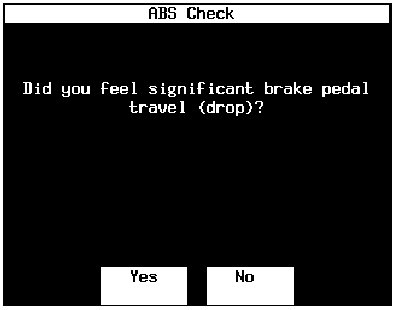
9. Answer the question on the ABS Check screen.
- If the answer is yes, proceed to the next step.
- If the answer is no, proceed to Chevrolet Optra Brake Modulator Replacement or Chevrolet Aveo, Pontiac G3 and Pontiac Wave Brake Modulator Replacement in this bulletin.
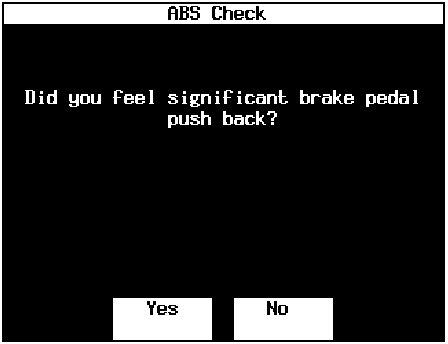
10. Answer the question on the ABS Check screen.
- If the answer is yes, proceed to the next step.
- If the answer is no, proceed to Chevrolet Optra Brake Modulator Replacement or Chevrolet Aveo, Pontiac G3 and Pontiac Wave Brake Modulator Replacement in this bulletin.
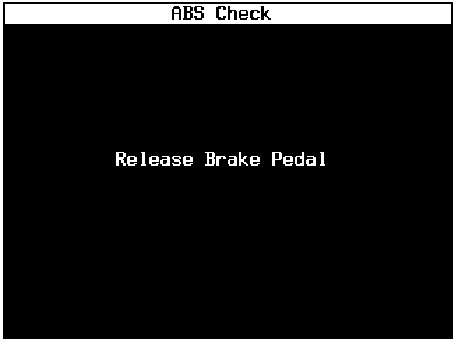
11. The ABS Check screen will instruct you to release the brake pedal.
While this screen is displayed, the pump motor is running (1 sec)
12. The "Procedure in Progress" message will appear on the ABS Check screen.
When the Tech 2 screen is prompted to "Apply and Hold the Brake Pedal," the technician should apply and hold heavy brake force during ABS Check
With the valve open, the pedal will drop for 2 seconds. With the motor pumping, the pedal will push back for 3 seconds.
13. Apply and hold brake pedal.
14. Answer the question on the ABS Check screen.
- If the answer is yes, proceed to the next step.
- If the answer is no, proceed to Chevrolet Optra Brake Modulator Replacement or Chevrolet Aveo, Pontiac G3 and Pontiac Wave Brake Modulator Replacement in this bulletin.
15. Answer the question on the ABS Check screen.
- If the answer is yes, proceed to the next step.
- If the answer is no, proceed to Chevrolet Optra Brake Modulator Replacement or Chevrolet Aveo, Pontiac G3 and Pontiac Wave Brake Modulator Replacement in this bulletin.
16. The ABS Check screen will instruct you to release the brake pedal.
While this screen is displayed, the pump motor is running (1 sec)
17. The "Procedure in Progress" message will appear on the ABS Check screen.
When the Tech 2 screen is prompted to "Apply and Hold the Brake Pedal," the technician should apply and hold heavy brake force during ABS Check
With the valve open, the pedal will drop for 2 seconds. With the motor pumping, the pedal will push back for 3 seconds.
18. Apply and hold brake pedal.
19. Answer the question on the ABS Check screen.
- If the answer is yes, proceed to the next step.
- If the answer is no, proceed to Chevrolet Optra Brake Modulator Replacement or Chevrolet Aveo, Pontiac G3 and Pontiac Wave Brake Modulator Replacement in this bulletin.
20. Answer the question on the ABS Check screen.
- If the answer is yes, proceed to the next step.
- If the answer is no, proceed to Chevrolet Optra Brake Modulator Replacement or Chevrolet Aveo, Pontiac G3 and Pontiac Wave Brake Modulator Replacement in this bulletin.
21. The ABS Check screen will instruct you to release the brake pedal.
While this screen is displayed, the pump motor is running (1 sec)
22. The "Procedure in Progress" message will appear on the ABS Check screen.
When the Tech 2 screen is prompted to "Apply and Hold the Brake Pedal," the technician should apply and hold heavy brake force during ABS Check.
With the valve open, the pedal will drop for 2 seconds. With the motor pumping, the pedal will push back for 3 seconds.
23. Apply and hold brake pedal.
24. Answer the question on the ABS Check screen.
- If the answer is yes, proceed to the next step.
- If the answer is no, proceed to Chevrolet Optra Brake Modulator Replacement or Chevrolet Aveo, Pontiac G3 and Pontiac Wave Brake Modulator Replacement in this bulletin.
25. Answer the question on the ABS Check screen.
- If the answer is yes, proceed to the next step.
- If the answer is no, proceed to Chevrolet Optra Brake Modulator Replacement or Chevrolet Aveo, Pontiac G3 and Pontiac Wave Brake Modulator Replacement in this bulletin.
26. The ABS Check screen will instruct you to release the brake pedal.
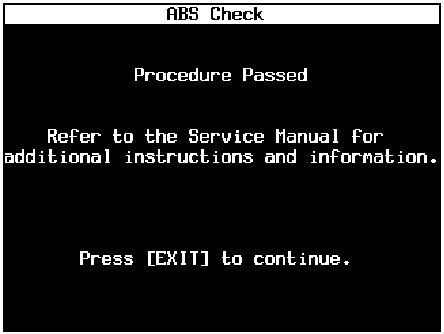
27. The "Procedure Passed "message will appear on the ABS Check screen.
Tech 2 Tool Update
Ensure that your Tech 2 is updated with software version 32.005 or higher. You can obtain this in the Software Download section of TIS2Web.
ABS Module Inspection
1. Park the vehicle on a flat, level surface.
2. Apply the parking brake.
3. Connect scan tool.
4. Select "F1: ABS Check" in Special Functions.
5. Start ABS valve check.
6. The Waiting for Data screen will appear.
While this screen is displayed, the pump motor is running (1 sec)
7. The "Procedure in Progress" message will appear on the ABS Check screen.
When the Tech 2 screen is prompted to "Apply and Hold the Brake Pedal," the technician should apply and hold heavy brake force during ABS Check
With the valve open, the pedal will drop for 2 seconds. With the motor pumping, the pedal will push back for 3 seconds.
Note
The Tech 2 test sequence is left front, right front, left rear and right rear during steps 8 through 23.
- If the ABS/ESC module test passes all 4 procedures (4 pedal drops and 4 push backs are "YES"), replace the brake fluid with Delco Supreme 11 Brake Fluid (P/N 19299818 USA, P/N 19299819 Canada). Flush the brake system. Refer to Brake Valve Cycling in this bulletin and proceed to Brake Valve Cycling on the Tech 2.
- If any of the answers are "NO", replace the ABS/ESC HCU and brake fluid with Delco Supreme 11 Brake Fluid (P/N 19299818 USA, P/N 19299819 Canada). Refer to Chevrolet Optra Brake Pressure Modulator Replacement or Chevrolet Aveo, Pontiac G3 and Pontiac Wave Brake Pressure Modulator Replacement in this bulletin.
8. Apply and hold brake pedal.
9. Answer the question on the ABS Check screen.
- If the answer is yes, proceed to the next step.
- If the answer is no, proceed to Chevrolet Optra Brake Modulator Replacement or Chevrolet Aveo, Pontiac G3 and Pontiac Wave Brake Modulator Replacement in this bulletin.
10. Answer the question on the ABS Check screen.
- If the answer is yes, proceed to the next step.
- If the answer is no, proceed to Chevrolet Optra Brake Modulator Replacement or Chevrolet Aveo, Pontiac G3 and Pontiac Wave Brake Modulator Replacement in this bulletin.
11. The ABS Check screen will instruct you to release the brake pedal.
While this screen is displayed, the pump motor is running (1 sec)
12. The "Procedure in Progress" message will appear on the ABS Check screen.
When the Tech 2 screen is prompted to "Apply and Hold the Brake Pedal," the technician should apply and hold heavy brake force during ABS Check
With the valve open, the pedal will drop for 2 seconds. With the motor pumping, the pedal will push back for 3 seconds.
13. Apply and hold brake pedal.
14. Answer the question on the ABS Check screen.
- If the answer is yes, proceed to the next step.
- If the answer is no, proceed to Chevrolet Optra Brake Modulator Replacement or Chevrolet Aveo, Pontiac G3 and Pontiac Wave Brake Modulator Replacement in this bulletin.
15. Answer the question on the ABS Check screen.
- If the answer is yes, proceed to the next step.
- If the answer is no, proceed to Chevrolet Optra Brake Modulator Replacement or Chevrolet Aveo, Pontiac G3 and Pontiac Wave Brake Modulator Replacement in this bulletin.
16. The ABS Check screen will instruct you to release the brake pedal.
While this screen is displayed, the pump motor is running (1 sec)
17. The "Procedure in Progress" message will appear on the ABS Check screen.
When the Tech 2 screen is prompted to "Apply and Hold the Brake Pedal," the technician should apply and hold heavy brake force during ABS Check
With the valve open, the pedal will drop for 2 seconds. With the motor pumping, the pedal will push back for 3 seconds.
18. Apply and hold brake pedal.
19. Answer the question on the ABS Check screen.
- If the answer is yes, proceed to the next step.
- If the answer is no, proceed to Chevrolet Optra Brake Modulator Replacement or Chevrolet Aveo, Pontiac G3 and Pontiac Wave Brake Modulator Replacement in this bulletin.
20. Answer the question on the ABS Check screen.
- If the answer is yes, proceed to the next step.
- If the answer is no, proceed to Chevrolet Optra Brake Modulator Replacement or Chevrolet Aveo, Pontiac G3 and Pontiac Wave Brake Modulator Replacement in this bulletin.
21. The ABS Check screen will instruct you to release the brake pedal.
While this screen is displayed, the pump motor is running (1 sec)
22. The "Procedure in Progress" message will appear on the ABS Check screen.
When the Tech 2 screen is prompted to "Apply and Hold the Brake Pedal," the technician should apply and hold heavy brake force during ABS Check.
With the valve open, the pedal will drop for 2 seconds. With the motor pumping, the pedal will push back for 3 seconds.
23. Apply and hold brake pedal.
24. Answer the question on the ABS Check screen.
- If the answer is yes, proceed to the next step.
- If the answer is no, proceed to Chevrolet Optra Brake Modulator Replacement or Chevrolet Aveo, Pontiac G3 and Pontiac Wave Brake Modulator Replacement in this bulletin.
25. Answer the question on the ABS Check screen.
- If the answer is yes, proceed to the next step.
- If the answer is no, proceed to Chevrolet Optra Brake Modulator Replacement or Chevrolet Aveo, Pontiac G3 and Pontiac Wave Brake Modulator Replacement in this bulletin.
26. The ABS Check screen will instruct you to release the brake pedal.
27. The "Procedure Passed "message will appear on the ABS Check screen.
Factory Service Tools
Use the Manual With the Right Hardware
Pair factory procedures with proven DIY tools so the instructions are easier to execute.
Disclosure: Verified tool recommendations may earn an affiliate commission at no cost to you.
When to See a Mechanic
Stop DIY work and contact a certified mechanic immediately if any of the following apply:
- • You smell fuel, burning insulation, or see smoke.
- • Brakes feel soft, pull hard to one side, or make grinding noises.
- • The engine overheats, stalls repeatedly, or misfires under load.
- • You are missing required tools, torque specs, or safe lifting equipment.
- • You are not confident in the next step or safety outcome.