
Safety Warning
DIY auto repair can cause serious injury, fire, or vehicle damage. These guides are for informational purposes only. Always follow OEM torque specs, wear PPE, and consult a certified mechanic if you are unsure. You are solely responsible for your safety.
2002 Chevrolet Tracker 2WD L4-2.0L VIN CFACTORY OEM SERVICE PROCEDURE
Powertrain Control Module (PCM) - Programming
BEFORE PROGRAMMING A CONTROL MODULE
IMPORTANT: Do NOT program a control module unless you are directed by a service procedure or you are directed by a General Motors Corporation service bulletin. Programming a control module at any other time will not permanently correct a customers concern.
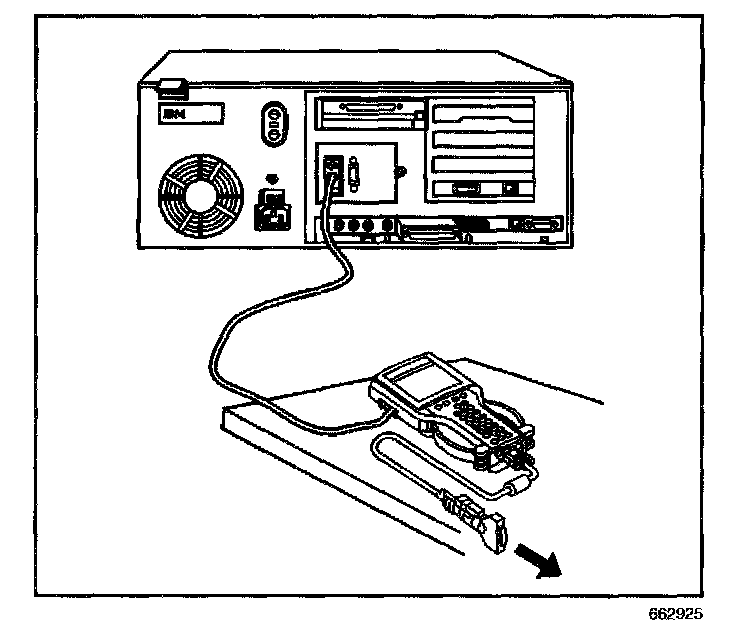
Ensure the following conditions are met before programming a control module:
^ Vehicle system voltage
- There is no charging system concern. All charging system concerns must be repaired before programming a control module.
- Battery voltage is greater than 12 volts but less than 16 volts. The battery must be charged before programming the control module if the battery voltage is low.
- A battery charger is NOT connected to the vehicle's battery. Incorrect system voltage or voltage fluctuations from a battery charger, may cause programming failure or control module damage.
- Turn OFF or disable any system that may put a load on the vehicle's battery.
^ Twilight sentinel
^ Interior lights
^ Daytime running lights (DRL)-Applying the parking brake, on most vehicles, disables the DRL system.
^ HVAC systems
^ Engine Cooling fans etc.
^ The ignition switch is in the proper position. The scan tool prompts you to turn ON the ignition, with the engine OFF. DO NOT change the position of the ignition switch during the programming procedure, unless instructed to do so.
^ All tool connections are secure.
- RS-232
- The connection at the data link connector (DLC) is secure.
- Voltage supply circuits
^ DO NOT disturb the tool harnesses while programming. If an interruption occurs during the programming procedure, programming failure or control module damage may occur.
PROGRAMMING THE PCM
IMPORTANT: The PCM can only be programmed using the Pass Through Programming method. The Pass Through Programming method requires the use of a scan tool in series with the Techline Terminal and the DLC.
1. Program the PCM according to the step by step procedures described in the Techline equipment users instructions.
IMPORTANT: DO NOT turn OFF the ignition if the programming procedure is interrupted or unsuccessful.
2. If the PCM fails to program, proceed as follows:
^ Check the connections at the following components:
- The Techline Terminal
- The scan tool
- The DLC
- The PCM
^ Check for the correct software version.
^ Repeat the programming.
^ If the programming fails again, replace and program a new PCM.
3. After the download is complete, EXIT Service Programming.
4. Turn OFF the ignition for 30 seconds.
PROGRAMMING VERIFICATION
1. Perform the scan tool clear DTC Information function.
2. Attempt to start the engine.
3. Repeat the Service Programming procedure if the engine does not start or has an engine performance concern.
4. Inspect the connections of the following components:
^ The Techline Terminal
^ The scan tool
^ The DLC
^ The PCM
5. Attempt to program the control module. If the programming fails again, replace and program a new PCM.
IMPORTANT: Do NOT program a control module unless you are directed by a service procedure or you are directed by a General Motors Corporation service bulletin. Programming a control module at any other time will not permanently correct a customers concern.
Ensure the following conditions are met before programming a control module:
^ Vehicle system voltage
- There is no charging system concern. All charging system concerns must be repaired before programming a control module.
- Battery voltage is greater than 12 volts but less than 16 volts. The battery must be charged before programming the control module if the battery voltage is low.
- A battery charger is NOT connected to the vehicle's battery. Incorrect system voltage or voltage fluctuations from a battery charger, may cause programming failure or control module damage.
- Turn OFF or disable any system that may put a load on the vehicle's battery.
^ Twilight sentinel
^ Interior lights
^ Daytime running lights (DRL)-Applying the parking brake, on most vehicles, disables the DRL system.
^ HVAC systems
^ Engine Cooling fans etc.
^ The ignition switch is in the proper position. The scan tool prompts you to turn ON the ignition, with the engine OFF. DO NOT change the position of the ignition switch during the programming procedure, unless instructed to do so.
^ All tool connections are secure.
- RS-232
- The connection at the data link connector (DLC) is secure.
- Voltage supply circuits
^ DO NOT disturb the tool harnesses while programming. If an interruption occurs during the programming procedure, programming failure or control module damage may occur.
PROGRAMMING THE PCM
IMPORTANT: The PCM can only be programmed using the Pass Through Programming method. The Pass Through Programming method requires the use of a scan tool in series with the Techline Terminal and the DLC.
1. Program the PCM according to the step by step procedures described in the Techline equipment users instructions.
IMPORTANT: DO NOT turn OFF the ignition if the programming procedure is interrupted or unsuccessful.
2. If the PCM fails to program, proceed as follows:
^ Check the connections at the following components:
- The Techline Terminal
- The scan tool
- The DLC
- The PCM
^ Check for the correct software version.
^ Repeat the programming.
^ If the programming fails again, replace and program a new PCM.
3. After the download is complete, EXIT Service Programming.
4. Turn OFF the ignition for 30 seconds.
PROGRAMMING VERIFICATION
1. Perform the scan tool clear DTC Information function.
2. Attempt to start the engine.
3. Repeat the Service Programming procedure if the engine does not start or has an engine performance concern.
4. Inspect the connections of the following components:
^ The Techline Terminal
^ The scan tool
^ The DLC
^ The PCM
5. Attempt to program the control module. If the programming fails again, replace and program a new PCM.
Factory Service Tools
Use the Manual With the Right Hardware
Pair factory procedures with proven DIY tools so the instructions are easier to execute.
Disclosure: Verified tool recommendations may earn an affiliate commission at no cost to you.
When to See a Mechanic
Stop DIY work and contact a certified mechanic immediately if any of the following apply:
- • You smell fuel, burning insulation, or see smoke.
- • Brakes feel soft, pull hard to one side, or make grinding noises.
- • The engine overheats, stalls repeatedly, or misfires under load.
- • You are missing required tools, torque specs, or safe lifting equipment.
- • You are not confident in the next step or safety outcome.