
Safety Warning
DIY auto repair can cause serious injury, fire, or vehicle damage. These guides are for informational purposes only. Always follow OEM torque specs, wear PPE, and consult a certified mechanic if you are unsure. You are solely responsible for your safety.
2012 Acura ZDX V6-3.7LFACTORY OEM SERVICE PROCEDURE
Campaign - Software Update For TCC Function
12-007
March 13, 2012
*Applies To:
2010-12 MDX - Check the iN VIN status for eligibility 2010-12 ZDX - Check the iN VIN status for eligibility*
Product Update: Software Update for Lock-up Clutch Function
(Supersedes 12-007, dated February 24, 2012, to revise the information marked by the black bars and asterisks)
*REVISION SUMMARY
In Applies to, and under SOFTWARE INFORMATION, 2012 model year MDX and ZDX information was added.*
BACKGROUND
A judder from the torque converter lock-up clutch may be felt while driving between 20-60 mph. To minimize the opportunity for the judder to occur, a software update for the transmission is available.
CLIENT NOTIFICATION

All owners of affected vehicles will be sent a notification of this product update. An example of the client letter is included at the end of this service bulletin.
Do an iN VIN status inquiry to make sure the vehicle is shown as eligible.
In addition, check for a punch mark above the ninth character of the engine compartment VIN. A punch mark in that location means this product update has already been completed.
Some vehicles affected by this campaign may be in your new or used vehicle inventory. Repair these vehicles before they are sold.
CORRECTIVE ACTION
Update the PGM-FI or the A/T software. Then, if the vehicle is client-owned or previously owned, replace the ATF.
PARTS INFORMATION
Washer: P/N 90441-PK4-000
Drain Washer: P/N 90471-PX4-000
REQUIRED MATERIALS
Automatic Transmission Fluid DW-1 (one quart;
four required): P/N 08200-9008A
Automatic Transmission Fluid DW-1 (55 gallon drum):
P/N 08200-9009

WARRANTY CLAIM INFORMATION
Failed Part: P/N 37820-RYE-A76
Defect Code: 5TJ00
Symptom Code: S2800
Skill Level: Repair Technician
SOFTWARE INFORMATION
NOTE:
Unnecessary or incorrect repairs resulting from a failure to update the HDS or MVCI are not covered under warranty.
MVCI Control Module (CM) Update:
* Application Version V2.16.04 or later
Database update 22-FEB-2012 or later*
HDS Software Version:
* 3.002.033 or later*
Before beginning the repair, make sure that both the HDS and MVCI are updated as listed above.
*Do only the update listed in this service bulletin.*
Check that the MVCI indicates the applicable program
ID listed below (or a later program ID) as the
Recommended Update when the update begins.
If the MVCI displays This vehicle does not need an update at this time during the update, the software for this service bulletin is already installed.

For more information about updating the HDS, the
MVCI, and vehicle systems, refer to Service Bulletin
01-026, Updating Control Units/Modules.
REPAIR PROCEDURE
NOTE:
MDX is shown; ZDX is similar.
1. Update the PGM-FI or the A" software. Refer to Service Bulletin 01-026, Updating Control Units/ Modules.
^ If this is a client-owned or previously owned vehicle, go to step 2.
^ If the vehicle is new and unsold, do not change the ATF. Go to step 15 to punch the VIN.
2. Start the engine and let it warm up to normal operating temperature (the radiator fan comes on), position the vehicle on a lift, and turn the engine off.
3. ZDX: Remove the air cleaner.
4. ZDX: Remove the intake air duct.
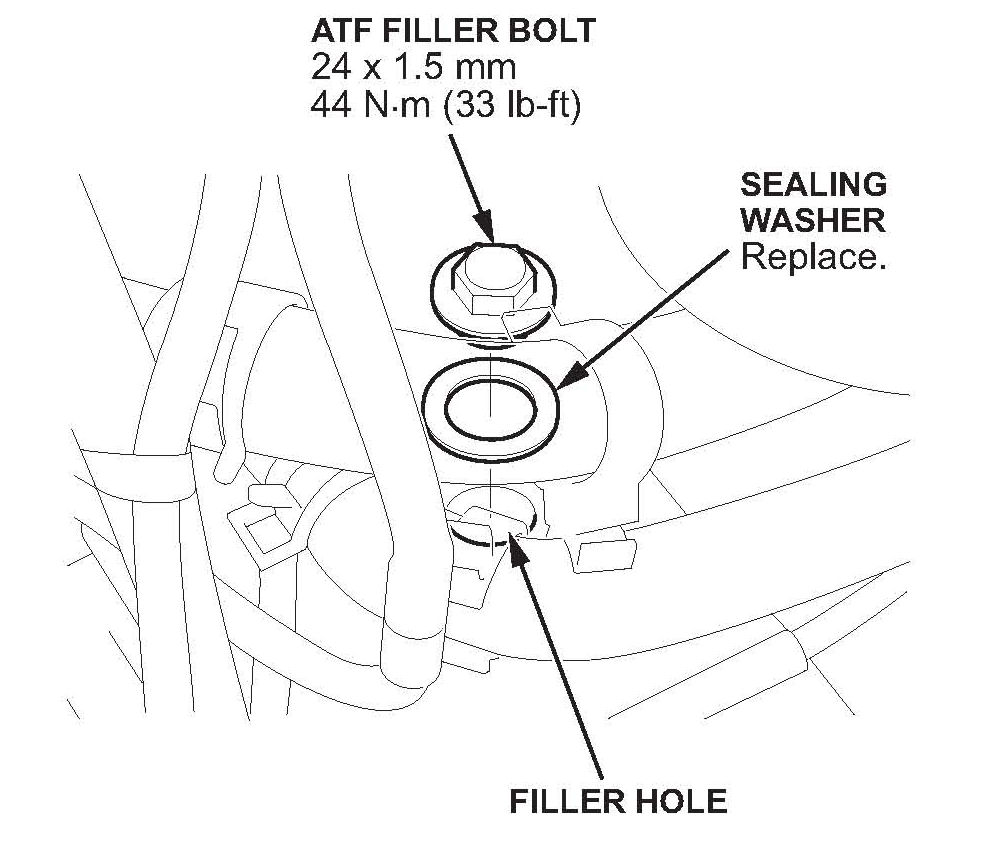
5. Remove the ATF filler bolt and the sealing washer.
6. Raise the vehicle, and make sure it's securely supported.
7. Remove the engine undercover.

8. Remove the drain plug, and drain the ATF.
9. Reinstall the drain plug using a new sealing washer, and torque it to 49 N.m (36 lb-ft).
10. Reinstall the engine undercover. Torque the bolts to 9.3 N.m (7 lb-ft), then lower the vehicle.
11. Refill the transmission with 3.3 quarts of ATF through the filler hole.
12. Install the ATF filler bolt using a new sealing washer, and torque it to 44 N.m (33 lb-ft).
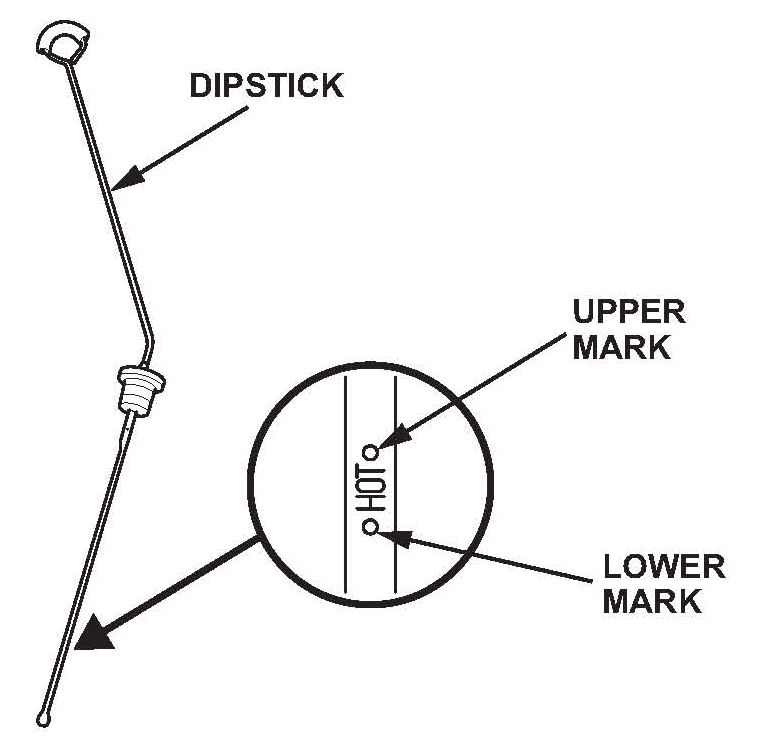
13. Check that the fluid is filled to the proper level.
14. ZDX: Reinstall the intake air duct and the air cleaner.

15. Center-punch a completion mark above the ninth character of the engine compartment VIN:

Disclaimer
March 13, 2012
*Applies To:
2010-12 MDX - Check the iN VIN status for eligibility 2010-12 ZDX - Check the iN VIN status for eligibility*
Product Update: Software Update for Lock-up Clutch Function
(Supersedes 12-007, dated February 24, 2012, to revise the information marked by the black bars and asterisks)
*REVISION SUMMARY
In Applies to, and under SOFTWARE INFORMATION, 2012 model year MDX and ZDX information was added.*
BACKGROUND
A judder from the torque converter lock-up clutch may be felt while driving between 20-60 mph. To minimize the opportunity for the judder to occur, a software update for the transmission is available.
CLIENT NOTIFICATION
All owners of affected vehicles will be sent a notification of this product update. An example of the client letter is included at the end of this service bulletin.
Do an iN VIN status inquiry to make sure the vehicle is shown as eligible.
In addition, check for a punch mark above the ninth character of the engine compartment VIN. A punch mark in that location means this product update has already been completed.
Some vehicles affected by this campaign may be in your new or used vehicle inventory. Repair these vehicles before they are sold.
CORRECTIVE ACTION
Update the PGM-FI or the A/T software. Then, if the vehicle is client-owned or previously owned, replace the ATF.
PARTS INFORMATION
Washer: P/N 90441-PK4-000
Drain Washer: P/N 90471-PX4-000
REQUIRED MATERIALS
Automatic Transmission Fluid DW-1 (one quart;
four required): P/N 08200-9008A
Automatic Transmission Fluid DW-1 (55 gallon drum):
P/N 08200-9009
WARRANTY CLAIM INFORMATION
Failed Part: P/N 37820-RYE-A76
Defect Code: 5TJ00
Symptom Code: S2800
Skill Level: Repair Technician
SOFTWARE INFORMATION
NOTE:
Unnecessary or incorrect repairs resulting from a failure to update the HDS or MVCI are not covered under warranty.
MVCI Control Module (CM) Update:
* Application Version V2.16.04 or later
Database update 22-FEB-2012 or later*
HDS Software Version:
* 3.002.033 or later*
Before beginning the repair, make sure that both the HDS and MVCI are updated as listed above.
*Do only the update listed in this service bulletin.*
Check that the MVCI indicates the applicable program
ID listed below (or a later program ID) as the
Recommended Update when the update begins.
If the MVCI displays This vehicle does not need an update at this time during the update, the software for this service bulletin is already installed.
For more information about updating the HDS, the
MVCI, and vehicle systems, refer to Service Bulletin
01-026, Updating Control Units/Modules.
REPAIR PROCEDURE
NOTE:
MDX is shown; ZDX is similar.
1. Update the PGM-FI or the A" software. Refer to Service Bulletin 01-026, Updating Control Units/ Modules.
^ If this is a client-owned or previously owned vehicle, go to step 2.
^ If the vehicle is new and unsold, do not change the ATF. Go to step 15 to punch the VIN.
2. Start the engine and let it warm up to normal operating temperature (the radiator fan comes on), position the vehicle on a lift, and turn the engine off.
3. ZDX: Remove the air cleaner.
4. ZDX: Remove the intake air duct.
5. Remove the ATF filler bolt and the sealing washer.
6. Raise the vehicle, and make sure it's securely supported.
7. Remove the engine undercover.
8. Remove the drain plug, and drain the ATF.
9. Reinstall the drain plug using a new sealing washer, and torque it to 49 N.m (36 lb-ft).
10. Reinstall the engine undercover. Torque the bolts to 9.3 N.m (7 lb-ft), then lower the vehicle.
11. Refill the transmission with 3.3 quarts of ATF through the filler hole.
12. Install the ATF filler bolt using a new sealing washer, and torque it to 44 N.m (33 lb-ft).
13. Check that the fluid is filled to the proper level.
14. ZDX: Reinstall the intake air duct and the air cleaner.
15. Center-punch a completion mark above the ninth character of the engine compartment VIN:
Disclaimer
Factory Service Tools
Use the Manual With the Right Hardware
Pair factory procedures with proven DIY tools so the instructions are easier to execute.
Disclosure: Verified tool recommendations may earn an affiliate commission at no cost to you.
When to See a Mechanic
Stop DIY work and contact a certified mechanic immediately if any of the following apply:
- • You smell fuel, burning insulation, or see smoke.
- • Brakes feel soft, pull hard to one side, or make grinding noises.
- • The engine overheats, stalls repeatedly, or misfires under load.
- • You are missing required tools, torque specs, or safe lifting equipment.
- • You are not confident in the next step or safety outcome.