
Safety Warning
DIY auto repair can cause serious injury, fire, or vehicle damage. These guides are for informational purposes only. Always follow OEM torque specs, wear PPE, and consult a certified mechanic if you are unsure. You are solely responsible for your safety.
2003 Acura 3.2CL V6-3.2L SOHCFACTORY OEM SERVICE PROCEDURE
Memory Positioning Module: Testing and Inspection
Control Unit Input Test
1. Before testing the driving position memory control functions, troubleshoot the multiplex control system.
Door Multiplex Control Unit:
2. Remove the driver's door panel.
3. Disconnect the connectors from the multiplex control unit, door.
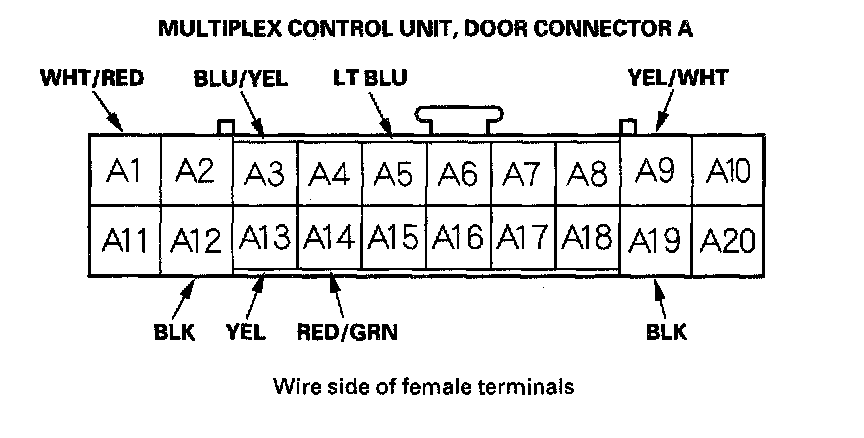
4. Inspect the connector and socket terminals to be sure they are all making good contact.
- If the terminals are bent, loose or corroded, repair them as necessary, and recheck the system.
- If the terminals look OK, go to step 5.
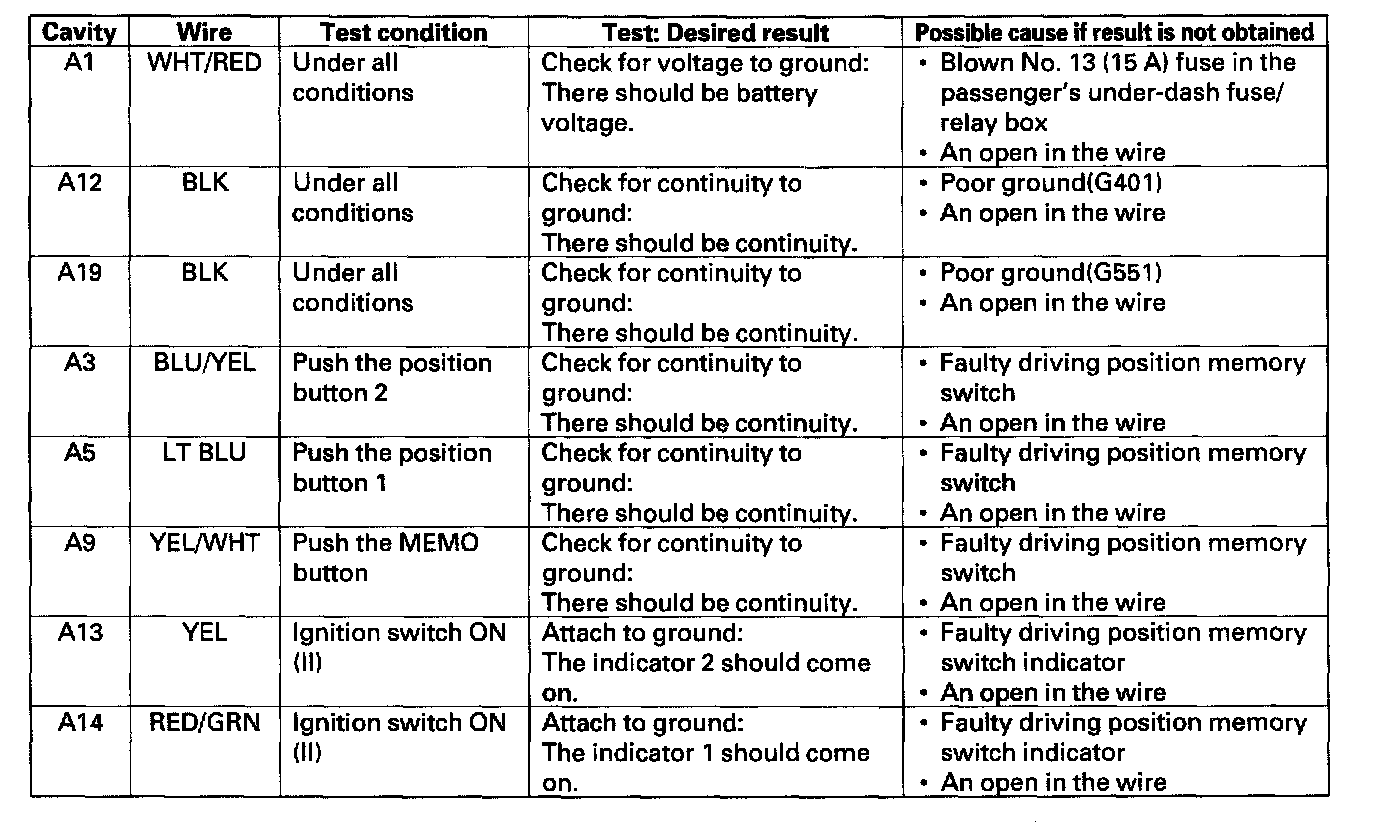
5. With the door multiplex control unit still disconnected, make these input tests at the connectors.
- If any test indicates a problem, find and correct the cause, then recheck the system.
- If all the input tests prove OK, go to step 6.
Passenger's Multiplex Control Unit:
6. Remove the passenger's multiplex control unit from the passenger's under-dash fuse/relay box, and disconnect its connector.
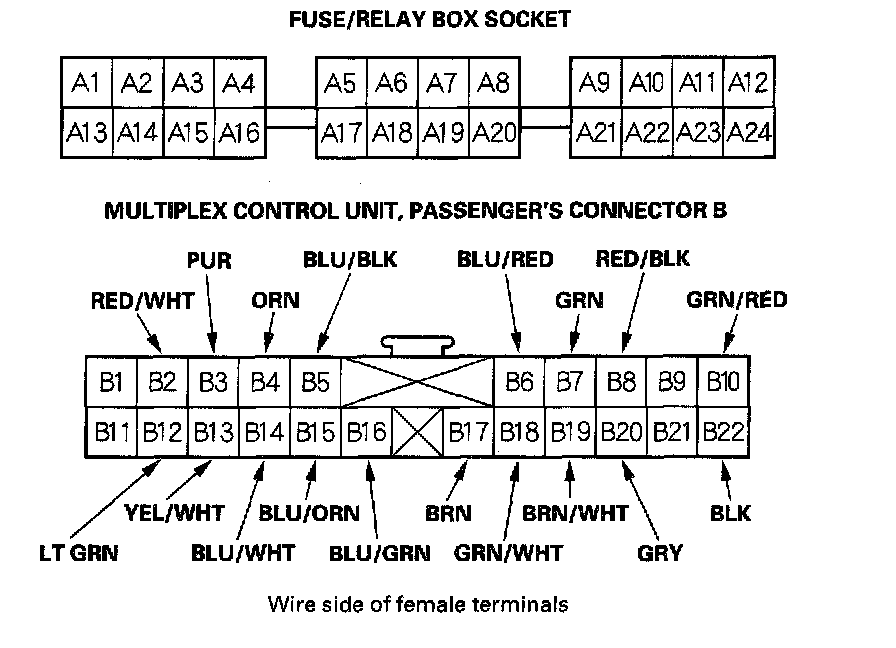
7. Inspect all connector and socket terminals to be sure they are all making good contact.
- If the terminals are bent, loose or corroded, repair them as necessary, and recheck the system.
- If the terminals look OK, go to step 8.
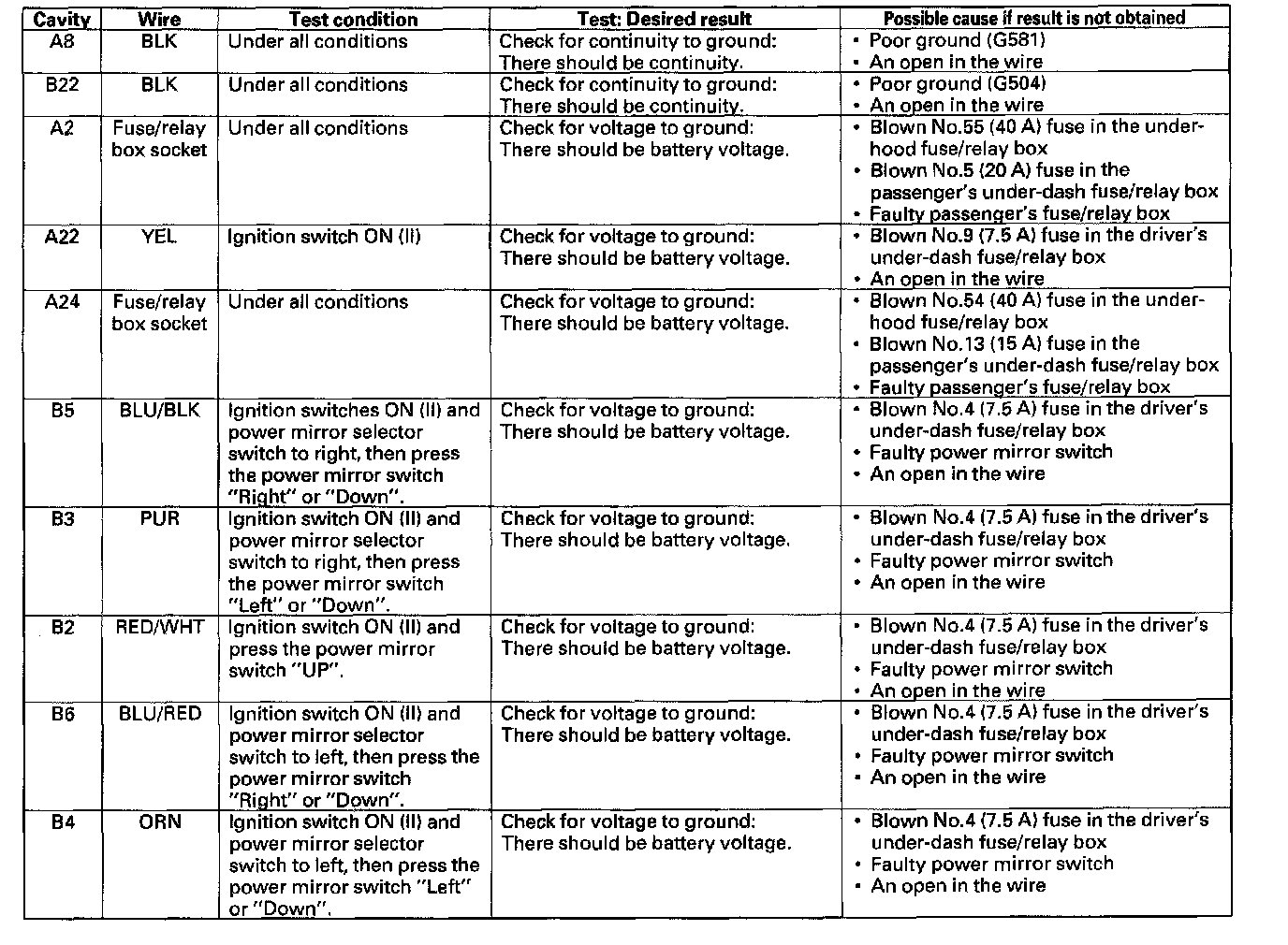
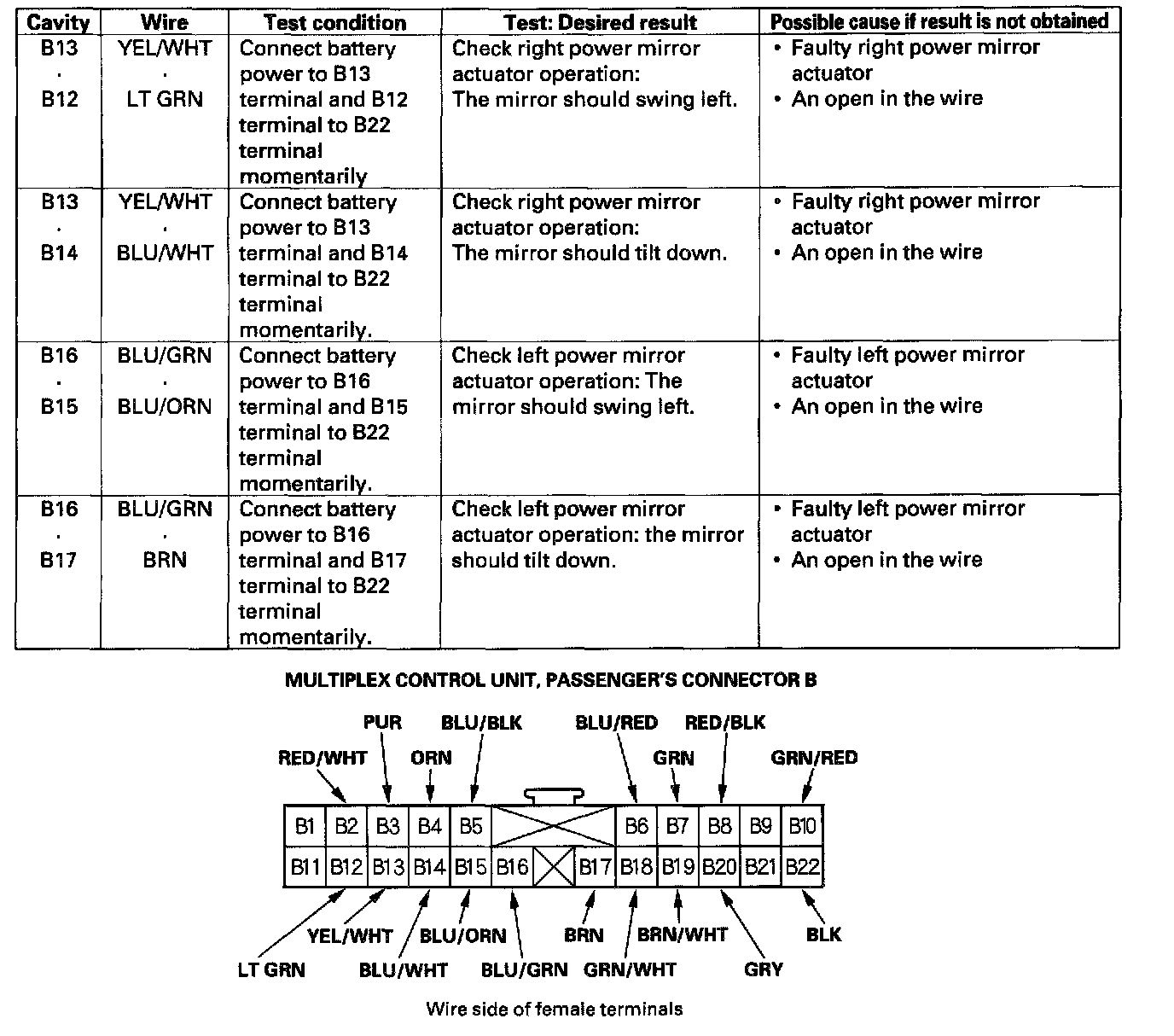
8. With the connectors still disconnected, make these input tests at the connectors.
- If any test indicates a problem, find and correct the cause, then recheck the system.
- If all the input tests prove OK, go to step 9.
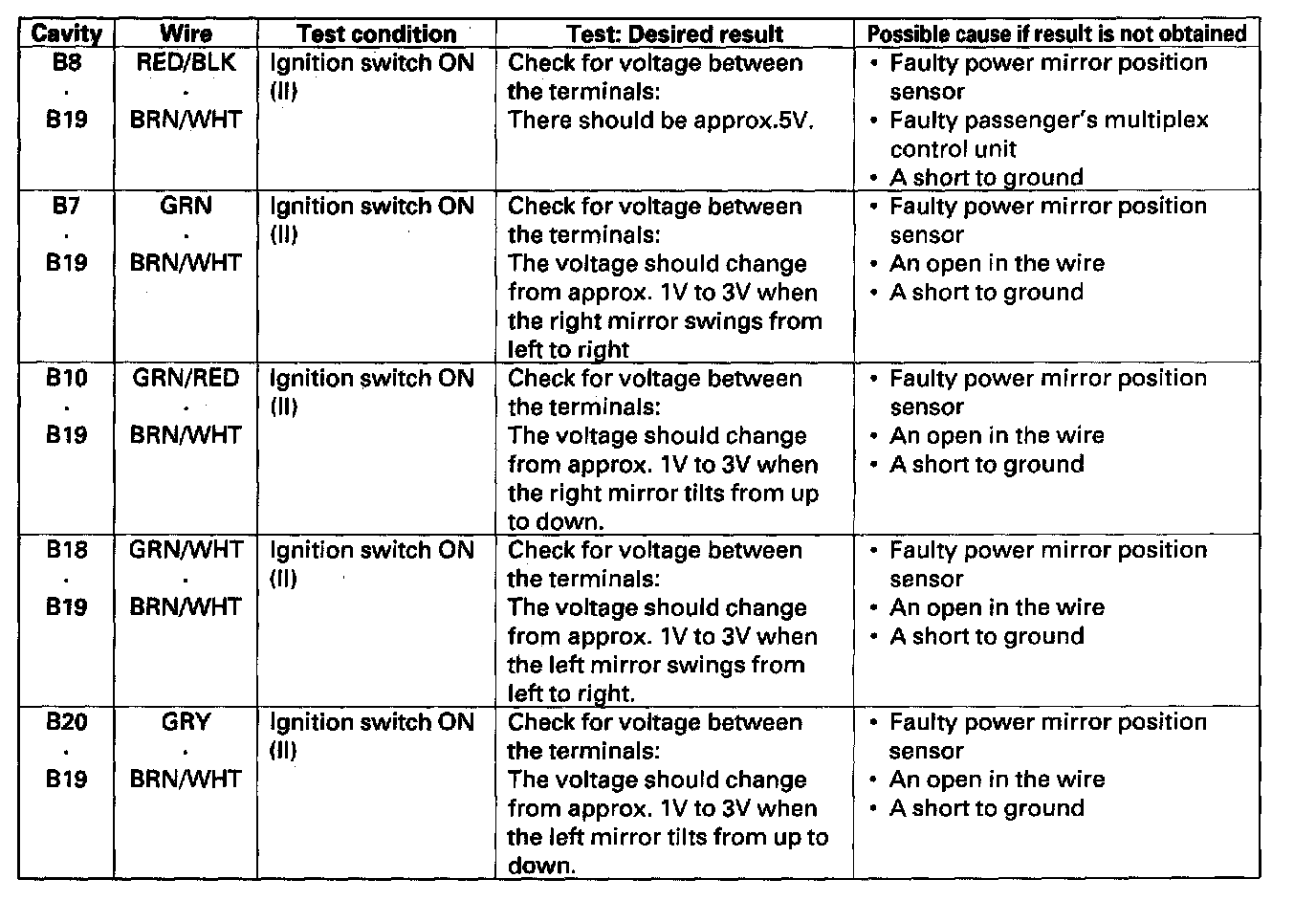
9. Reconnect the passenger's multiplex control unit to the passenger's under-dash fuse/relay box, and make these input tests at the appropriate connectors on the passenger's under-dash fuse/relay box.
- If any test indicates a problem, find and correct the cause, then recheck the system.
- If all the input tests prove OK, go to step 10.
Driver's Multiplex control Unit:
10. Remove the driver's multiplex control unit from the driver's under-dash fuse/relay box, and disconnect its connector
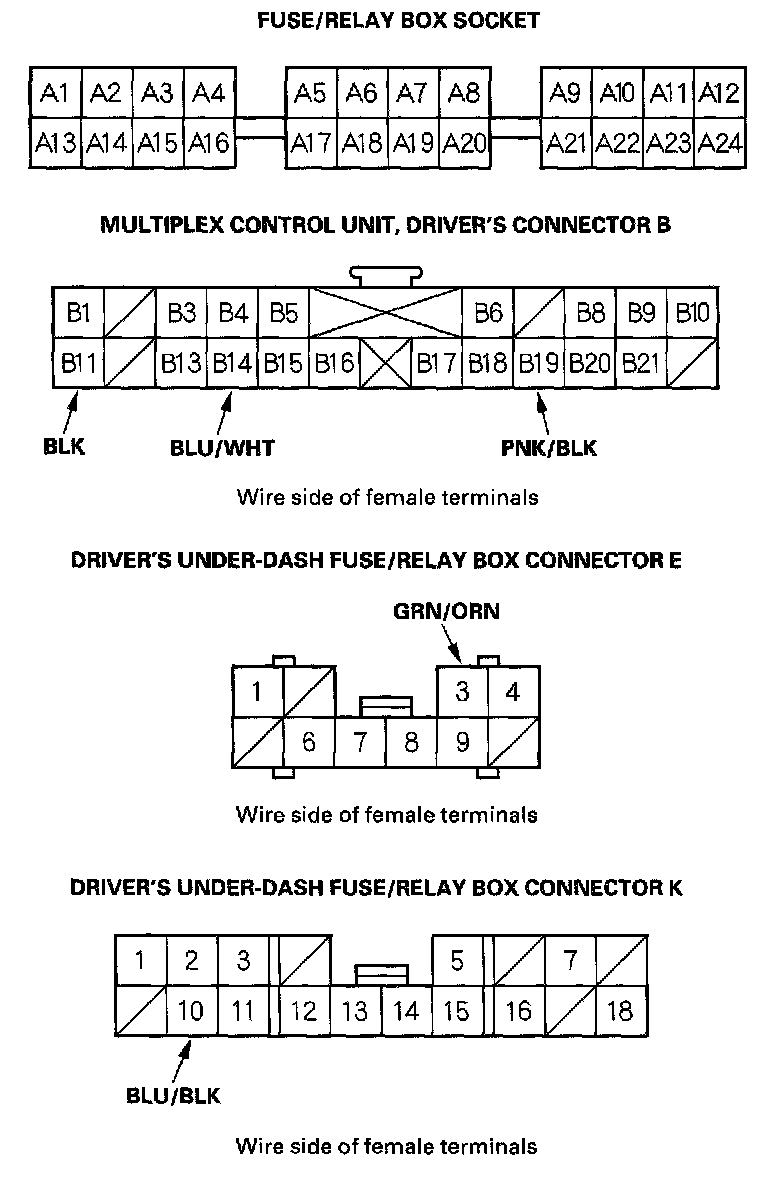
11. Inspect all connector and socket terminals to be sure they are all making good contact.
- If the terminals are bent, loose or corroded, repair them as necessary, and recheck the system.
- If the terminals look OK, go to step 12.
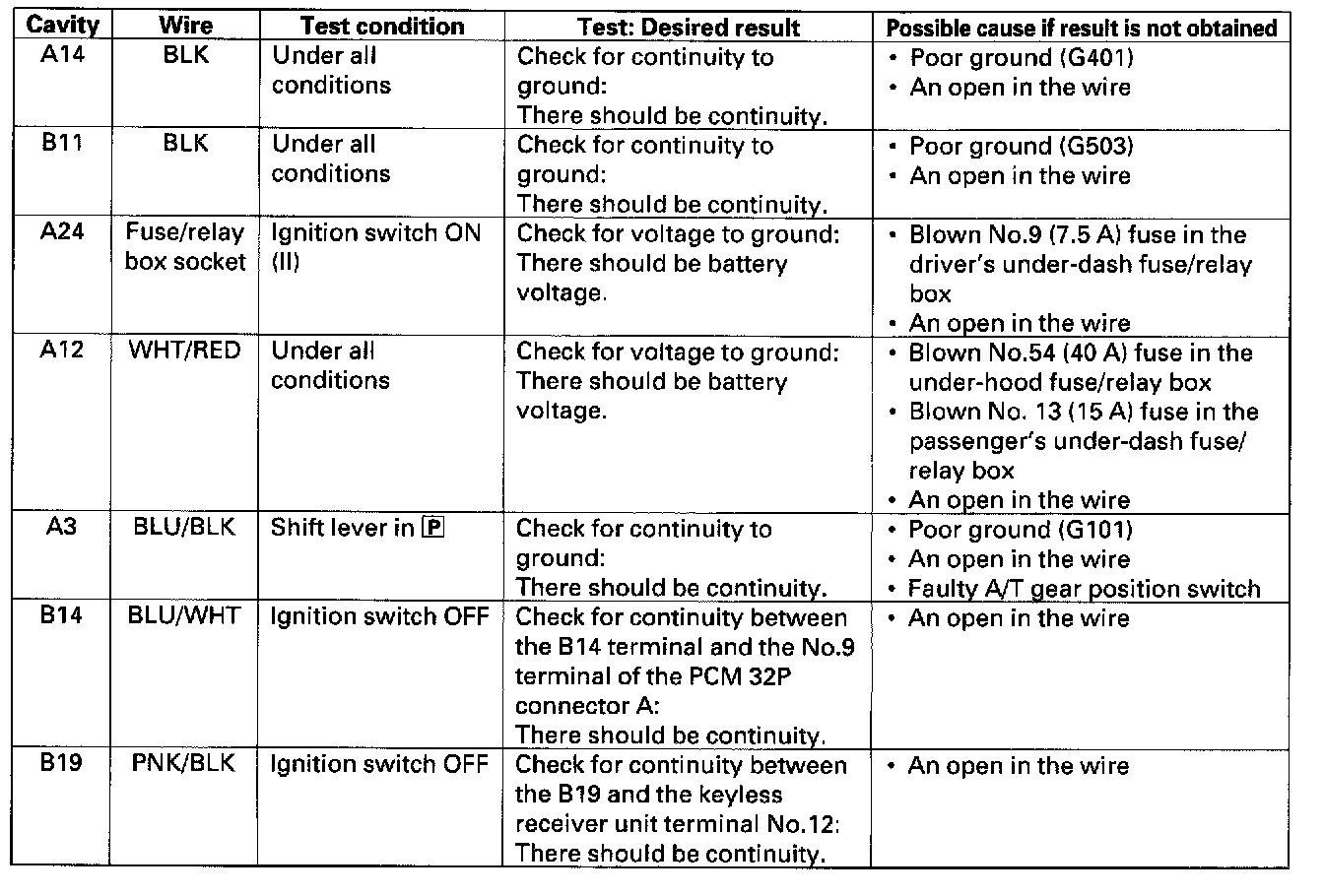
12. With the driver's multiplex control unit still disconnected, make these input tests at the connectors.
- If any test indicates a problem, find and correct the cause, then recheck the system.
- If all the input tests prove OK, go to step 13.

13. Reconnect the driver's multiplex control unit to the driver's under-dash fuse/relay box, and make these input tests at the appropriate connectors on the driver's under-dash fuse/relay box.
- If any test indicates a problem, find and correct the cause, then recheck the system.
- If all the input tests prove OK, go to step 14.
14. If all the input tests prove OK, one of the control units must be faulty, Substitute a known-good control unit for the one that is most likely at fault, then recheck the system. If the system works properly, the original control unit is faulty; replace it. If there is still a malfunction, substitute a known-good control unit for the next most likely unit to be at fault, and recheck. If the system works properly, the original unit is faulty; replace it.
1. Before testing the driving position memory control functions, troubleshoot the multiplex control system.
Door Multiplex Control Unit:
2. Remove the driver's door panel.
3. Disconnect the connectors from the multiplex control unit, door.
4. Inspect the connector and socket terminals to be sure they are all making good contact.
- If the terminals are bent, loose or corroded, repair them as necessary, and recheck the system.
- If the terminals look OK, go to step 5.
5. With the door multiplex control unit still disconnected, make these input tests at the connectors.
- If any test indicates a problem, find and correct the cause, then recheck the system.
- If all the input tests prove OK, go to step 6.
Passenger's Multiplex Control Unit:
6. Remove the passenger's multiplex control unit from the passenger's under-dash fuse/relay box, and disconnect its connector.
7. Inspect all connector and socket terminals to be sure they are all making good contact.
- If the terminals are bent, loose or corroded, repair them as necessary, and recheck the system.
- If the terminals look OK, go to step 8.
8. With the connectors still disconnected, make these input tests at the connectors.
- If any test indicates a problem, find and correct the cause, then recheck the system.
- If all the input tests prove OK, go to step 9.
9. Reconnect the passenger's multiplex control unit to the passenger's under-dash fuse/relay box, and make these input tests at the appropriate connectors on the passenger's under-dash fuse/relay box.
- If any test indicates a problem, find and correct the cause, then recheck the system.
- If all the input tests prove OK, go to step 10.
Driver's Multiplex control Unit:
10. Remove the driver's multiplex control unit from the driver's under-dash fuse/relay box, and disconnect its connector
11. Inspect all connector and socket terminals to be sure they are all making good contact.
- If the terminals are bent, loose or corroded, repair them as necessary, and recheck the system.
- If the terminals look OK, go to step 12.
12. With the driver's multiplex control unit still disconnected, make these input tests at the connectors.
- If any test indicates a problem, find and correct the cause, then recheck the system.
- If all the input tests prove OK, go to step 13.
13. Reconnect the driver's multiplex control unit to the driver's under-dash fuse/relay box, and make these input tests at the appropriate connectors on the driver's under-dash fuse/relay box.
- If any test indicates a problem, find and correct the cause, then recheck the system.
- If all the input tests prove OK, go to step 14.
14. If all the input tests prove OK, one of the control units must be faulty, Substitute a known-good control unit for the one that is most likely at fault, then recheck the system. If the system works properly, the original control unit is faulty; replace it. If there is still a malfunction, substitute a known-good control unit for the next most likely unit to be at fault, and recheck. If the system works properly, the original unit is faulty; replace it.
Factory Service Tools
Use the Manual With the Right Hardware
Pair factory procedures with proven DIY tools so the instructions are easier to execute.
Disclosure: Verified tool recommendations may earn an affiliate commission at no cost to you.
When to See a Mechanic
Stop DIY work and contact a certified mechanic immediately if any of the following apply:
- • You smell fuel, burning insulation, or see smoke.
- • Brakes feel soft, pull hard to one side, or make grinding noises.
- • The engine overheats, stalls repeatedly, or misfires under load.
- • You are missing required tools, torque specs, or safe lifting equipment.
- • You are not confident in the next step or safety outcome.